Toonly: AI Story & Comic Maker review
 Analysis by Appsdrops
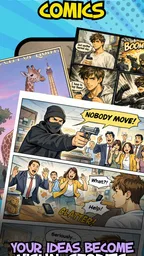
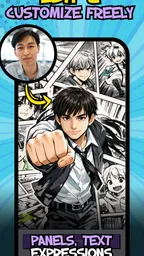
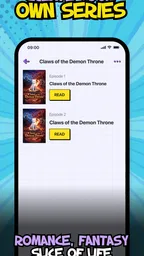
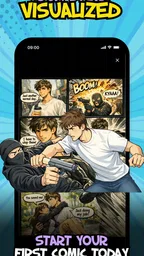
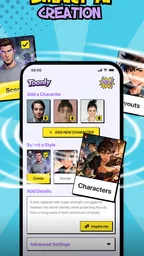
Toonly caught my attention because it treats a comic less like a page I simply read and more like a small story I can shape. In this Comics app, I can start from a ready-made template, use AI to help build a scenario, and make choices part of the reading experience. That combination suits quick experiments and playful storytelling, though it also makes a reliable connection an important consideration: the creative process may involve online services, so I would not assume every step works without internet access.
Making a story feel interactive
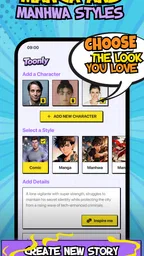
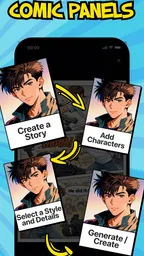
Toonly: AI Story & Comic Maker is made by Wiin Ltd. and is aimed at people who want to create interactive comics without beginning with a blank page. Templates can give a project an initial shape, while AI helps turn a premise into story material and choices. The appealing part is the lower barrier to getting started; the trade-off is that a generated starting point still needs a human eye for pacing, character voice, and whether a choice actually matters.
I see the strongest use for it in short, focused projects: a branching scene for a friend, a light comic idea to share with family, or a quick storytelling exercise when inspiration is there but a full script is not. Choices work best when they lead to meaningfully different reactions or outcomes, rather than simply asking readers to tap through. A useful habit is to decide what the reader should feel at the end of each branch before building the scene. That keeps the interaction purposeful instead of decorative.
The app’s audience is reflected in its Teen content rating, which is worth keeping in mind if a younger person will be using it or reading the resulting stories. The app is free to download, with in-app purchases ranging from $2.49 to $59.99 per item. I would treat that as a reason to explore the basic creation flow first and consider paid options only once I know what I need. Someone who just wants a finished comic to read may find a conventional comics reader more direct.
Where a connection can shape the workflow
Because Toonly combines AI-assisted creation with templates, I would plan around moments when a stable connection is available rather than assume that drafting, generating, and revising are all equally convenient everywhere. This matters most at the beginning of a project: a creator may want to try several premises, compare generated directions, and settle on one before committing time to the details. If a network is slow or unavailable during that exploration, the flow could become less spontaneous.
For a practical workflow, I would keep a rough premise and a few key beats in a separate note before opening the creator. For example, write down the main character’s goal, the obstacle, and the decision that changes the scene. Then use a template and AI as a springboard rather than relying on them to hold the whole concept together. This preparation makes a session easier to resume if connectivity interrupts the creative process, and it also helps me judge whether generated material supports my idea or pulls it somewhere less interesting.
Toonly is not the same kind of tool as a standard digital comic library. A reader app is usually better when I want to browse and consume finished work; a drawing app is better when control over every line and panel is the priority. Toonly’s distinctive appeal is the combination of structured starting points, AI assistance, and reader choices. That can be a welcome shortcut for a casual storyteller, but it is not a substitute for detailed illustration or a carefully managed long-form writing process.
Using it in ordinary mobile moments
On a phone, the idea of making a small story in short bursts is attractive: I might shape a premise while waiting for an appointment, then revisit it later to refine a choice or tighten a scene. The most useful mobile projects are likely to be deliberately compact. A short exchange with one clear decision is easier to review and polish on a small screen than a sprawling plot with many branches. I would start with one turning point, make sure it reads clearly, and expand only if the concept is working.
A realistic example is a parent creating a light, choose-what-happens-next story for a family gathering. Before opening the app, I would decide on a simple situation—perhaps a character choosing how to solve a small everyday problem—and keep the branches brief enough to read aloud. The template can help overcome the blank-page problem, while AI can suggest ways to vary the scene. The parent still needs to check the wording and make sure the choices lead somewhere sensible; generated text is a draft, not a guarantee of a polished story.
For a student or hobby writer, another useful approach is to treat a branching comic as a planning exercise. Build two different reactions to the same event, then compare which one better reveals the character. This makes the interactive format useful even when the finished comic is only a personal experiment. It also avoids a common trap: adding choices simply because the format allows them. If a decision does not reveal character or change the direction of the scene, it may be better left out.
What to do when a session is interrupted
Any creative app can feel frustrating when a connection drops at the wrong moment, especially when the work involves generated material. I would avoid starting an important project in a place where I expect the network to be unreliable, and I would make a habit of checking that a section is still present before leaving a session. I cannot assume that every action is saved immediately or that an interrupted request will recover in a particular way, so keeping the core idea in a separate note is sensible insurance.
If something appears to stall, I would first give the current action time to finish rather than repeatedly tapping controls. Then I would check the connection, return to the project, and confirm what is there before trying the same step again. That careful sequence helps avoid duplicate attempts or accidentally replacing work. For a bigger story, I would also keep a simple outline outside the app: the premise, the order of scenes, and what each choice is meant to change. It is not as convenient as having everything in one place, but it gives me a dependable reference if I need to rebuild a section.
This is where Toonly’s template-led approach can be a mixed blessing. A prepared structure can reduce the amount of setup if I have to return and continue, but it can also encourage me to move quickly through early decisions. I would review the project as a reader after each substantial edit, not just as its creator. That catches branches that feel abrupt, choices that do not connect to the next scene, and wording that seemed clear while I was composing but becomes confusing on a fresh read.
Keeping mobile use intentional
AI-assisted creation can involve more than the initial idea: testing a different prompt or asking for another direction may mean additional network activity. If I am mindful of mobile data, I would do exploratory work while connected to a trusted Wi-Fi network and save phone data for short edits or review where practical. That is a general precaution, not a claim about the app’s data use. It is especially useful if I plan to experiment repeatedly rather than make one focused draft.
I would also think about the content before sending a prompt. A fictional premise rarely needs personal details, and there is little creative benefit in including someone’s private information when a broad description will do. For a story inspired by a real person, changing identifying details is a simple way to keep the exercise comfortable and shareable. This advice applies particularly well to collaborative or family projects, where several people may contribute ideas without realizing how much personal context they have included.
The app’s free entry point makes it easier to try the basic concept, but the listed purchase range is broad enough that I would not buy anything before understanding which part of my workflow it improves. If I only want to test whether AI-assisted branching feels fun, I can begin with a modest story and see whether I enjoy shaping the result. If I need precise control over art, extensive revision tools, or a dependable offline writing environment, I would compare dedicated drawing or writing apps before investing further.
Who will get the most from it
Toonly is best suited to curious beginners, casual comic makers, and writers who enjoy turning a simple premise into a choice-driven scene. Its combination of templates and AI can help when the hard part is getting started, and the interactive angle gives a short comic a reason to invite participation. It may also suit someone who wants a low-pressure way to test story ideas before deciding whether they merit a larger project.
I would recommend a different tool to anyone whose main goal is reading a large catalogue of published comics, drawing every panel by hand, or developing a complex narrative with many carefully tracked branches. Those needs call for a reader, illustration workspace, or more specialized writing setup. Toonly’s value is in getting an idea moving, not in replacing every tool a comic creator might use. The best results will come from creators willing to edit AI suggestions and keep the scope manageable.
Its reception gives a little context without settling whether it will fit an individual’s style: Toonly has a 4.1 average from around 3,000 ratings, and it has passed 50,000 installs. The current version is 0.8.8, and it requires Android 7.0 or later. I would read those details as a sign of an app with an active audience, not as a promise that every creative workflow will feel finished or suit every device. The useful test is whether its particular mix of templates, AI, and branching makes me want to keep refining a story.
My connectivity verdict
For me, Toonly is most appealing when I can give it a focused session and a dependable connection: choose a small idea, use the template to get moving, treat AI output as material to edit, and make each reader choice earn its place. Keeping an outline outside the app and postponing exploratory work until I have a suitable connection are practical ways to reduce interruptions. Those habits do not remove every possible friction, but they make the workflow easier to manage.
I would try Toonly if I wanted to make short, interactive comics without facing a blank page, especially when experimenting with story choices sounds more fun than simply reading. I would skip it if offline-first access, detailed hand-drawn control, or a traditional comics library is what I need most. As a free app from Wiin Ltd. in the Comics category, it offers a distinctive creative starting point, but the experience is most rewarding when I bring my own judgement to the story and stay realistic about the role of connectivity.
What we like
- Easy tools make it simple to build comics without drawing skills.
- Ready-made characters help bring story ideas to life quickly.
- Speech bubbles make dialogue easy to add and arrange.
- A range of layouts supports different comic formats.
- Export options make it convenient to share finished stories.
What could be better
- Some characters and assets may require a paid plan.
- Customization can feel limited for experienced artists.
- A stable connection may be needed to access some assets.
- Projects with many panels can take time to organize.
- The app may not offer the precision of desktop design tools.





