




Tapas – Comics and Novels review
 Analysis by Appsdrops
I judge a reading app not only by how much it has to offer, but by how comfortably I can use it when I’m tired, distracted, or reading in an awkward setting. Tapas – Comics and Novels brings comics and prose together in one place, which makes it appealing if you like switching between visual stories and chapter-by-chapter fiction. Its biggest strength is that variety; its main question is whether the reading experience suits your eyes, hands, and routine.
Finding a comfortable way to read
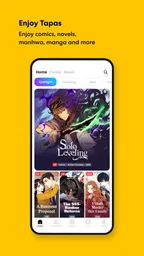
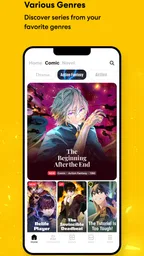
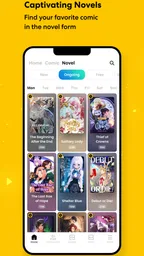
Tapas is a comics app from Tapas Entertainment Inc., and it also includes webnovels. That combination matters more than it may sound. A reader who wants illustrated stories one day and text-focused fiction the next can keep both habits in the same app, rather than dividing attention between separate services. I’d recommend it most to people who enjoy discovering ongoing stories and reading in short stretches.
Navigation is central to that experience. A large library can feel welcoming when you already know what you want, but daunting when you don’t. I find it helpful to approach Tapas with a small goal: continue a series I’ve started, browse for a particular mood, or try a few chapters of something unfamiliar. That keeps discovery from turning into an endless scroll, especially when a striking cover makes it tempting to open one more story.
The format also shapes how I’d use it. Comics reward focused, panel-by-panel attention, while novels are easier to fit into a spare moment when I can read a few paragraphs. Moving between those modes gives Tapas a useful flexibility, though it means the app is not a substitute for a dedicated ebook reader if your priority is long-form text and finely controlled reading settings.
Tapas is free to download, and its current version is 7.13.1. The app has a 4.2 average from around 126,000 ratings, with more than 10 million installs. Those figures suggest a well-established audience, but popularity alone can’t tell you whether its presentation will work for you. I’d treat a short trial with a comic and a novel as the best test: notice whether the text, panels, and navigation feel comfortable over more than a quick glance.
Reading across different abilities and habits
For readers who have difficulty sustaining attention, the chapter-based nature of webcomics and webnovels can make starting easier than opening a very long book. A short session still feels like a complete reading moment, even if the larger story continues. The trade-off is that serial fiction often asks you to remember characters and plot details between visits. I’d keep to one or two active series at first rather than follow a crowded list.
For readers with low vision, the important practical question is not simply whether a story is available, but whether its text and artwork remain comfortable on the device they use. Comics can be visually dense: small lettering, busy backgrounds, and changes in panel layout may demand more effort than prose. Before settling into a long session, I’d sample a few pages at the brightness and distance I normally use. If lettering feels tiring, a text-led novel may be a better choice in that moment.
Readers who prefer text-to-speech, extensive font controls, or a highly adjustable ebook layout should compare Tapas with a dedicated reading app before making it their main library. I wouldn’t assume every story is equally adaptable, because comics depend on fixed artwork and lettering. That’s not a flaw unique to Tapas; it’s a basic trade-off of the medium. It does mean the app’s mix of formats won’t solve every reading need in the same way.
Hands, attention, and sensory comfort
Phone reading can be convenient, but it also involves repeated touch input: opening stories, moving through episodes, and returning to browsing. If you have limited dexterity, hand pain, or difficulty making precise gestures, that interaction may become the tiring part even when the story itself is easy to follow. I’d test the app during a brief session before committing to a long catch-up. If tapping and scrolling feel uncomfortable, reading on a larger device or choosing a less interaction-heavy format may work better.
Comics can be vivid and visually busy, which is part of their appeal, but it can also be a lot to process. A page with dense artwork may be harder to scan than a simple text chapter, particularly when you’re already fatigued or sensitive to visual clutter. My practical tip is to switch formats rather than push through: if a comic feels overwhelming, try a novel; if a wall of prose is hard to focus on, a visual story may be easier. Tapas’s two formats give you that choice without changing apps.
Notifications and browsing can also compete with concentration in any story app. I prefer to decide what I’m opening before I start, then read that episode or chapter instead of repeatedly returning to recommendations. This is a small but useful habit for anyone who gets pulled off task by competing choices. It also makes the app feel more like a reading space and less like an open-ended feed.
When and where Tapas fits best
Consider a commute where you have a few quiet minutes but not enough time to settle into a paperback. You could read one episode of a comic while waiting, then switch to a novel chapter later when the surroundings are calmer. That flexibility is a genuine everyday strength. But on a crowded train, small text, glare, movement, or limited hand space can make a phone screen uncomfortable. In that situation, I’d save the story for a steadier moment rather than force a poor reading session.
At home, Tapas works well for a low-pressure evening routine: read a chapter, stop at a natural break, and return when you have time. For a long uninterrupted reading session, however, a larger screen or an ebook reader may be kinder to your eyes and posture. The app is best understood as a convenient companion for serial reading, not automatically the most comfortable choice for every context.
It is also worth thinking about connection and attention before relying on any mobile reading routine. If you expect to read somewhere with limited service, check how the app behaves in your own circumstances before counting on it for a trip. I wouldn’t plan around offline access without testing it first. For travel, keeping another book or reading option available is sensible if uninterrupted access matters.
Costs, expectations, and where friction remains
The app is free, but it includes in-app purchases ranging from $0.99 to $99.99 per item. That wide span means I’d pay attention to what I’m choosing before confirming a purchase, especially if I’m browsing casually or handing a device to someone else. A free download does not mean every way of following stories is necessarily free, so it’s wise to set a personal spending limit and check the cost of an individual item when it appears.
That matters particularly for serial stories, where enthusiasm can turn into a desire to keep reading immediately. If you prefer to know the total cost of a complete book before beginning, a conventional ebook store or library service may be a better fit. Tapas is more appealing if you’re comfortable exploring stories in installments and deciding as you go. I see that as a real difference in reading style, not just a pricing detail.
The app is rated Teen, so I would not treat that label as a guarantee that every story will suit every younger reader or household. Parents and readers choosing content for someone else should make their own selections with care. The developer is Tapas Entertainment Inc., and the app has been available since October 2, 2012. It supports devices running version 9 or later of its stated operating system, so checking your device’s compatibility before downloading is a practical first step.
Another limitation is that accessibility depends partly on the individual story. A novel’s text and a comic’s lettering create different demands, and a reader who manages one comfortably may struggle with the other. I’d sample content in the format you actually plan to read, not judge the whole app from a single attractive preview. That gives you a better sense of whether the material, visual density, and session length suit your needs.
Who I’d recommend it to
I’d point Tapas toward readers who enjoy webcomics, like fiction released in manageable installments, and want both illustrated and text-based stories in one app. It is particularly useful if your reading happens in short pockets throughout the day and you enjoy trying new series. The app’s long presence and large audience make it an established option in the comics space, but the right fit still depends on your preferred format and reading comfort.
I’d suggest looking elsewhere if your main requirements are a highly customizable ebook layout, a predictable all-in price for a complete book, or a reading experience designed around long sessions with minimal touching. A dedicated ebook reader may suit those priorities better. Likewise, if visual detail causes fatigue, the comics side may not be comfortable enough to make the app worthwhile, even though the novel format offers an alternative.
Overall, Tapas – Comics and Novels is most convincing as a flexible place to sample and follow serial stories, rather than as a universal solution for every kind of reader. Its range of comics and prose gives me a practical way to match a story to my attention and surroundings. I’d start with a few different chapters, check how the presentation feels on my device, and keep an eye on purchases. For readers whose habits align with episodic fiction, that’s a sensible and enjoyable way to decide whether Tapas belongs in their daily reading routine.
What we like
- New chapters arrive regularly for many ongoing series.
- The catalog includes both comics and prose novels.
- Users can support creators through in-app purchases.
- Reading progress is saved across sessions.
- Personalized recommendations can help uncover new series.
What could be better
- Many episodes require coins or other in-app purchases.
- Free unlocks may involve waiting between episodes.
- The coin system can make series costs hard to predict.
- Some stories end abruptly while waiting for new chapters.
- Offline access may be limited for unlocked episodes.





