



Toomics - Read Premium Comics review
 Analysis by Appsdrops
Comic apps are easy to judge by how many stories they offer, but the more important question for me is whether reading feels comfortable and manageable. Toomics is a comics app from Toomics Global, built around a broad mix of genres. Its appeal depends on finding stories that suit your tastes, but also on whether its reading experience fits your eyesight, attention, device, and daily routine. I’d consider it if I wanted a dedicated place for digital comics, while keeping in mind that a premium-focused service can involve more than simply opening a story and reading for free.
Reading comfortably and finding a story
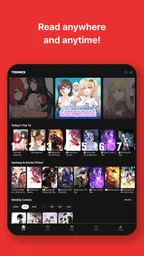
On a phone, comics have to work in a narrow space. A reader may need to follow speech bubbles, notice facial expressions, and understand panel order without constantly pinching, zooming, or losing their place. That is the practical standard I use to judge a comics app. Toomics is designed for comic reading rather than serving as a general-purpose ebook library, so its central job is to help readers browse stories and follow them on a mobile screen.
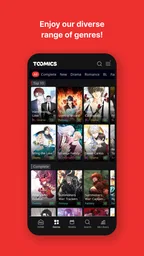
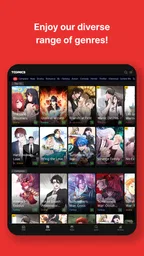
The service describes itself as spanning every genre, which makes it potentially useful when you want to move between different kinds of stories instead of sticking to one niche. Still, a large range is only helpful if browsing brings you to something you actually want to read. I’d approach the catalog as a place to sample and discover, rather than assume that every title or genre will suit every reader. A Teen content rating also gives families and younger readers a useful signal, but it is not a substitute for checking whether a particular comic’s themes are right for an individual reader.
My practical advice is to treat the first visit as a test of both content and comfort. Pick a story whose art style is easy for you to parse, read a short stretch, and notice whether you can follow the sequence without effort. Different comics can have very different lettering, contrast, panel density, and pacing; a screen that works well for one title may feel cramped with another. This is especially worth checking if you use a smaller phone or find detailed artwork tiring.
Navigation matters as much as page layout. When you are choosing among many stories, it helps to browse with a clear idea of what you want: a preferred genre, a particular mood, or a short read for a break. That reduces the chance of spending more time searching than reading. If you are undecided, try a few different kinds of titles before settling into a longer series. The right match is not necessarily the most popular-looking option; it is the one whose artwork and storytelling are comfortable to follow.
Toomics has an average rating of 4.0 from around 29,000 ratings, alongside roughly 1,300 written reviews. I take that as a broad indication that the app has an established readership, not proof that its interface or catalog will work for every person. Reader preferences vary sharply in comics, and accessibility is personal: someone who enjoys dense illustrated pages may be comfortable with a layout another reader finds difficult.
Small-screen reading is a personal fit
For readers who rely on larger text, magnification, or strong visual separation, the comic itself can be the limiting factor. Speech lettering is part of the artwork, so it may not behave like adjustable text in a conventional ebook. Before committing to a long series, check whether its lettering remains comfortable at the screen size you normally use. If you frequently need to enlarge the image, consider whether doing so makes panel order harder to follow.
A useful routine is to read while holding the phone at your usual distance and brightness, not under ideal conditions that you rarely encounter. If you can follow a few pages without leaning closer or repeatedly adjusting the screen, that particular title is a better match for everyday reading. If not, try a different comic or a larger device before deciding that the whole service is unsuitable. In visual storytelling, the art and lettering can matter as much as the reader interface.
Motor and sensory comfort deserve a real-world test
Comic reading can involve repeated taps, scrolling, and page changes. For someone with limited dexterity, tremor, or fatigue, even ordinary gestures may become tiring over a long session. I would test the basic reading flow with the hand and posture you actually use: can you advance through a story without uncomfortable repeated movement, and can you pause or put the phone down without losing your place? Those questions are more useful than assuming that every touchscreen interaction will be effortless.
Sensory comfort is also individual. Bright screens, saturated colors, busy illustrations, and emotionally intense scenes can be tiring or overwhelming for some readers. A comic app cannot make every title visually calm, because much of that experience comes from the artwork. Choosing a less crowded art style or shorter reading session may help. If you are sensitive to flashing or rapidly changing imagery, inspect a title cautiously rather than assuming that all comics will present the same visual experience.
Voice control, switch access, screen readers, and other operating-system tools can help some people use mobile apps, but their usefulness depends on how the app’s controls and comic images are presented. I would not assume that dialogue embedded in artwork will be read aloud like ordinary selectable text. If spoken access is essential, test a sample with your usual assistive setup before investing time or money. The same principle applies to one-handed use: check the controls directly instead of relying on a general expectation about phone apps.
Reading in the gaps of an ordinary day
A realistic use case is a short break on a commute or between appointments. The app has been installed more than five million times, and its focused comics format suits readers who want stories on a phone rather than carrying printed volumes. But public transport brings glare, movement, interruptions, and limited hand space. A title with clear lettering and a straightforward panel flow is likely to be easier to enjoy in those conditions than a visually dense one. I’d also avoid choosing a complicated chapter when I know I will be interrupted every few minutes.
At home, the trade-off changes. A larger screen or a stable reading position can make detailed art easier to appreciate, but long sessions may still strain the eyes or hands. I find it sensible to decide in advance whether I’m browsing or following a continuing story. Browsing works well for a spare few minutes; a longer session is better when I can settle in and avoid rushing through the artwork. This distinction helps prevent the app from turning a relaxing activity into another task to manage.
For parents, the Teen rating is a starting point for deciding whether the service fits a household, not a guarantee that every title will match a child’s age or sensitivities. I’d review the specific comic together or beforehand, especially when a young reader is drawn to a title by its cover or genre label. For adults who simply want to avoid particular themes, the same habit applies: inspect a story before settling into it, rather than treating the app’s overall audience rating as a description of every comic.
Premium access, alternatives, and practical trade-offs
The app is free to install, but it includes in-app purchases ranging from $4.99 to $99.99 per item. That matters if you are comparing it with free webcomics, library services, or apps where you already own digital books. I’d explore the available reading experience before paying and decide what kind of access I actually want. A large purchase can make sense only if the titles and reading habits justify it; it is a poor fit if you are still unsure whether the catalog suits you.
Compared with a general ebook reader, Toomics is more specifically oriented toward comics and their visual storytelling. A broad digital library may be a better choice if you want novels, adjustable text, or one place for several reading formats. Free webcomic platforms may suit readers who prioritize no-cost browsing, while print can be more comfortable for people who dislike prolonged phone use or need a larger, stable image. Each alternative gives up something: breadth of comic-focused discovery, convenience, or the feel of a physical page.
The release date was October 17, 2018, and the current version is 1.7.0, with a minimum operating-system requirement of version 9. Those details are useful when checking compatibility on an older device. Toomics remains a focused option for comic readers, but an older phone that struggles with modern apps or a device that cannot meet that system requirement is a straightforward reason to choose another way to read.
Toomics is rated for Teen audiences and has reached more than five million installs. Those figures describe its reach and intended age range, but they do not settle the accessibility question. For me, the decisive test is personal: can I find a story I want, read its lettering comfortably, and move through it without tiring from the controls or visuals? A brief trial with a few different comics is more revealing than browsing a long list of titles without actually reading them.
Who will feel at home, and who may not
I’d recommend giving the app a try if you already enjoy digital comics, like exploring different genres, and are comfortable reading illustrated stories on a phone. It may also suit someone who wants a dedicated comic destination rather than a mixed library. The strongest reason to keep using it is a good match between the available stories and your reading routine, not simply the size of the catalog or the fact that the app is popular.
I’d be more cautious if you need comics with fully adjustable text, rely on screen-reader access to all dialogue, have difficulty with repeated touch gestures, or want a completely free reading habit. In those cases, test the app with your own accessibility tools and device before spending. A larger screen, print edition, library option, or reader designed around selectable text may be a better fit. That is not a criticism of comics as a format; it is a reminder that artwork-based reading has different practical demands.
Overall, Toomics is worth considering as a genre-focused comics app, especially for readers who enjoy discovering stories and can comfortably follow artwork on a mobile display. Its free download lowers the barrier to trying it, while the in-app purchases make it sensible to check the experience before spending. My inclusive verdict is positive but conditional: the service can be enjoyable when the catalog, lettering, controls, and your reading environment line up, yet no single comic app can remove the visual and motor demands built into reading comics. Try a short session in the setting where you expect to use it, and let comfort—not habit or hype—decide whether it belongs on your device.
What we like
- A broad catalog offers comics across multiple genres.
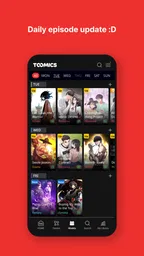
- Episodes are easy to browse and continue reading.
- New installments can keep ongoing series engaging.
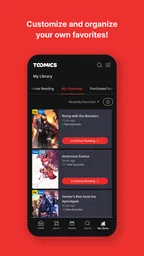
- Reading progress helps you pick up where you left off.
- The app provides a convenient way to read on mobile.
What could be better
- Many chapters require a paid subscription or purchase.
- Some series may include mature themes or imagery.
- Availability of titles can vary by region.
- A steady internet connection may be needed for access.
- The growing catalog can make choosing a series difficult.





