





PixShaft review
 Analysis by Appsdrops
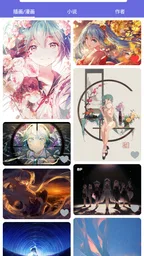
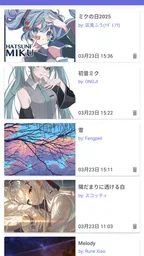
When I try an illustration-discovery app for the first time, I want to know one thing quickly: will it help me find work worth stopping for, or will I spend my time scrolling without a clear direction? PixShaft is aimed at people who enjoy illustrations, comics, and novels, with a focus on finding work from creators around the world. That makes it appealing as a browsing companion, though it is best approached as a place to explore rather than a tool with a specific reading or drawing workflow.
In my view, the reassuring way to start is to keep the first visit simple. Pick one interest—perhaps a visual style, a kind of comic, or a story mood—and use that as your starting point. You do not need to make PixShaft your main library immediately. A small first goal, such as discovering one creator whose work you want to revisit, is a better test of whether its browsing approach suits you.
What to expect from an illustration-first browser
PixShaft is a free comics-category app from CeuiLiSA. Its focus reaches beyond comics alone: illustrations and novels are part of the mix, so the experience is intended for people whose interests cross between visual art and storytelling. I find that combination more useful than a narrowly defined comic reader when I am in the mood to browse, but less predictable when I already know exactly what I want to read.
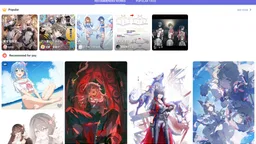
The app’s role is discovery. Think of it as a place to look for work that catches your eye and to follow curiosity from one piece or creator to another, rather than assuming it will replace every dedicated reader or artist portfolio service you already use. That distinction matters: a discovery tool can be enjoyable even when it is not the best place for a long, uninterrupted reading session.
PixShaft has a 4.9 average from around 305 ratings, and it has over 10,000 installs. Those figures suggest that it has found an audience, but they cannot tell me whether its particular browsing style fits your taste. The more useful question is whether you enjoy discovering art without arriving with a specific title in mind.
The app is free and rated for Everyone, which makes trying it a low-commitment way to see whether its collection and presentation suit you. It was released on March 23, 2026, and the current version is 4.9.9. It supports Android 7.0 and later, so an older compatible phone may be enough to get started.
Who is likely to enjoy it
I’d point first to illustration enthusiasts who like finding unfamiliar creators, readers who move between comics and prose, and anyone who enjoys browsing in short bursts. If your usual routine is to open a social feed and pause whenever an image or story interests you, PixShaft’s broad creative focus may feel natural.
It is less suited to someone who wants a highly organized personal library, a particular comic series, or a specific creator’s newest work on demand. A dedicated comic reader may be the more comfortable choice for people who prioritize a clear reading queue. Likewise, if you mainly want to study an artist’s portfolio, a service centered on individual portfolios may make that task more direct.
Getting started without overthinking it
After installing PixShaft, I’d give myself a modest first session rather than trying to understand every corner of the app at once. Start by choosing the kind of work you feel like seeing today. If you are drawn to character art, begin there; if you want a story, approach it with the mindset of finding a comic or novel that earns a closer look. This gives your browsing a purpose without turning it into a chore.
A practical first-session routine is to notice what makes you stop scrolling. Is it a particular look, a subject, or the promise of a continuing story? Once you have found something interesting, take a moment to identify its creator and see whether more of their work appeals to you. That small step turns a passing discovery into a useful result: you have found a possible artist or storyteller to return to, rather than simply having seen another image.
I would also avoid judging the app by one quick glance. Discovery depends on what you are in the mood for, and a broad creative service can feel uneven if you browse without any preference in mind. Try a second visit with a different intention—art one time, comics or novels another—and compare how easily you find something engaging. That gives you a fairer sense of whether PixShaft’s range is a benefit or a distraction for you.
Your first meaningful discovery
A realistic everyday use is a short break between tasks. Instead of opening a general feed and hoping something relevant appears, open PixShaft with a simple question: “What kind of illustration do I want to see right now?” Browse until one piece catches your attention, then explore the creator or related work if that path is available in the app. The goal is not to collect a huge list; it is to leave with one work or name you genuinely want to remember.
That approach also helps you decide whether to keep using it. If you repeatedly find creators or stories that match your interests, the app is doing its job for you. If each visit feels like random scrolling, narrow your intention and try a different type of work. If that still does not help, you may be better served by a platform organized around a particular series, reading list, or artist community.
One useful habit is to keep your own lightweight note of discoveries you want to revisit, especially if you are exploring many creators in a single sitting. I would not assume that a discovery app automatically provides the exact bookmarking or collection system you prefer; the safest workflow is to check what the app itself offers, then use a simple personal note if you need a dependable record. That prevents a promising find from disappearing into a long browsing session.
Common points of confusion
The first possible misunderstanding is expecting PixShaft to behave like a traditional comic reader. Its scope includes illustrations and novels, so the experience is broader than opening a series and moving chapter by chapter. If you want a focused reading session, begin with a known title or use a dedicated reader instead of treating general discovery as a reading queue.
A second source of friction is not knowing what to search or browse for. When an app covers several creative formats, “show me something good” can be too vague even for a curious user. I get better results by choosing a mood or subject first, then allowing myself to wander within it. This is a small change, but it makes browsing feel intentional rather than endless.
It is also worth separating a striking image from a creator you want to follow. One attractive piece is a good reason to look further, not proof that everything else by that artist will suit you. I recommend sampling a little more before deciding that a creator is a match. This is especially helpful if you are using PixShaft to build a longer-term list of artists or storytellers rather than just pass time.
Finally, a high average rating should be treated as a useful signal, not a guarantee that every part of the experience will fit your habits. Some users want serendipity; others want strict organization and predictable access to a known work. PixShaft’s discovery-oriented premise is a strength for the first group and can feel less direct to the second.
How it compares with familiar alternatives
Compared with a dedicated comic reader, PixShaft appears more suited to browsing across creative work than to managing a structured reading routine. If your main goal is to pick up exactly where you left off in one series, a reader built around that task will usually feel more straightforward. If your main goal is finding an unfamiliar illustration, comic, or novel, PixShaft’s broader mix is the more relevant starting point.
Compared with a general social feed, its appeal is the creative focus: you are coming to an app centered on illustrations, comics, and novels, not a stream of unrelated updates. The trade-off is that an open-ended discovery experience asks you to bring some curiosity and direction of your own. For someone who enjoys looking around, that can be refreshing; for someone who wants a tightly curated list of known favorites, it may feel less efficient.
Compared with an artist portfolio service, PixShaft’s range may be more comfortable for readers who want both art and narrative work in the same discovery session. But if your priority is evaluating a creator’s complete body of work or contacting them professionally, choose a service designed for portfolios and professional presentation. I would use PixShaft to stumble upon interesting work, then use the right specialized service for any deeper task it does not naturally serve.
Making the next visit more useful
Once you have had one successful discovery, make the next session more specific. Return with a question such as whether you want to see more work from that creator, look for a similar visual mood, or switch from images to a story. This creates a simple loop: explore, notice what you liked, and use that preference to guide the next browse. It is a more dependable way to get value than repeatedly opening the app with no idea what you hope to find.
If you share a device with a younger reader, the Everyone content rating is a reassuring starting point, but I still recommend choosing apps and material in line with your household’s preferences. The rating gives a broad age suitability indication; it does not replace a parent’s own judgment about what a particular person should read or view.
For a first-time user, my advice is to treat PixShaft as a discovery shelf, not a promise that every visit will deliver a perfect match. It is free to try, has a clear creative audience, and brings illustrations, comics, and novels into the same browsing space. Its strongest use is an open-minded search for work you would not have found otherwise; its main limitation is that this kind of exploration can be less convenient than a focused library or reader.
I’d recommend PixShaft if you enjoy visual art and stories, want to encounter creators beyond your usual favorites, and are happy to spend a little time following your curiosity. I would skip it as a primary choice if you need a tightly managed comic collection or a direct route to a specific title. Go in with one small goal, give the browsing a fair chance, and judge it by whether you leave with a creator or piece you genuinely want to revisit.
What we like
- Offers a simple way to create pixel-style artwork.
- Pixel art can be an enjoyable activity for short breaks.
- The visual format is easy for beginners to understand.
- Coloring each section can help users focus on detail.
- Finished creations can provide a satisfying sense of progress.
What could be better
- Small sections may be difficult to tap accurately on a phone.
- Repetitive coloring may not hold everyone's attention.
- Pixel art limits the level of detail in finished images.
- Progress may feel slow on larger designs.
- The app may offer less appeal to users who prefer freeform drawing.





