
OpenToon - Manga Translator review
 Analysis by Appsdrops
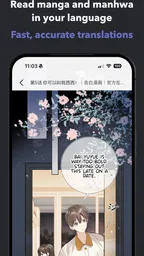
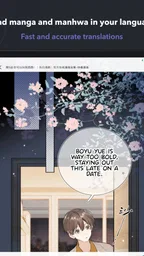
Reading a translated comic is not quite the same as reading one written in a language I know well. Dialogue has to fit inside speech bubbles, sound effects are part of the art, and a mistranslated name can make a scene hard to follow. OpenToon is aimed at that particular problem: it is a comics app from OpenNovel focused on translating manhwa and webtoons. I see its appeal less as a replacement for a normal comic reader and more as a practical option for readers who want to follow illustrated stories across language barriers.
Where OpenToon fits in a comics routine
OpenToon belongs to the comics category, but its translation focus gives it a different job from a conventional digital-comic library. If I already read comics in a language I understand, I may have little reason to add another app. If I keep running into manhwa or webtoons I cannot comfortably read, though, translation is the feature that matters most—not a bigger shelf or a new way to browse familiar titles.
That distinction is useful when deciding whether to try it. A regular comic reader is usually the simpler choice for reading a known-language series without an extra translation step. OpenToon makes more sense when the language itself is the obstacle. Its name, OpenToon - Manga Translator, points to that use, though the store summary specifically highlights manhwa and webtoons; I would not assume every kind of comic or every language is handled equally well.
In an ordinary day, I might open a chapter during a commute, reach a panel where the dialogue is unfamiliar, and use a translation-oriented app rather than abandon the story until later. That is a valuable niche, but it also means the app’s usefulness depends on the reading material and the quality of the translated text. Artwork can survive an imperfect sentence; a confusing punchline or plot reveal is harder to forgive.
What the current release tells readers
The current version is 1.1.6, so this is an app with a numbered release rather than just a concept described in a store blurb. The version gives readers a clear reference point when discussing the app or checking whether their installed copy is up to date. It does not, on its own, tell me which features changed between releases, so I would avoid treating the number as proof of a particular improvement.
The app was released on May 24, 2026. That makes the version and release date useful context for understanding where OpenToon sits today, but they are not a changelog. I would look for release notes in the app store before attributing a new capability or fix to an update. That is especially important for translation tools: small changes to text handling or language support can matter more to a reader than a version number alone suggests.
Its average rating is 4.6 from around 6,800 ratings, with 189 written reviews, and it has over 100,000 installs. Those figures suggest that a meaningful group of readers has tried it and that the overall response is favorable. Still, ratings cannot show whether the app will work well with a particular comic, so I would treat them as a reason to investigate rather than a promise of perfect results.
How existing readers can assess the change
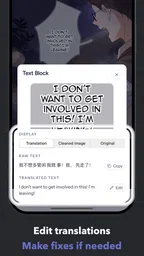
If I already use a comic app, I would not switch my whole reading routine immediately. I would first try OpenToon on a short section of a series I know well. Familiar dialogue gives me a useful comparison: I can tell whether a translated line preserves the meaning, whether names stay consistent, and whether the result remains easy to read in a narrow panel.
That small test also helps separate two different problems. If the story is unfamiliar, I may simply be missing context. If I know what a character said and the translated wording changes the intent, that is a clearer sign that the translation needs caution. I would keep the original comic reader available rather than treating a translated result as the definitive version, particularly for jokes, wordplay, or plot-heavy scenes.
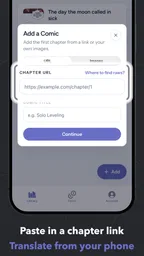
Another practical approach is to use translation selectively. If most of a chapter is readable but a few speech bubbles are not, I would translate only the points that block comprehension instead of interrupting every panel. This keeps the pace closer to ordinary reading and helps me notice when an interpretation seems odd. It is a small workflow adjustment, but it can make a translation tool feel less intrusive.
For a reader who follows a story week by week, continuity matters as much as a single good translation. I would pay attention to recurring character names, titles, and expressions across multiple chapters. If the wording shifts, I would use the surrounding art and dialogue to check the meaning rather than assume the latest phrasing is automatically correct. That habit is useful with any machine-assisted reading workflow, and especially with comics where a few short lines carry a lot of narrative weight.
Where translation helps—and where it can get in the way
Manhwa and webtoons often rely on vertical pacing: a pause, a reaction, then a reveal lower down the screen. Translation can help me follow the dialogue without leaving that rhythm to search elsewhere. The trade-off is that any extra reading step can break the flow. If a result is difficult to scan or obscures the artwork, a plain-language edition or a conventional reader with an official translation may be a better fit.
Text in comics is not limited to dialogue. A panel may contain a sign, a sound effect, handwritten lettering, or a visual joke. Readers should judge whether the app’s treatment works for the specific material they read rather than expect every element to become clear. For a conversation-driven series, translated speech may be enough to follow the plot; for a story where lettering and visual wordplay are central, incomplete translation can leave important details behind.
There is also a difference between understanding the basic action and getting the author’s exact voice. Short comic dialogue can be ambiguous even before translation, and a character’s personality may depend on formality, slang, or deliberate awkwardness. I would use OpenToon to get oriented, but I would be careful about relying on its wording alone when a scene hinges on tone or a subtle emotional shift.
The app is free to install, while in-app purchases range from $2.99 to $119.99 per item. That is a wide span, so I would check the purchase details in the app before spending anything and decide whether the free experience already suits my reading habits. I would not treat a high-end purchase as necessary just because it is offered; first establish how often translation solves a real problem for you.
Who is likely to find it useful
I would recommend giving OpenToon a try if you regularly encounter manhwa or webtoons in languages you do not read and want a translation-focused option to explore. It may also suit a casual reader who is curious about a series before committing to a translated edition. Its free price makes that initial trial easier, though purchases are available inside the app and deserve a careful look before checkout.
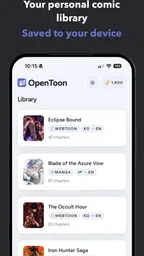
On the other hand, readers who already have reliable access to official translations may prefer to stay with those. An official edition is often the better choice when polished localization, consistent terminology, or the creator’s intended voice matters most. Someone looking primarily for a broad comic catalog, social reading features, or a standard library experience should compare those needs with what OpenToon is built to do rather than assume a translation focus covers them.
The content rating is Everyone, which makes the app broadly accessible from an age-rating perspective. That rating is not a guarantee that every comic a reader encounters will suit every household, so parents should still consider the actual material being read. I would make that distinction clear: an app’s age label and the themes of an individual story are not the same thing.
What I would watch as it develops
For an app at version 1.1.6, the most useful evidence of progress would be clear release notes that explain what has changed and why it matters to readers. I would watch for information about translation quality, language coverage, and how the app handles comic text without assuming those improvements have already happened. Those are sensible areas to monitor, not confirmed features or promises.
I would also look for signs that the reading workflow stays comfortable over a full chapter. A translation tool can be impressive in a quick test yet tiring if it repeatedly interrupts panel-to-panel pacing. Readers can evaluate that themselves by trying a short, dialogue-heavy section and then a scene with sound effects or small lettering. Comparing those cases gives a more realistic picture than judging the app from one easy panel.
OpenNovel’s OpenToon has a clear purpose: help readers approach manhwa and webtoons when language gets in the way. Its 4.6 average rating and more than 100,000 installs make it a credible option to consider, but neither figure can guarantee a good result with every series. My advice is to test it on familiar material, keep a conventional or official translation available when precision matters, and avoid paying until you know the app fits your routine.
Overall, I see OpenToon as a useful specialist rather than an all-purpose comic reader. It is most compelling for curious readers willing to check translations against context, and less compelling for anyone who expects flawless localization or a complete replacement for their existing library. If that trade-off sounds acceptable, its free entry point makes a careful trial worthwhile; if the wording, tone, or lettering must be exact, I would choose a polished official edition instead.
What we like
- Translates text directly from manga pages.
- Supports multiple language pairs.
- Helps readers follow stories without waiting for official translations.
- Useful for scanning text from image-based pages.
- Can make unfamiliar manga more accessible.
What could be better
- Translation quality may vary by language pair.
- Stylized lettering can be difficult for text recognition.
- Low-resolution images may reduce recognition accuracy.
- Complex page layouts can lead to misplaced translations.
- Some features may require an internet connection.





