





Manta - Manga, Manhwa, Novels review
 Analysis by Appsdrops
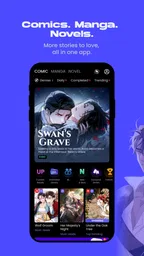
I reach for Manta when I want a comic or serialized story that reads comfortably on a phone, without having to sort through a sprawling general-purpose reading app. It is a comics app from RIDI Corporation, and its mix of manga, manhwa, webtoons and webnovels gives it a broader feel than a reader devoted to one format. That variety is appealing, though it also means the experience depends on whether its particular catalog matches your tastes.
The app is free to install, but that does not make every reading choice cost-free: in-app purchases range from $0.49 to $249.99 per item. I’d treat it as a place to explore first, then check how a series is accessed before settling into it. That small habit matters more here than the broad promise of having several kinds of stories in one place.
What using Manta feels like now
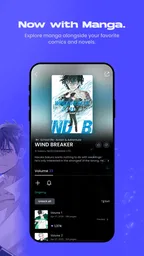
Manta is aimed at readers who enjoy following illustrated stories in short sessions as much as settling in for a longer read. The vertical, mobile-oriented webtoon format suits a commute, a lunch break or a few quiet minutes before bed. Manga and manhwa give readers other visual storytelling styles, while webnovels offer a text-led alternative when a screen full of panels is not what they want.
That range is the app’s most practical advantage, not simply a long list of formats. If I finish a chapter and want something different, I can stay in the same reading environment rather than switching immediately to another service. The trade-off is that a broad collection is not the same as a complete one: anyone looking for a particular title should check the available catalog rather than assume it will be there.
The app has an average rating of 3.9 from around 63,000 ratings, with about 3,900 written reviews. Those figures suggest a sizable audience and a mixed-to-positive reception, but they cannot tell me whether a reader will find the genres or series they personally want. The more useful question is whether Manta’s selection and access model fit your habits.
Its Teen age rating makes it a more natural fit for older children, teens and adults than for young readers. I would still make choices based on the specific story: a general age label is not a substitute for checking whether an individual series suits the person who will read it.
How the catalog shapes the experience
Different formats call for different reading rhythms. A vertically arranged webtoon can be easy to follow with one hand and little zooming, while manga may feel more familiar to readers used to page-based comics. Webnovels are useful when I want to continue a story without relying on artwork. Having all three kinds under one roof is convenient, but it also rewards a little experimentation; someone who only wants conventional manga may not get much value from the other formats.
My practical suggestion is to judge the app by a few titles rather than by its category labels. Try one series that matches your usual taste and another that makes use of a different format. If both are enjoyable to browse and read, the range is a genuine benefit. If the stories you want are missing or the format is not to your liking, the breadth will not make up for that mismatch.
Version history and what it tells readers
The current version is 26.10.478, and the app was released on November 9, 2020. That establishes a useful timeline: Manta is not a newly launched reader, and it continues to be presented through a current version number. I would not infer particular additions, redesigns or performance improvements from the version number alone; it is evidence of the current build, not a changelog.
For someone who already uses the app, that distinction is important. A newer build can matter when deciding whether to update, but the number itself does not tell you what changed or whether a problem you care about has been fixed. I’d read the update notes in the app store when they are available and base the decision on the actual changes, especially if your current reading setup is working well.
The app’s reach is substantial, with over five million installs. That can make it easier to find community discussion and reader opinions, but it does not guarantee a particular title, a uniform experience across devices or a reading feature you expect from another service. The version and install figures are context, not a promise about your own experience.
Making it work for an everyday reading routine
For a realistic routine, I’d use Manta as a short-session reader: choose a series in advance, read a chapter while waiting for an appointment, then return to it when I have another spare moment. That is more satisfying than opening a large catalog with no idea what to read and spending the whole break browsing. A small shortlist of ongoing stories can keep the app focused on reading rather than discovery.
Another useful approach is to separate discovery from commitment. Browse when you have time, but start a new series only when its premise and presentation hold your attention. Serialized fiction asks for repeated visits, so sampling too many stories at once can leave you with a crowded reading queue and little sense of progress. A couple of active series are easier to keep track of than a dozen abandoned starts.
It is also worth deciding in advance how you feel about in-app spending. Since individual purchases can range from less than a dollar to amounts as high as $249.99, I would not treat “free” as a guarantee that every desired reading path will remain free. Check the options shown for the specific content you want and set a personal spending limit before making purchases. That is especially helpful if more than one person uses the same device or account.
One less obvious trade-off is the value of convenience versus catalog certainty. Keeping comics and novels together can reduce app-hopping, but readers who follow a specific creator or series across several services may still need more than one app. I would keep Manta as a focused option for the stories it handles well, rather than assuming it can replace every source in a reading collection.
Where it can frustrate, and who may prefer another app
The biggest limitation I see is the uncertainty that comes with any curated catalog. A reader may like Manta’s format and still find that a favorite genre or title is not represented in the way they want. If your priority is access to a specific publisher’s entire backlist, a publisher-focused service or another catalog known to carry those titles may be a better fit.
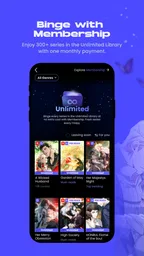
Cost needs a little attention, too. The app itself is free, but in-app purchases can make the overall experience different from reader to reader. I would not begin a long series without understanding the access choices attached to it. Anyone who strongly prefers a fixed subscription, a one-time purchase model or no paid content at all should compare the terms offered for the stories they plan to read before making Manta a main library.
Reading style is another reason to skip it. If you dislike scrolling through long vertical episodes, prefer printed pages, or mostly want text novels rather than illustrated serials, the format mix may not feel like an advantage. A dedicated e-book reader is likely a more natural choice for someone whose reading is almost entirely prose, while a specialist comics service may suit someone who wants a narrower, more predictable selection.
Device compatibility is worth checking before installing: the listed minimum operating system is version 7.0. That makes the app relevant to a range of devices, but an operating-system floor does not tell you how smoothly it will run on a particular older phone. If your device is near that minimum, I’d test basic browsing and reading before buying anything or building a large collection around it.
How it compares with other reading choices
Compared with a general e-book app, Manta is more centered on serialized visual storytelling and the webtoon reading experience. A general reader may be more convenient for people who already own many conventional ebooks or want one library for unrelated genres. Manta’s case is stronger when the goal is to discover and follow comics and webcomics, with webnovels available as another kind of serial reading.
Compared with a single-format comics reader, its variety is useful when your interests shift between manga, manhwa, webtoons and prose. The downside is that a specialist alternative may better match readers who care most about a particular format, publisher or collection. I would compare the actual series you want to read, not just the number of formats each app advertises.
In that sense, Manta works best as a complement as often as it does as a replacement. It can become the convenient home for the stories you find there, while another app remains necessary for titles outside its selection or for a different payment and library model. That is a sensible setup, not a failure of the app.
What to check before settling in
Before committing to a long read, I’d answer three practical questions: is the series I want available, do I understand how access to it works, and do I enjoy reading that format on my phone? Those checks address the most meaningful sources of friction without requiring a reader to guess what future updates might bring.
I’d also pay attention to whether browsing helps me find stories or repeatedly distracts me from finishing them. If discovery is the fun part, a broad mix can be a strength. If I want a calm, fixed library and a predictable reading routine, I would save a short list of favorites and avoid treating every recommendation as a new commitment.
RIDI Corporation’s app has been around since 2020 and remains a substantial option in mobile comics, with more than five million installs. Its current version is 26.10.478, but I would look to explicit update notes—not a version number—for evidence of changes that affect existing readers. That keeps expectations grounded while still leaving room to benefit from improvements as they are documented.
Overall, I’d recommend Manta to someone who likes serialized comics, wants webtoons alongside manga and manhwa, and is open to trying webnovels in the same app. I’d be more cautious if you need one specific catalog, want every story to follow a fixed cost model, or rarely read on a phone. Its strongest appeal is the chance to move between several story formats in one reading habit; its main caveat is that convenience does not remove the need to check titles and purchase terms. If that balance suits you, it is worth exploring at your own pace.
What we like
- A clean interface makes discovering new series straightforward.
- Episodes are easy to read on phones and tablets.
- New chapters are added regularly across many series.
- Original stories offer content beyond familiar franchises.
- Reading progress helps you return to ongoing series.
What could be better
- A subscription is needed for access to much of the catalog.
- Some series have limited chapters available for free.
- The catalog may not include every popular title.
- Offline reading options may be restricted by plan or title.
- New chapter availability can vary between series.





