

MangaNest:QToon Lite & Comic review
 Analysis by Appsdrops
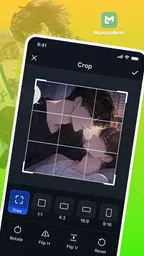
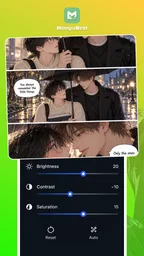
I can see why MangaNest catches the eye during a first try: it offers a quick route from an ordinary photo to something with a manga-inspired feel, without asking me to learn a full illustration program. As a comics-focused editing app from Quanettema, it is aimed at people who want to crop an image, give it a visual treatment, add words, or draw on top. The appeal is less about building a comic from scratch and more about giving a picture a personal, expressive finish.
That focused idea also sets a useful expectation. I would treat MangaNest as a lightweight creative tool for edits and small comic-style moments, not as a replacement for a professional drawing suite or a complete page-layout workflow. If you enjoy making character edits, reaction images, or simple panels from photos, the combination of editing and annotation can be handy. If your main goal is to produce polished, multi-page comics with precise lettering and complex layers, you will probably want a more specialized tool.
What feels satisfying in the first week
The first sessions are the easiest to enjoy because the available actions map neatly to familiar creative impulses: improve the framing, adjust the look, add a line of text, or sketch directly over the image. That gives a beginner a low-pressure way to experiment. Instead of starting with a blank canvas, you can begin with a photo that already has a subject and composition, then decide how far to push it toward a comic-like result.
In everyday use, I would start with a photo that has one clear focal point and leave enough open space around it for a caption or drawn marks. Cropping before adding text is a practical habit: it helps prevent a later framing change from cutting into a speech bubble or placing a caption awkwardly near the edge. The workflow is simple in concept, but that small bit of planning can make the finished image feel intentional rather than like a stack of effects.
The first-week fun is also about speed of imagination. A snapshot from a walk can become a dramatic character portrait; a picture of a pet can become a playful reaction image; a selfie can be reframed as a small visual joke. I like this kind of app most when the result has a clear purpose, even if that purpose is simply making a friend smile. Manga-inspired editing works best when the photo already has a readable expression or gesture for the edits to emphasize.
Its free price makes trying that workflow an easy decision, and the Teen age rating gives families a broad indication of the intended audience. MangaNest has a 4.6 average from around 3.7 thousand ratings, with over 100 thousand installs. Those figures suggest a modestly established audience rather than a brand-new curiosity, though popularity by itself does not tell me whether the editing style will fit your taste.
Building an image rather than piling on effects
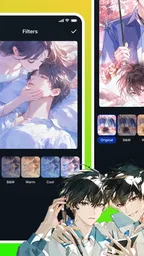
A useful way to get more from the editor is to treat each tool as having a separate job. Cropping should clarify the subject; filters should establish a mood; text should carry a line that the image cannot communicate on its own; drawing should add emphasis or a personal touch. When all four are competing for attention, the result can become cluttered. I would make one change at a time and pause to check whether the image is still easy to read at phone size.
That is especially important for captions. A short phrase can strengthen a comic-style image, but long text quickly turns a visual post into a small reading exercise. I would keep lettering concise, leave breathing room around it, and avoid placing it over the most expressive part of a face. The app’s text and drawing tools invite quick experimentation, but the editor cannot make a crowded composition feel clear by itself.
For a first project, a good low-effort exercise is to use one photo, one overall look, and one handwritten accent. That keeps the focus on how the image changes rather than on how many controls are available. It also gives you a practical sense of whether the result feels like your own style. If you find yourself repeatedly adjusting the same image without getting closer to a clear idea, it may be better to start over with a simpler source photo.
Where recurring value comes from
The more useful question is not whether MangaNest is entertaining once, but whether it gives you a reason to return. For me, the answer depends on whether photo editing is already part of a small routine. Someone who regularly shares character-inspired edits, makes visual jokes, or adds annotations to pictures can get repeat use from a compact set of actions. The app is easier to keep around when it solves a recurring, specific task rather than serving as a novelty effect drawer.
A realistic example is making a quick reaction image after a family gathering. I might crop a candid shot to isolate a funny expression, choose a filter that supports the mood, and add a brief caption. That is a complete result with a clear use, and it does not require me to spend an evening learning a complicated editor. The same workflow could suit a club announcement, a casual fan post, or a small personalized greeting, provided the user is comfortable sharing the image through whatever channel they normally use.
Another recurring use is annotating a photo before sending it to someone: a drawn arrow can point out a detail, while a short note gives the image context. This is not the same as producing a finished comic, but it is a practical bridge between a photo editor and a sketching app. The creative benefit comes from combining visual changes and marks in one place, rather than moving between separate tools for every small edit.
Compared with a typical photo editor, MangaNest’s identity is more playful and comic-oriented. A general-purpose editor may be the better choice when your priority is detailed correction, consistent color work, or broad image adjustments. Compared with a dedicated drawing app, MangaNest is more approachable for editing an existing photo, but it is not the obvious pick for someone who wants a blank canvas, extensive illustration control, or a carefully managed sequence of comic panels. Its strongest position is between those familiar categories.
Maintenance without turning editing into a chore
Creative apps can lose their place on a phone when every use creates a cleanup task. I would keep the workflow tidy by deciding what each edit is for before starting and by saving only versions I may actually use. If I am exploring several looks, I would avoid treating every experiment as a final image; otherwise the camera roll can fill with near-identical options that are difficult to distinguish later.
A simple naming or album habit outside the editing session can help if you make images for different purposes, such as personal jokes, fan art, or event posts. That advice is not a special feature claim; it is just a way to keep a lightweight editor from creating a messy trail of exports. The most sustainable routine is a short one: choose the source photo, make a few deliberate edits, check the result at normal viewing size, then keep or discard it.
There is also a practical trade-off in using a photo-based tool: the quality and suitability of the source image matter. A dark, busy, or poorly framed picture may remain difficult to read after editing. I would not expect filters or drawing to rescue every image. Picking a clearer photo is often faster than trying to compensate with extra effects, and it usually produces a more convincing comic-inspired result.
MangaNest is listed at version 1.6.21 and requires Android 7.0 or later. That gives Android users a straightforward compatibility check before installing. It is worth considering your own device and storage habits as well, especially if you already keep several editing apps. For someone who only makes an occasional image, a tool they already know may be enough; for someone who wants this particular photo-to-comic workflow, a dedicated app can make the process feel more direct.
What may wear thin after the novelty
The main risk is repetition. If your first few edits all rely on the same photo, same look, and same kind of caption, the results can start to feel interchangeable. The app’s core tools are useful, but a compact creative workflow naturally depends on the user bringing fresh ideas and images. I would not install it expecting an endless stream of new material or a built-in reason to create every day.
Another possible source of fatigue is the gap between a quick edit and a finished comic. A few marks and a caption can make a picture feel playful, but people who want panel pacing, elaborate speech placement, or a consistent cast may find that photo editing is only a small part of the job. In that case, a comic-layout or illustration app is a better fit, even if it takes longer to learn. Choosing the right tool is more satisfying than trying to force a simple editor into a larger production role.
There is a similar distinction between a casual share and work that needs precise control. If you are preparing an image for a formal project, a client, or a carefully coordinated set of posts, you may prefer an editor with more specialized controls and a repeatable process. MangaNest makes more sense when experimentation and immediacy matter more than fine-grained production. That is not a defect so much as a boundary worth recognizing before you build a workflow around it.
I also think the app is less compelling for people who rarely edit photos at all. If you only want to read comics, this is not a reading app; its role is making images with a manga-inspired touch. And if drawing is the part you care about most, you may get more satisfaction from a dedicated sketching environment. The best match is someone who already has photos to work with and wants a light creative step between taking a picture and sharing it.
Who should keep it installed
I would recommend MangaNest to casual creators who like transforming photos into expressive, comic-flavored images without committing to a large editing project. It is a reasonable fit for fan-oriented posts, personal jokes, simple visual notes, and quick experiments with text and drawing. Quanettema’s app has enough of a defined purpose to be useful when that sort of edit is part of your regular phone use, and its free availability lowers the stakes of trying it.
I would steer away from it if you need a full comic-production pipeline, detailed illustration controls, or a highly repeatable professional workflow. I would also skip it if you expect an editor to supply the creative idea for you: the most satisfying results still come from choosing a good photo and knowing what you want the edit to say. The tools can support a joke, mood, or emphasis, but they cannot replace a clear visual concept.
For me, the lasting value is conditional but real. MangaNest earns space when I use it as a quick finishing tool for pictures that benefit from a little comic energy, not when I expect it to become my main art studio. The first-week appeal is easy to understand; month-to-month usefulness comes from having occasions to make these images and keeping the process restrained. If that matches how you already create, MangaNest is worth a try. If not, a general photo editor or a dedicated drawing app will probably serve you better over time.
What we like
- Offers a focused library of manga and comics in one app.
- Lite branding suggests a more streamlined reading experience.
- A compact interface can make browsing feel less cluttered.
- Useful for readers who prefer digital comics on mobile.
- Can provide an alternative to reading comics in a web browser.
What could be better
- Catalog availability may vary by region.
- Some titles may have incomplete chapters.
- Reading options may feel limited for advanced users.
- Content discovery can be difficult in a large catalog.
- The app may require an internet connection to read comics.





