






Key Collector Comics review
 Analysis by Appsdrops
Starting a comic collection is fun until you need to remember which issue you own, which one you meant to buy, and whether a particular cover is worth a closer look. Key Collector Comics is built for that kind of collector’s problem: it brings collection management and comic price-guide browsing together in one app. I’d recommend it most to readers who want a searchable reference while organizing or shopping, rather than to someone looking for a place to read comics digitally.
What to expect from a collector-focused app
Key Collector Comics is a free comics app from Key Collector Comics. It has a 4.5 average from around 5,700 ratings, and more than 100,000 people have installed it. Those figures suggest a healthy audience, but the more useful question is whether its collector-first approach fits the way you keep track of books.
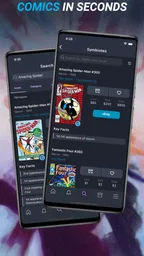
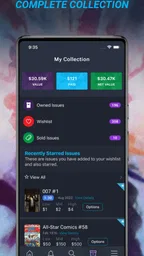
The app’s central appeal is practical: a comic collection is easier to manage when you can consult a guide and organize what you own in the same place. That makes it a different proposition from a general reading app, where the focus is usually on accessing stories, or a simple spreadsheet, where every title and note depends on your own upkeep. Here, the reference side is part of the reason to open the app in the first place.
I would approach its price information as a guide for orientation, not a promise that a book will sell for a particular amount. Comic values can depend on condition, edition, demand, and the details of a sale. A guide can help you spot a book worth investigating or compare items on your list, but it is not a substitute for checking the exact issue and assessing its physical condition.
The app is marked for Everyone, and it is free to download. In-app purchases range from $1.99 to $39.99 per item, so it is worth noticing the distinction between trying the app and choosing to spend within it. I would begin with the free experience and decide whether any paid option is useful only after you have tested your own collecting workflow.
Start with a small, useful collection
When you first open a collection manager, the temptation is to enter everything you have. I would resist that. Start with a short group of books you can verify easily—perhaps the comics on your current pull list, a handful of recent purchases, or the issues you are actively trying to complete. A small, accurate collection is more useful than a large one with uncertain entries.
Before adding a comic, take a moment to identify the issue you mean, rather than relying on a familiar series name alone. Long-running titles can have multiple volumes, and different editions or covers may be easy to confuse when you are moving quickly. If the result you find does not look like the book in your hand, pause and check the issue details before treating it as a match.
This careful start pays off when you are away from your shelves. If a friend mentions a series or you see an issue at a shop, a collection record is only helpful if you trust it. For that reason, I would add books in batches that are easy to check, rather than trying to build a perfect inventory in one sitting.
Your first useful win: avoid a duplicate purchase
A realistic first success is simple: before buying a comic you think you might already own, search for it in your collection. If you have logged the issue, you can make a more confident decision at the shop instead of relying on a hazy memory of a box at home. That small check is the kind of everyday benefit that makes a catalog worth maintaining.
The same habit helps when you are planning a run. Keep the issues you still want separate in your own thinking from the ones you have confirmed, and use the app as a reference point while you browse. I would not assume that an item appearing in a guide has automatically been added to your personal collection; treat collection tracking and looking up a comic as separate actions unless the screen clearly shows otherwise.
For a first session, choose one series you know well and enter only the issues you can identify confidently. Then check the resulting records against the physical books. If anything looks off, correct your search rather than letting the uncertainty spread through a larger catalog. This is less exciting than entering an entire long box, but it gives you a dependable base and teaches you how the app represents the books you collect.
Where price-guide browsing helps—and where it can mislead
The guide is most useful as a way to narrow your attention. It can help you recognize that an issue may deserve a closer look, compare a candidate purchase with other comics you are considering, or make a note to research a book later. That is a better use than treating a displayed figure as a guaranteed resale value.
Condition is the key trade-off. Two copies of the same issue can be very different in desirability if one has creases, damaged corners, or other wear. A guide cannot inspect the copy in your hand for you. When I am buying, I would use the app to identify the book and establish a reference point, then judge the physical copy separately and compare it with current selling conditions if the amount matters.
This also changes how I would use it for a collection’s worth. It can give you a broad sense of what deserves attention, but a total based on guide figures should not be confused with cash you could reliably receive. If you are cataloging for insurance, an estate, or a sale, keep clear records and seek a more careful assessment for significant books rather than relying on a quick app lookup alone.
Common points of confusion for new collectors
The first is assuming that a series title uniquely identifies a comic. It may not: a title can return in a new volume, and covers or editions can differ. Search with the issue information you have, inspect the result, and be willing to try another query if the cover or publication details do not line up. This is especially important when you are logging older books from memory.
The second is expecting collection management to do the work of physical organization. A digital record can tell you what you entered, but it cannot tell you which box or shelf holds a comic unless you keep that information in a way the app supports. If you organize books by box, consider using a consistent method for noting that location wherever the app gives you a suitable place to do so. If it does not, a separate box map may still be necessary.
The third is mixing a shopping shortlist with an owned collection. When you browse at a convention or shop, it is easy to treat a promising search result as something already accounted for. I recommend checking the status of the item deliberately before paying. That two-second pause is more dependable than trusting memory, especially when a series has many issues or similar-looking editions.
Some readers will also find that a collector’s catalog asks for more attention than a basic notes app. A notes list is quicker if you only need to jot down a few titles. The advantage here is having a comics-oriented reference alongside collection tracking; the trade-off is that you still need to identify entries carefully and keep your records current. If you collect only occasionally and do not care about prices or detailed cataloging, a simpler list may feel less demanding.
Who should use it, and who may prefer another tool
I think it is a strong fit for someone who buys comics regularly, follows specific runs, or wants a better way to check their collection while shopping. It is also appealing if you are just getting serious about collecting and want one place to begin organizing books while learning what to research. The app’s approach can turn a vague “I think I have that” into a more deliberate check.
It is less compelling for readers whose main goal is digital comic reading, because this is a management and reference tool rather than a reading experience. It may also be the wrong choice if you need a detailed, customized inventory for a collection with special storage, grading, or insurance requirements. In those cases, a spreadsheet or dedicated inventory system can offer more control over fields and documentation, while this app can still serve as a handy comic lookup companion.
Likewise, if you rarely buy or track individual issues, the effort of maintaining a catalog may outweigh the benefit. You could simply keep a short list of titles you are following. The best reason to use Key Collector Comics is not that every collector must have an app; it is that a searchable, comics-specific reference can save time when your collection and shopping decisions are getting hard to hold in your head.
Build a routine that stays manageable
Once the first entries are in place, add new purchases soon after you get home. That is when the issue is easiest to identify and when you can check that the record matches the copy. A brief update after each shopping trip is usually less frustrating than trying to reconstruct months of purchases later.
For a more useful browsing routine, make a quick list of the series or issues you are actively pursuing before heading to a shop. Use the app to check what you already own and to look up unfamiliar candidates, then make your final call based on the actual comic in front of you. This separates three questions that collectors often blur together: whether you own it, whether it is the right edition, and whether the copy is worth its asking price.
If you are managing a large backlog, work by shelf, box, or series rather than jumping randomly between books. That makes it easier to spot mistakes and gives you a clear stopping point. I would also revisit uncertain entries rather than letting a guess become part of your trusted inventory. Accuracy matters more than finishing quickly.
The current version is 5.1.0, and the app supports Android 7.0 and later. If you use an older device, check compatibility in the app store before planning to make it your main catalog. The developer is Key Collector Comics, and the app has been available since October 3, 2017, giving it a longer track record than a brand-new collecting tool.
My recommendation after the first session
I would install Key Collector Comics if I wanted a comics-specific way to keep track of issues and consult price references while building or shopping for a collection. The best way to judge it is not to catalog everything immediately. Add a small set of books, verify the matches, and use that set to check a possible duplicate purchase. If that first loop feels useful, the app has earned a place in your routine.
My main caution is to keep its guide in perspective. It can point you toward information and make everyday collecting more organized, but it cannot replace checking edition details, judging condition, or deciding what a comic is worth to you. For a beginner, that is a reassuring balance: you can start with a manageable catalog and learn as you go, without treating every price or search result as the final word.
In short, Key Collector Comics is worth trying if your shelves are growing and your memory is no longer a reliable inventory. Start small, confirm what you enter, and use the app as a practical companion rather than a substitute for careful collecting. That approach gives you the clearest first win—and helps you decide whether its features fit the way you actually buy and organize comics.
What we like
- Tracks comic book values and collection details in one place.
- Barcode scanning can speed up adding issues to your collection.
- Price guides help you estimate the value of your comics.
- Want lists make it easier to track issues you are looking for.
- Collection data can help when buying or selling comics.
What could be better
- Accurate values depend on having current and complete issue data.
- Some features may require a paid subscription.
- The extensive catalog can feel overwhelming for new collectors.
- Pricing estimates may not reflect a comic's actual sale price.
- Using the app effectively requires entering collection details.





