

EZ Manga: Webtoon & Manhwa review
 Analysis by Appsdrops
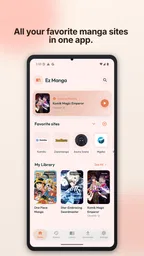
I’d look at EZ Manga as a reading companion for someone who moves between manga and webtoons, rather than as a guaranteed one-stop library. Its appeal is the way it brings browsing, a reader mode, and syncing together: those are useful when you want to find something to read, settle into a chapter, and pick up again later. The key decision is whether that kind of flexible reading workflow matters more to you than a dedicated catalog with a familiar, tightly defined collection.
What matters when choosing a manga reader
EZ Manga: Webtoon & Manhwa is a free comics app from EZ Apps Studio, with a mature 17+ age rating. It has a 3.7 average from around 99 ratings, and more than 10,000 installs. Those figures suggest a modestly established option, not a consensus choice; I’d treat the rating as a prompt to check whether its approach suits you rather than as a verdict on the reading experience.
The app is currently at version 1.0.75 and requires Android 7.0 or later. That makes device compatibility worth checking before you build a routine around it, particularly if you use an older phone or tablet. It is free to install, but in-app purchases range from $2.99 to $49.99 per item, so “free” should not be read as a promise that every possible purchase will be inexpensive.
Before choosing any reader, I’d ask three practical questions: can I find the kind of comics I actually want, does the reading flow feel comfortable on my screen, and can I return to a series without losing my place? EZ Manga’s emphasis on browsing, reader mode, and sync makes the latter two questions central. The first still deserves a personal check: a useful interface cannot make up for a catalog that does not suit your tastes.
Why the combined reading approach can work
Manga and webtoons don’t always invite the same reading habits. A manga chapter may feel natural as a sequence of pages, while a webtoon is often better approached as a continuous vertical scroll. An app that presents itself as a browser for both gives readers a reason to keep one tool handy instead of switching between separate apps whenever their mood changes.
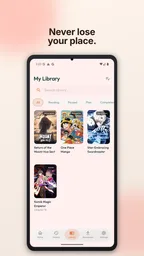
The practical benefit is less about having a single icon and more about reducing little interruptions. If you discover a series while browsing and can continue in a reader view, you avoid mentally jumping from “searching” to “reading.” Syncing adds another potentially useful bridge for people who alternate between devices. I would still check that your progress is being kept as expected before relying on it for a long-running series.
Where it may win in everyday use
Imagine you have a few minutes during a commute, browse for a new title, and start a chapter before arriving. Later, at home, you want to continue without trying to remember the page or scroll position. That is exactly the kind of routine where the combination of discovery, reader mode, and sync sounds more valuable than a reader that only opens files you already have or a browsing app that makes returning to a story feel like starting over.
A less obvious advantage of a combined browser and reader is that it can make short reading sessions easier to manage. I’d use browsing time to collect or identify a series, then switch to reading only when I have enough time to enjoy a chapter. That separation helps avoid spending the whole break searching. If the app lets you move smoothly between those activities, it supports a more deliberate habit; if browsing feels cluttered or the next step is unclear, the all-in-one idea loses much of its appeal.
Another useful workflow is to treat sync as a convenience, not as your only record. When you finish a session, take a moment to confirm that the app has retained your place before closing it, especially if you are changing devices or have a spotty connection. This is a sensible safeguard for any synced reader, and it matters most when you are midway through a chapter rather than at a natural stopping point.
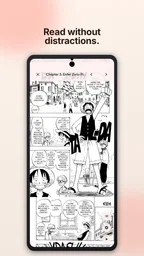
Reader mode is also worth judging on your own screen, not just by its name. A good fit depends on whether the text and artwork remain comfortable to follow during the longer sessions you actually have. I would try both a quick chapter and a more relaxed reading session before deciding. A layout that feels fine for a few minutes may become tiring if you read for an hour, and a reader that suits vertical webtoon panels may not feel equally natural for every manga format.
Where a different kind of app may fit better
The usual alternatives fall into a few broad groups: dedicated comic services, general-purpose readers, and browser-based ways of finding comics. A dedicated service may be the better choice if you want a clearly curated experience or already follow a particular publisher’s collection. A general reader may suit you if your priority is managing material you already have, rather than discovering titles inside a browser. A browser-first option may be more appealing if you value open-ended searching over a unified reading workflow.
Those are category-level trade-offs, not claims that every alternative has a specific feature or a better catalog. The right comparison is the one you can make with your own reading list. Search for a few titles you genuinely care about, see whether the results make sense, and try a chapter in the format you use most. If the selection does not match your interests, switching to a more focused service is likely to be more satisfying than trying to make a flexible browser serve as a specialist library.
EZ Manga is also not an obvious fit for someone who wants an app intended for younger readers. Its mature 17+ classification is a clear reason for families to choose carefully and check that the app is appropriate for the person using it. Likewise, if you want a completely free experience with no possibility of paid extras, the presence of in-app purchases may make another reader feel more comfortable. The purchase range is broad enough that I’d look carefully at any purchase screen before confirming anything.
Some readers will also prefer a simpler tool with one job. If you already have a reader you trust and rarely browse for new series, an additional app may add little. The value here depends on using the discovery and reading sides together; installing it just to replace a familiar reader could create more friction than it removes.
Switching without making your reading routine harder
The main cost of trying a new reader is not necessarily money. It is the time spent learning where your series are, how the controls feel, and whether your current progress carries over in the way you expect. I would start with one or two titles rather than moving every ongoing read at once. That small trial tells you whether the browsing style and reader mode fit without making the app your only place to follow a long story.
Syncing can make a change easier if you read on more than one device, but it is not a substitute for checking that the change has worked. After a session, reopen the series and confirm that your place is still clear. If you plan to move from another app, don’t assume that a reading history or saved list will transfer automatically; keep your old reader available until you have verified the new routine works for you.
For someone who reads on a single device, the transition is simpler: test a chapter, judge the controls, and decide whether browsing inside the same app is genuinely useful. For someone who switches devices, test sync deliberately before depending on it. This makes the decision less about promises and more about whether the feature solves a problem you actually have.
My recommendation
I’d recommend EZ Manga: Webtoon & Manhwa to readers who want one place to browse comics and read them, especially if they move between manga and webtoon-style stories and appreciate the possibility of syncing progress. Its free entry point makes a cautious trial reasonable, while the mature age rating and paid items are worth keeping in mind from the start.
I would skip it if you need a child-oriented reader, want a service built around a particular curated catalog, or already have a reading setup that handles discovery and progress exactly as you like. The app’s 3.7 average is middling rather than exceptional, so I would not install it expecting a universally polished experience. Instead, test your own common use case: find a series you care about, read enough to judge the layout, then check whether your place is retained when you return.
Overall, this is a practical option to consider when browsing and reading belong in the same routine. Its strongest case is convenience across those steps, not a promise that it will suit every comic fan or replace every specialist alternative. If that combined workflow matches how you read, it is worth trying; if your priority is a particular collection, a younger audience, or a very simple reader, another category of app may be the better choice.
What we like
- A clean reading layout keeps panels easy to follow on a phone.
- Reading progress helps you return to the chapter you left.
- Genre filters make it easier to find stories that match your taste.
- A broad catalog offers options for different reader preferences.
- Regular updates can bring fresh chapters to ongoing series.
What could be better
- Some titles may have chapters missing or released later than expected.
- The reading experience may include ads that interrupt browsing.
- A large catalog can make specific series harder to locate.
- Some content may require an account or paid access.
- Translation quality may vary between titles.





