



ComicID: Comic Book Scanner review
 Analysis by Appsdrops
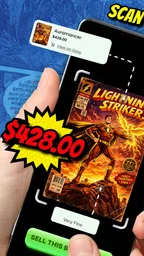
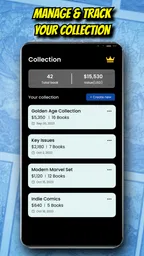
I would reach for ComicID when a comic box has turned into a guessing game: I recognize the artwork, but not the issue, and I would rather check than sort every book by hand. This comics app from The App Dude is built around using a phone camera to identify books and help with selling a collection. That focus gives it a more practical feel than a comics reader, but it also means the experience depends on being able to present a cover clearly and judge whether the result is right.
Reading the screen and understanding the result
ComicID: Comic Book Scanner is free to install, with in-app purchases priced from $4.99 to $18.99 per item. Its basic idea is easy to grasp: use the camera to scan a comic, then use the identification as a starting point for organizing or selling. I like that the central task is concrete; you do not have to learn a broad cataloging system before trying to identify a book.
That simplicity does not remove the need to check what the app has recognized. Comic covers can share a character, logo, or color scheme across many issues, and editions may look nearly identical at a glance. I would treat a scan as a useful lead rather than a final authority, especially before listing a valuable book for sale. Verify the issue details against the physical comic, including its issue number and any edition or variant clues you can see.
The interface is most useful when it helps a person move from recognition to a sensible next step. For a casual collector, the camera-led approach is less tedious than searching broad image galleries or typing partial titles into a general web search. For someone who already knows the exact title and issue, manual lookup may still be quicker. My practical advice is to keep the comic in good light and frame the full cover; a cropped or reflective image gives any visual identification tool less to work with.
The app has a 3.9 average from around 166 ratings, with roughly 25 written reviews. That gives a prospective user some context, but it is not enough to conclude that every kind of comic will be identified equally well. With 10,000 or more installs, it has found an audience, yet I would still test it on a few ordinary books before relying on it for a large inventory.
Camera use, handling, and sensory demands
The scanning workflow makes the camera the key input, so the physical setup matters. Holding a phone steady above a comic while avoiding glare can be awkward for someone with limited hand control, fatigue, tremors, or difficulty positioning objects. A table or other stable surface can reduce the need to hold both the phone and book in the air. If a book is delicate, I would avoid pressing it flat just to improve a scan; preserving its condition is more important than getting a quick result.
Lighting is another real-world constraint. Glossy covers can reflect overhead lamps, while dim rooms make cover details harder to capture. Rather than repeatedly taking the comic out of its sleeve or changing its position, try shifting the light source or rotating the book slightly. That small adjustment can make the process calmer and helps avoid handling a collectible more than necessary.
For sensory access, the important question is whether the visual result is easy for you to inspect. A person who has difficulty distinguishing small text or subtle cover differences may need to enlarge the physical details or ask someone to confirm an issue before selling. I would not assume the scan alone resolves those distinctions. The app is best understood as an identification aid, not a substitute for reading fine print or examining the comic itself.
ComicID is rated Everyone, and it runs on Android version 8.0 or later. Those facts make it broadly approachable in terms of age and device compatibility, but they do not tell me whether its controls suit every access need. If you depend on a particular screen reader, enlarged text, voice control, or other assistive setup, try the core scan-and-review path early. The critical test is whether you can start a scan and understand the result comfortably on your own device.
Where it fits into everyday collecting
A realistic use for me would be sorting a box inherited from a relative. I would separate books into small groups, scan the unfamiliar covers, and jot down confirmed issue details before deciding what to keep or sell. This is a better workflow than treating each recognition result as a complete inventory entry: it creates a chance to catch a mistaken match while the book is still in hand.
For a seller, the app can help turn an unknown stack into a shortlist worth researching. I would scan first, then inspect condition and confirm the edition before writing a listing. A cover match alone does not establish grading, completeness, value, or buyer demand. Keeping those decisions separate avoids the common trap of letting a convenient identification stand in for a careful sale description.
It may also help when a collector wants to identify a book at a convention or during a visit to a friend’s collection. In those settings, I would use it as a quick prompt rather than a definitive answer: ambient glare, crowded spaces, and limited time can all make a scan harder. If the book is rare or the details matter financially, take a clear note of the result and verify it later instead of rushing into a purchase.
Compared with a general search engine, a camera-first comic tool saves the effort of describing a cover from memory. Compared with a dedicated collection spreadsheet or a manually maintained catalog, it offers a more immediate way to start from an unidentified book. Those alternatives remain better when you want precise control over fields, a carefully curated inventory, or research that does not depend on camera recognition. I see ComicID as a bridge between a physical collection and further checking, not as a complete replacement for collector knowledge.
Limits that matter before you rely on it
The biggest trade-off is that scanning only helps when the cover is visible and the match can be checked. A book in a tight protective sleeve, a worn cover, or a visually similar issue may take more effort than expected. If you have hundreds of comics, scanning every item one by one could feel slow; a hybrid approach is more sensible. Use the app for unfamiliar books, then record confirmed details in a format you can search or back up according to your own needs.
The selling angle also calls for care. Identifying a comic does not automatically tell you what condition it is in or what a buyer will pay. Before listing, inspect corners, spine, pages, and any markings, and compare the exact edition rather than relying only on the cover image. If your main goal is price research or professional grading, a specialist resource and a human appraisal may be more suitable than a scanner alone.
Because the app offers in-app purchases, I would explore the free experience first and decide whether the paid options fit a real need before spending. The listed purchase range runs from $4.99 to $18.99 per item, so it is worth being deliberate rather than assuming every feature is necessary. Its current version is 1.7, and I would check the purchase screen carefully so the cost and what it unlocks are clear before confirming anything.
There is also a privacy-minded practical step worth taking with any camera-based workflow: scan only the comic cover, and avoid including people, private paperwork, or other personal material in the frame. That keeps the task focused and makes the image easier to assess. I would also avoid scanning books that someone else is handling without asking, particularly in a shop or at a convention.
Who will find it useful
I would recommend ComicID to collectors who have unfamiliar books, want a quick starting point for sorting, or need help identifying items before researching a sale. It is especially appealing if typing titles from partially remembered artwork is the part of collecting you find most frustrating. The camera-led approach gives you a direct route from the comic in your hands to a possible identification.
I would hesitate to recommend it as the sole system for a valuable collection, a high-volume inventory, or anyone who needs a fully accessible workflow without first testing it on their own device. People who cannot comfortably position a phone and comic, who rely on assistive technology, or who need dependable issue-level verification should try a few representative books before building a process around it. A manual catalog, specialist database, or help from another collector may be the better fit in those situations.
Overall, I see this as a handy first pass rather than a magic answer: useful for turning an unknown cover into something you can investigate, but still dependent on clear images and a human check. Its strongest inclusive quality is the straightforward, visual task; its main barrier is that the same task asks users to handle a phone, position a comic, and inspect small details. If that setup works for you, the free entry point makes it reasonable to test on a handful of books before deciding whether its selling and organizing role suits your collection.
What we like
- Identifies comic books from cover images with minimal effort.
- Useful for quickly checking a comic's publication details.
- A practical companion for organizing a collection.
- Can help identify unfamiliar issues while browsing a shop.
- Focused on comic recognition rather than general image scanning.
What could be better
- Recognition may be less reliable for worn or obscure covers.
- Poor lighting can make cover scans harder to identify.
- Some comic editions may be missing from its database.
- You may need an internet connection for identification.
- A scan may not distinguish similar cover variants.





