
Comic maker - Arcstory review
 Analysis by Appsdrops
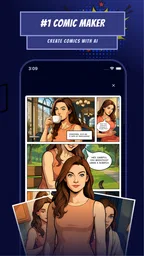
I can see the appeal of an AI comic maker immediately: you can start with a story idea rather than a blank drawing canvas. Comic maker - Arcstory is aimed at people who want to shape that idea into comics, manga, or manhwa, even if they are not confident illustrators. My main question after the initial novelty, though, is whether it becomes a useful creative habit or just an interesting app to open a few times. That depends less on the first generated page than on how much control and repeatable value you want from the process.
From a quick idea to a first comic
Arcstory is a free comics app from Wallet Passes Alliance, with in-app purchases ranging from $0.99 to $99.99 per item. It is rated for Everyone, and its current version is 4.3.0. The broad pitch is accessible: use AI to help turn a premise into comic-style work. That makes it a different starting point from traditional drawing apps, where the first challenge is often learning tools and making every panel yourself.
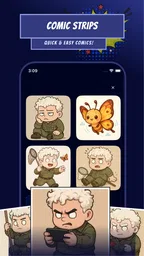
In the first week, that low barrier is its strongest asset. You can approach it with a small, specific thought—a character facing a difficult choice, a funny misunderstanding, or a short fantasy encounter—and see whether the comic format suits it. This is useful for beginners who want to explore visual storytelling without first committing to drawing lessons, and for writers who think in scenes but struggle to picture how those scenes might look on a page.
I would treat the first result as a draft, not as a finished comic. AI-assisted creation can make the blank-page problem feel smaller, but a generated image or sequence still needs a human eye for clarity. Does each panel move the action forward? Can a reader tell who is speaking? Is the emotional beat visible without an explanation? Those are storytelling questions, not buttons an app can answer for you. A better first session is therefore a short scene with one clear event rather than a sprawling story with many characters and locations.
That approach also gives you a fairer way to judge whether the app fits. If you ask for too much at once, it can be hard to tell whether an unsatisfying result comes from the idea, the tool, or the sheer complexity of the request. I recommend starting with a single moment and deciding what you would change before trying a longer piece. The value is not only in what appears on screen, but in whether the process helps you make a story decision you would otherwise have postponed.
Why the first session can feel rewarding
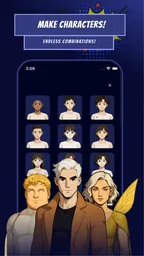
Compared with a conventional illustration app, Arcstory shifts effort away from drawing every mark and toward choosing the premise and judging the outcome. Compared with writing in a notes app, it invites you to think in pictures and scenes. That middle ground is a real draw: you can test whether an idea works visually before spending hours polishing art or formatting a complete book.
Still, people who already have a precise visual style in mind may find this trade-off frustrating. If your priority is exact character design, panel composition, or fine control over every line, a dedicated drawing or page-layout tool is usually the better home for a finished project. Arcstory makes more sense as an idea workbench or an accessible entry point than as an assumption that every result will match a carefully art-directed vision.
Make the experiment manageable
One practical habit is to write down the purpose of each scene before you create it: introduce a character, reveal a clue, or land a joke. That keeps the AI element from becoming a source of endless variation for its own sake. If a panel looks appealing but does not serve the scene, it may be more useful to revise the idea than to keep chasing a prettier result.
For a casual everyday use case, imagine having a spare half-hour and wanting to turn a conversation with a friend into a short comic gag. A compact setup lets you focus on the punchline and whether the visual sequence reads clearly. You can then decide if the result is worth sharing or simply keep it as a playful experiment. This is a more realistic test of lasting usefulness than beginning with a full-length series.
Will it still earn a place next month?
The app has passed 100K+ installs, while its average rating is 2.9 from 727 ratings, with 37 written reviews. That combination suggests a product that has attracted interest but does not satisfy everyone. I would not read a rating alone as a verdict on a creative tool, since expectations can vary sharply: someone looking for instant polished artwork is judging a different thing from someone using AI to explore rough story concepts.
For month-to-month value, the key question is whether you have recurring reasons to make short visual stories. A comics hobbyist might use it to test premises between larger projects. A writer could use it to spot where a scene needs a stronger visual beat. A parent or teacher might explore a simple story idea with a child, bearing in mind the Everyone age rating and the importance of supervising any creative activity involving a young user. These uses rely on your own projects and routine; the app is not automatically valuable simply because it can generate a first result.
There is also a useful distinction between making comics and maintaining a comic practice. If you want to produce a regular series, you will need to keep track of characters, story continuity, and the choices that make each installment feel connected. A generative tool can help get a scene moving, but the creative responsibility still belongs to you. I would keep a small story note outside the app with character names, visual traits, and the next plot beat, so each session starts with a clear direction rather than another round of rediscovery.
That lightweight preparation is one of the more important trade-offs. It adds a little work, but it can prevent a recurring project from feeling like unrelated one-off images. If you only want occasional novelty, that structure is unnecessary. If you hope to build a recognizable cast or continue a plot over time, a separate outline becomes more valuable than repeatedly prompting from memory.
Where it sits among the alternatives
Traditional comic-making tools are usually a stronger choice when precision and repeatable page production matter most. They let an artist shape the work deliberately, but ask for more drawing skill and manual effort. General-purpose writing tools are better when the main task is refining dialogue or plot, but they do not make the same visual experiment the center of the activity. Arcstory occupies a more playful, image-oriented space between those options.
That makes it a sensible companion rather than a universal replacement. You might use it to explore a visual direction, then move to a drawing app if you want exact revisions or a polished, consistent sequence. Or you might stay with it when speed and experimentation matter more than precise authorship. Choosing based on that distinction can save disappointment: the app is most compelling when you value momentum, not when every panel must obey a detailed production plan.
Costs, upkeep, and creative fatigue
Although the app is free to install, in-app purchases run from $0.99 to $99.99 per item. That is a wide range, so I would decide what you need from the free experience before spending. In particular, avoid treating a purchase as a shortcut to a finished creative routine. First see whether you enjoy making and revising short comics with the tools you already have access to; then consider whether an offered item addresses a specific limitation you have actually encountered.
The maintenance burden is mostly creative rather than technical. You need to bring ideas, make choices, and decide when a result is good enough. That can be refreshing for someone who wants a prompt to get unstuck, but tiring for someone who expects the app to supply both the concept and the editorial judgment. A simple personal rule helps: set the scene’s goal before starting, and stop when it communicates that goal clearly enough for your purpose.
One source of fatigue is the temptation to keep generating alternatives without learning from them. More variations do not necessarily make a story stronger. Another is the gap between an appealing standalone image and a coherent sequence: a comic depends on continuity and readable transitions, not just striking panels. If you notice yourself collecting outputs without finishing even a short scene, switch to a smaller target—one setup, one change, one ending. That gives the session a finish line.
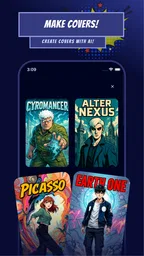
It is also worth asking whether you want to share work publicly, keep it private, or use it only as a planning aid. Those goals call for different standards. A rough visual reference can be valuable even if it is not ready for an audience. Someone preparing a portfolio, commission, or carefully branded series will probably want more direct control over the final artwork and should view Arcstory as an exploratory stage rather than the whole production process.
Who should keep using it—and who should move on
I think Arcstory is best suited to curious beginners, comic readers who want to try making their own scenes, and writers who benefit from seeing ideas represented visually. It can also suit an experienced artist who wants a quick way to explore a premise, provided they are comfortable treating the output as a starting point. Its comic focus gives experimentation a clear direction, which is more helpful than an open-ended image tool when the real goal is telling a sequence.
I would skip it if you need exact control over every visual detail, dependable continuity across a long story, or a conventional drawing workspace as your main tool. I would also be cautious if you are prone to spending on creative apps before confirming that you will use them regularly. With a 2.9 average, it is particularly sensible to approach it with measured expectations: test a small idea, see how the actual workflow feels on your device, and decide for yourself whether the results justify returning.
Device compatibility is another practical consideration before you commit: the minimum operating-system requirement is 8.0. The app was released on June 3, 2024, so it is still a relatively recent option in this niche. Those details do not tell you whether its creative approach will fit your taste, but they help you establish whether it is a workable candidate before you invest time in a project.
My long-term verdict
Arcstory earns lasting space only if you give it a repeatable job. As a quick way to turn a small premise into a visual experiment, it has a clear reason to exist. As a place to build a disciplined, highly controlled comic from beginning to end, it may not be enough on its own. I would keep it for short scene tests, character ideas, and low-pressure storytelling, while using a more hands-on tool when consistency and precise finishing become the priority.
That is why I would recommend trying it without expecting the novelty to do all the work. Pick one scene you genuinely want to tell, keep the scope modest, and judge the app by whether it helps you complete that scene—not by how surprising the first output feels. If you find yourself returning with new ideas and making deliberate revisions, the free entry point may be worthwhile despite the optional purchases. If you mostly browse results and feel no urge to shape them into stories, it is probably a fun experiment rather than an app that deserves a regular place in your routine.
What we like
- Simple tools make it easy to arrange panels and speech bubbles.
- Useful for turning original ideas into short comic strips.
- Visual editing helps beginners plan each scene.
- Exporting finished comics makes them easy to share.
- A focused feature set keeps comic creation straightforward.
What could be better
- Creative options may feel limited for experienced artists.
- Precise edits can be difficult on a small phone screen.
- Finished comics may need polishing in another art app.
- Complex stories can take time to organize panel by panel.
- The app may not suit users seeking advanced drawing tools.





