
Comic Book Reader (cbz/cbr) review
 Analysis by Appsdrops
When I read comics on a phone, I care less about elaborate extras than whether I can get to the right page and keep my place. Comic Book Reader (cbz/cbr) is built around that practical job: it handles comic archives and manga, with collections and bookmarks to help manage reading. Its network angle is worth understanding, too. The app is intended for reading files on a device, but that does not mean every part of finding, transferring, or organizing those files happens without a connection.
I find this distinction useful before installing any comic reader. If your books are already stored on your phone, the main reading session can be independent of browsing a comic shop or streaming pages from a service. If you expect the app to supply comics from an online library, this is not the same kind of product. It is a reader for your own files, so the quality of the experience begins with how conveniently you can get those files onto your device.
Getting comics ready before you go offline
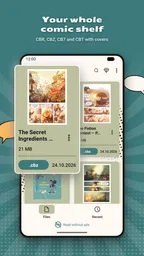
Comic Book Reader is a free comics app from Android Tools (ru). It supports CBR, CBZ, CB7 and CBT archives, formats commonly used to package comic pages together. That range is useful if your collection has accumulated from different sources over time: you do not need to convert every archive into one single format before trying to read it.
The key practical point is that an archive reader is only as convenient as your file-handling routine. I would sort a few series into clear folders before a trip, then open each one in the app and confirm that the pages appear in the expected order. That small check can prevent an awkward discovery when you are already on a train with a weak signal and no easy way to fetch a replacement file.
The app’s collection feature matters most once you have more than a handful of books. Rather than relying on memory or repeatedly searching through a general downloads folder, you can keep comics grouped for browsing. I would use collections for broad reading piles—such as a current series and a backlog—rather than create a separate category for every issue. Too much organization becomes a second chore, especially on a phone.
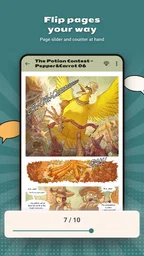
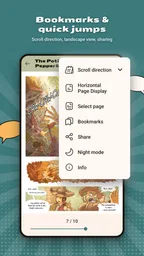
Bookmarks are another small feature with a real travel benefit. If you switch between a long comic and a manga volume, a bookmark gives you a deliberate place to return to instead of trusting that you will remember the page. I would set one before closing a book when I expect to change devices or lend my attention to something else. It is a simple habit, but it makes interrupted reading less frustrating.
What a connection does—and does not—change
Because this is a file reader rather than a comic subscription service, I would not plan around an online catalog being available inside it. Your connection is most relevant when obtaining or transferring the archives you want to read. Once the files are on the phone, reading them is a different task from downloading them, and preparing in advance is the sensible way to make a journey less dependent on reception.
This setup suits readers who already maintain a digital collection and want a focused place to open it. It is less convenient for someone who wants to browse new titles, discover recommendations, or tap a cover and have a complete library delivered automatically. A storefront or subscription app is better for that discovery-and-download workflow, while this reader makes more sense when you want control over files you already have.
I would also think about where the archive is stored before leaving home. A file that remains in a cloud-only location may require a connection before the reader can access it. Saving the actual comic to the device first is the safer approach. That is not a complicated process, but it is easy to confuse seeing a file in a cloud folder with having its contents ready for offline use.
Reading in the places where reception is unreliable
The app is a natural fit for commutes, waiting rooms and travel, provided the comics have been prepared locally. A realistic routine would be to choose a couple of issues at home, place them in a collection for the trip, open them once to check the pages, and add a bookmark to the story you are currently following. Then a patchy connection is much less likely to interrupt the reading itself.
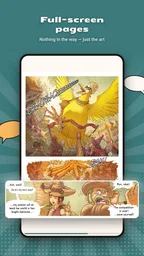
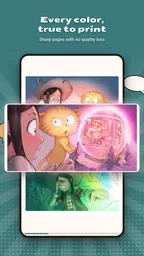
Phone screens do impose a trade-off. A page designed for print can make small lettering hard to read, and zooming in can mean moving around the page rather than taking in the whole composition at once. I would use a larger screen when detailed art or dense dialogue is the priority, but a phone is perfectly reasonable for a short session or a familiar series. The best choice depends on the page, not just the reader app.
For manga, page order deserves a quick check before settling in, especially if an archive came from an unfamiliar source. A file reader can display the images it receives, but it cannot fix a badly assembled archive. If a chapter seems to jump or read in an odd sequence, I would first inspect the file and its page order rather than assume the connection or the reader has lost content.
One useful habit is to keep a small “next to read” collection rather than importing an entire library at once. It reduces clutter when browsing on a narrow screen and helps conserve device storage if your collection is large. It also makes it easier to spot which books are actually ready on the phone, instead of mistaking a title in a wider collection for a locally available file.
When a comic fails to open
File-based reading gives you control, but it also means you may have to do a little troubleshooting yourself. If an archive will not open, I would check that it is one of the supported formats, that the transfer finished, and that the file itself is not damaged. Re-downloading or copying the archive while connected can solve a transfer problem; repeatedly tapping the same broken file offline will not.
If a comic opens but some pages look wrong or are missing, compare it with the original archive in the place where you stored it. That helps separate a bad source file from a reading issue. Keeping an untouched copy of an archive until you have read it is a sensible precaution, particularly if you have renamed or reorganized files. It gives you a clean recovery point without needing to guess what changed.
Connectivity can complicate recovery. If the only copy is in online storage, a signal may be needed to retrieve it again; if the copy is already on the device, the immediate problem is more likely the archive itself or its transfer. Before a long trip, I would open the files I plan to read and avoid relying on last-minute downloads. This is a practical safeguard rather than a special feature, but it can make the difference between a ready reading list and an empty one.
Collections and bookmarks help with navigation, not with repairing files. That boundary is worth keeping in mind: the app can make a personal library easier to browse and a reading session easier to resume, while file quality and backup remain the reader’s responsibility. If you prefer an app that hides file management completely and handles every recovery step through an account, a managed reading service may feel smoother.
Keeping mobile data and storage in mind
A local comic archive can be substantial, so downloading or transferring a large reading pile over mobile data is not always the best plan. I would move books over a trusted connection when possible, then keep only the next few titles on the phone. This avoids spending data on files I may not read soon and limits how much storage an oversized backlog occupies.
There is also a useful distinction between the cost of the app and the cost of optional purchases. Comic Book Reader is free to install, while in-app purchases are listed from $0.99 to $99.99 per item. I would check the purchase screen carefully before confirming anything and treat the free reader as the starting point rather than assume every optional item is required for basic use.
The app is rated for everyone, and its current version is 1.0.120, with Android 8.0 or later required. It has an average rating of 4.4 from around 8,900 ratings, and has passed one million installs. Those figures suggest it has found a substantial audience, but I would still judge it by the way it fits your own file collection and reading habits: a rating cannot tell you whether your particular archive is well organized or whether you prefer reading on a larger display.
Compared with a basic image viewer, a comic reader’s advantage is the comic-specific workflow: archives, collections and bookmarks belong together in one place. Compared with a subscription library, the trade-off runs the other way. You gain a file-centered approach, but you need to source, transfer and keep track of your own books. If you want an online catalog and discovery tools first, choose a service built for that. If you already have files and want a reader rather than a shop, this app is more closely aligned with the job.
Who I would recommend it to
I would recommend Comic Book Reader to Android users who have comics or manga in supported archive formats, value having a personal collection on their device, and are willing to prepare files before heading offline. Its appeal is especially clear for someone who reads in short bursts: keep a few books together, bookmark the current spot, and return when there is time. Android Tools (ru) has kept the app focused on that file-reading role rather than making it a substitute for a digital comics storefront.
I would skip it if you do not want to manage files, if you expect the app to provide a ready-made catalog, or if you need a reading service that keeps your library and downloads synchronized through an account. I would also choose a larger-screen setup when page detail matters more than portability. Those are not defects so much as boundaries: a simple archive reader is useful precisely because it does not need to be a complete comics ecosystem.
My overall view is that this is a practical companion for a collection you already own, with network reliability affecting preparation more than the act of reading. Get the files onto the phone, check them before you leave, and use collections and bookmarks to keep a mobile reading list manageable. If you want your own comic archives ready for a commute rather than an online catalog to browse, this is the kind of reader I would try first.
Comic Book Reader (cbz/cbr) is most convincing when you treat connectivity as part of the setup, not something to depend on at every page turn. That makes it a good fit for readers who like control over their files and a less suitable choice for anyone who wants effortless discovery and account-based syncing. For my own use, the preparation is a fair trade for a straightforward way to carry a selected stack of comics and pick up where I left off.
What we like
- Supports popular CBZ and CBR comic archive formats.
- Keeps comic pages readable without extracting archive files.
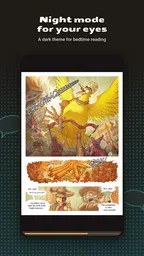
- Offers a focused reading experience with little visual clutter.
- Works well for browsing comics stored on your device.
- Useful for readers who prefer digital versions of print comics.
What could be better
- Requires you to source and import your own comic files.
- Compatibility with less common archive formats may be limited.
- Reading experience depends on your device's screen size.
- Large comic files can take longer to load.
- Advanced library management features may be limited.





