
CLZ Comics comic book database review
 Analysis by Appsdrops
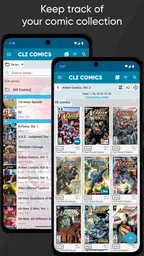
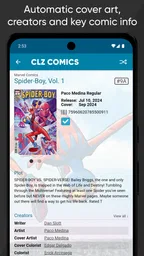
My first impression of CLZ Comics is that it treats a comic collection as something you’ll want to search and maintain, not just photograph once and forget. The Android app, made by CLZ, is a comics cataloging tool built around adding issues to a personal library and keeping their details organized. Its camera-based cover scanning gives you a quicker way to get started than typing every title from scratch, while the catalog itself is the reason to keep using it after the initial setup.
I’d recommend it most to readers whose shelves have grown beyond what memory can reliably track: people who want to check whether they own an issue before buying it, sort out a long run, or keep a record while moving or lending books. It is free to install, rated for Everyone, and has a 4.8 average from around 16 thousand ratings, with more than 100 thousand installs. Those figures suggest it has found a substantial audience among collectors, but the more important question is whether a cataloging habit fits the way you collect.
From a cover scan to a useful catalog
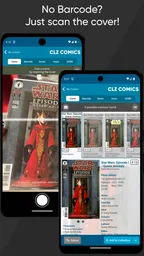
The practical starting point is to scan a comic’s cover with your device camera and use the resulting match to add it to your collection. That is a better fit for a stack of recognizable issues than entering every detail by hand. I would still treat scanning as an identification aid, not a substitute for checking the result. Covers can look alike across editions, and a run may include variants or reprints that are easy to confuse when you are moving quickly.
My recommended first session would be deliberately small. Pick one short series or a box you know well, scan a few issues, and confirm that the catalog entries correspond to the copies in front of you. This creates a useful test before you invest a whole evening cataloging a large collection. It also lets you learn how you prefer to name or organize your books without having to undo a mountain of rushed entries later.
That verification step is especially valuable if you collect multiple editions. A title alone may not distinguish the copy you own from another printing, so compare the cover and issue details before accepting an entry. If an item does not match cleanly, slow down and search or review the available catalog information rather than letting a near-match quietly become part of your record. A tidy catalog is only helpful when it reflects the physical books on your shelf.
Once a batch is in, the payoff is less about the act of scanning and more about having a dependable inventory. If a friend asks whether you have a particular issue, you can check your collection instead of relying on a hazy memory. The same applies when browsing a comic shop: a quick check before buying can help avoid an accidental duplicate, provided you have kept the catalog up to date.
Build a routine that survives a busy week
The easiest way to let a collection drift out of sync is to postpone cataloging every new purchase until the next big cleanup. I find a repeatable habit more realistic: add a handful of books after unpacking a shopping trip, then check the entries before putting the comics away. That keeps the app close to the physical collection and makes mistakes easier to spot while the covers are still in front of you.
For a larger collection, divide the work into clear batches rather than trying to scan the entire shelf in one sitting. A single series, a short box, or the new books from one visit gives you a natural stopping point. If you are interrupted, you can resume with a known section instead of wondering which issues you already entered. This is not a special feature; it is a simple workflow that makes any catalog more reliable.
I would also decide on a consistent way to handle books that are temporarily elsewhere. If you lend comics, move them between storage areas, or take a stack to a convention, make a personal habit of updating the record when their status changes in your real-world routine. The app is most useful as a reference when its contents match what you can actually find, so a few timely corrections matter more than a huge initial scan.
Check the cost and setup before committing
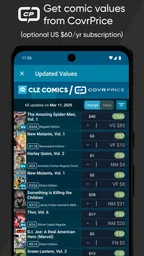
The app is free to download, but it includes in-app purchases ranging from $1.99 to $89.95 per item, and its store summary presents a US $20-per-year option. I would look at the current purchase choices inside the app before planning a long-term workflow, especially if you are cataloging a very large collection. The right decision depends on how much you expect to use it and which access arrangement suits you; the free download itself should not be mistaken for a promise that every level of use is free.
CLZ has been available since December 6, 2010, and the current Android version is 11.4.3, with Android 6.0 as the minimum operating system requirement. That makes it worth checking your device’s compatibility before you start. The version number also reminds me that this is an established cataloging product rather than a one-purpose camera filter, though I would still judge it by how comfortably its present interface supports your own collection.
Before spending time importing a large library, take a moment to explore the app’s settings and any available organization choices. I would focus on options that affect how you identify, display, or maintain entries, then settle on a consistent approach rather than constantly changing conventions mid-catalog. I would not assume that every preference is essential: a collector who only wants a quick ownership check can keep the process simple, while someone managing several series may benefit from being more deliberate.
Small habits that make scanning more reliable
Good lighting and a steady camera are sensible basics when scanning covers. More importantly, separate the scanning step from the verification step in your mind: first identify the likely issue, then confirm that it is the exact edition you own. That small pause is a useful trade-off. It takes longer than accepting every match immediately, but it can save more time than correcting a catalog full of lookalike entries later.
When cataloging a run, I would work in issue order even if the books are piled in a different order. That makes gaps easier to notice and helps you catch a duplicate entry before moving on. If a cover does not scan cleanly, set that book aside and continue with the clear matches, then return to it using a more careful search. This prevents one difficult item from derailing an otherwise productive batch.
A second useful pattern is to use the catalog before shopping, not only after. If you are headed to a store for a specific missing issue, check your collection at home and make a short note of what you are seeking. At the shop, consult the app before paying. This is a practical use of a catalog that a basic photo album cannot match: the goal is not merely to remember what a cover looks like, but to make an informed decision about ownership.
For collectors who lend books, a pre-lending check is equally worthwhile. Look up the issue before it leaves your shelf, and make a repeatable note or update using the organizational tools available in your version of the app. The exact method is less important than applying it consistently. Without that step, a digital inventory can say you own something while the comic is actually in a friend’s reading pile.
Where a dedicated catalog beats everyday alternatives
The usual alternative is a spreadsheet, a notes app, or a folder of cover photos. Those can work well for a modest collection or for someone who enjoys building a custom system. A spreadsheet gives you control over columns and labels, but you have to create and maintain the structure yourself. Photos are quick to capture, yet become awkward when you need to search for a particular issue or check a run. CLZ Comics is more appealing when you want a purpose-built comics catalog and would rather spend your effort checking books than designing a database.
That convenience does not make it the right choice for everyone. If you own only a small handful of comics and rarely need to check them, a simple note may be quicker and cost nothing beyond the time you already spend. If you need a highly customized inventory with fields and workflows of your own design, a spreadsheet may be more flexible. And if your main interest is reading comics digitally, this is a collection organizer, not a substitute for a reading app.
The camera workflow also depends on the condition and legibility of the covers, as well as the accuracy of the match. A worn, obscured, or visually similar cover may take more attention than a clean, distinctive one. That is why I would not plan a fast, uninterrupted scan marathon and expect every item to fall into place. The app can reduce repetitive entry, but the collector still needs to recognize when an identification deserves a second look.
Who will get the most from it
Experienced collectors are likely to appreciate the balance between repeatable cataloging and a dedicated comic-focused record. If you follow several series, buy regularly, or often forget what is already in your boxes, the app can turn an informal memory into something you can consult. It is also useful during a move or a shelf reorganization, when knowing what you own can make it easier to check that your collection has been accounted for.
New collectors can use it too, but I would begin with the books they already care most about rather than trying to build a perfect archive immediately. A small, accurate catalog is more useful than a huge one filled with uncertain matches. Once the routine feels comfortable, expand by series or storage section. That gradual approach keeps the app from turning a hobby into a data-entry chore.
By contrast, someone who buys comics only occasionally and has no interest in tracking editions may find the extra maintenance unnecessary. The app is not magic: it cannot keep your record current if you stop adding purchases, and scanning does not remove the need to distinguish similar releases. If you prefer browsing shelves and remembering by sight, that may be enough for your needs.
A grounded verdict for collectors
My take is that CLZ Comics makes the most sense when you treat it as a living inventory rather than a one-time project. Its cover-scanning approach gives you a practical entry point, while the real value comes from checking matches, keeping new purchases current, and consulting the catalog when buying or lending books. Those small habits are what turn a collection list into a tool you can trust.
There is some friction: scanning still calls for attention, a large backlog takes time, and the in-app purchase choices deserve a look before you rely on the app for ongoing cataloging. Those are reasonable trade-offs for a dedicated comics database, but they matter if you want a free, hands-off solution or only need to record a few books. The app’s Everyone rating and broad audience do not change that basic fit question: it is aimed at organizing a collection, not replacing the experience of reading one.
For a collector who regularly asks, “Do I already own this issue?”, I think it is worth trying with a small, representative batch. Check the scan results, see whether the catalog’s workflow feels natural, and decide whether the available purchase option suits your intended use. If that first batch saves you from one duplicate purchase or helps you spot a gap in a run, you will have a concrete reason to keep building the catalog. If it feels like more bookkeeping than your hobby needs, a simple list is a perfectly sensible alternative.
What we like
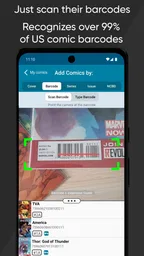
- Barcode scanning makes it quick to add many physical comics.
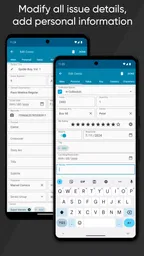
- Custom fields help track details such as purchase price and condition.
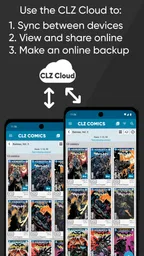
- Collection data syncs across devices with a CLZ account.
- The app supports comic series from publishers around the world.
- Want lists help you keep track of issues you still need.
What could be better
- A paid subscription is required for ongoing access to key features.
- The catalog may lack details for obscure or newly released comics.
- Scanning can struggle with damaged or poorly printed barcodes.
- Manual entry takes time when barcode data is unavailable.
- Some users may find the collection tools overwhelming at first.





