
CDisplayEx Comic Reader Lite review
 Analysis by Appsdrops
I’d choose a comic reader based on the files I already own and the way I like to read, not just on a promise of a large library. CDisplayEx Comic Reader Lite is a free comics app from Progdigy Software, aimed at people who want to open and read their own comic files rather than browse a built-in shop. That makes it a practical choice for a personal collection, but a less natural fit if you expect an app to supply stories or guide you through discovering them.
Start with the kind of comic reader you need
There are two broad approaches in this category. Some apps center on buying or discovering comics inside a service; others work mainly as readers for files you bring yourself. CDisplayEx belongs to the second group. Before installing it, I’d ask a simple question: do you already have comics stored on your device, or are you looking for a place to find and purchase them?
If you have a collection of compatible comic files, a dedicated reader can be more convenient than opening each item with a general file viewer. Comics are designed around panels and pages, so a reader’s job is to make those pages comfortable to browse. If you have no files yet, though, the app won’t solve the first step of finding comics. You may be better served by a legitimate digital comics shop or a library service that includes reading access.
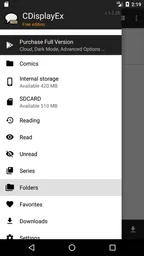
The name includes “Lite,” so it’s worth setting expectations: this is the free edition, not a promise that every reading workflow or advanced option will match another app. I’d treat it as a sensible starting point. You can try reading your own material before deciding whether you need a different tool or a more specialized setup.
Best suited to a collection you already have
For a reader who keeps comics on a phone or tablet, the appeal is straightforward: open a comic and focus on the pages. That can be useful for downloaded purchases, personal scans, or files you have permission to read. It also suits someone who wants one reader for a collection rather than a separate app for every title.
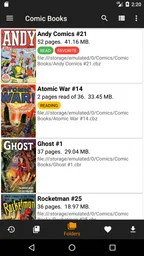
One useful habit is to organize your files before importing or browsing them. Folders by series, volume, or reading order make it easier to find the next issue and reduce the chance of starting in the wrong place. This is especially helpful with long runs, where file names can be similar and a quick search through a crowded folder becomes frustrating.
Where CDisplayEx earns its place
CDisplayEx has a clear identity as a comic-book reader, rather than a general ebook app adapted to comics. That distinction matters when you read art-heavy pages: comic panels depend on visual flow, and a reading app should keep the experience centered on the page instead of surrounding it with unrelated store or library features.
It also has a substantial audience for a focused reader. The app has over a million installs and an average rating of four stars from around fifteen thousand ratings. I see that as a sign that many readers have found it useful, not as a guarantee that it will suit every device, file collection, or personal preference. The more valuable test is whether it opens your own comics comfortably and fits the way you move through them.
For a practical first test, choose a comic you know well rather than a huge unfamiliar collection. Try a few pages in different layouts and check whether the text remains readable at your preferred zoom. Then open a longer issue and see whether finding your place again feels natural. This small trial tells you more than judging a reader by its icon or a short description.
A less obvious benefit of starting with a familiar issue is that you can spot reading friction quickly. You know where a page turn should lead and what details you expect to see, so awkward scaling or an inconvenient navigation pattern stands out. If you test only with a cover or a handful of pages, you may miss the annoyances that matter over a full sitting.
Everyday reading: a useful way to test it
Imagine saving a few issues for a train ride. Before leaving home, you sort them into a folder by series and open the first issue once, checking that the pages are legible on your phone. On the journey, you can spend your time reading rather than searching through unrelated files. This workflow is simple, but it highlights the app’s central strength: it is most useful when your collection is already organized and ready to open.
The same approach works for reading between errands or during a short break. Keep a current issue easy to locate, and use a longer session at home to sort a batch of comics. If your collection is scattered across different locations or you depend on a service to synchronize everything, test that routine before making this your only reader. A comic app can feel excellent at displaying pages yet still be inconvenient if your files are hard to reach.
For small screens, I’d pay special attention to lettering. A page that looks fine at full size may require frequent zooming on a phone, while a larger screen can make full-page reading more comfortable. This is a genuine trade-off with digital comics generally: the artwork may fit the screen, but tiny dialogue can become tiring. If you usually read dense pages on a phone, test several pages rather than assuming every comic will be comfortable.
When another kind of app is a better fit
If you want to discover new series, buy issues, or keep purchases tied to a particular publisher or retailer, a store-centered comics app is likely the better starting point. Those services are built around catalogues and accounts, while a file reader is built around material you already have. The trade-off is control versus convenience: a personal-file workflow gives you more say over your collection, while a storefront can make discovery and access simpler.
A general ebook reader may be enough if you mainly read text-based books and only occasionally open a comic. But for someone whose library is mostly visual comics, a dedicated reader is the more focused category to try. Conversely, if you need a reader that also manages a broader ebook library, notes, or a unified reading service, CDisplayEx may not be the one-app solution you want.
People with very particular preferences should also compare a couple of readers before committing: for example, if you rely on a specific library organization method, a particular navigation style, or a workflow across multiple devices. I wouldn’t assume that a reader’s popularity means it handles every personal setup equally well. The right choice is the one that makes your own files easy to find and pages comfortable to read.
The small cost of changing readers
Trying CDisplayEx is low-risk because it is free, and the age rating is Everyone. The more meaningful cost is the time spent arranging your collection and learning a new reading routine. If you already have folders organized in a way that works, there may be little to change. If your files are scattered, tidy them first; that makes judging the reader fairer and keeps the app from being blamed for a messy collection.
Moving to another reader later is easiest when you keep your comic files in ordinary folders you can locate, rather than relying on a single app’s internal arrangement. That is a useful general practice for personal libraries: keep the source files organized, and treat the reader as the tool used to open them. It gives you room to compare alternatives without rebuilding your collection from scratch.
There is also a small learning cost in deciding how you prefer to read. Full-page viewing preserves the composition, while zooming can make dialogue clearer on a phone but demands more interaction. I’d use the first few sessions to settle on a comfortable pattern, then judge whether the app supports your habits well enough. Switching too quickly after one awkward page may confuse a screen-size issue with a reader issue.
A grounded recommendation
Progdigy Software’s CDisplayEx is worth trying if you want a free, dedicated way to read comics you already have and you are comfortable managing those files yourself. It is particularly appealing to readers who value a straightforward reading-focused app over a built-in marketplace. The app’s audience and four-star average make it a credible option to test, but your own collection and screen are the deciding factors.
I’d skip it as a first choice if your main goal is to browse a large catalogue, buy comics inside one service, or have an app do the organizing for you. I’d also compare alternatives if your reading depends on a special cross-device routine or if phone-sized pages make lettering uncomfortable. Those are not reasons the app is bad; they are signs that a different category of reader may match your needs better.
My recommendation is to install the free edition, open a familiar issue, and try a longer reading session before moving your whole collection into a new workflow. If you like how it handles your files and pages, it can be a dependable home for personal comics. If you find yourself wishing for discovery, shopping, or broader library management, choose an app built around those priorities instead. For readers who simply want to open their own comics and get on with the story, CDisplayEx Comic Reader Lite is a sensible place to start.
What we like
- Supports common comic archive formats including CBZ and CBR.
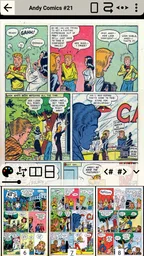
- Offers page-by-page and continuous scrolling modes.
- Includes zoom controls for reading detailed artwork.
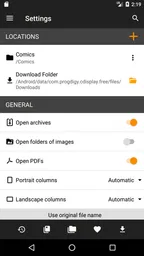
- Can browse comic files stored on your device.
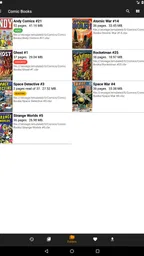
- Provides a library view for organizing your collection.
What could be better
- The Lite version includes advertisements.
- Some advanced features require a paid upgrade.
- It does not provide comics for users to read.
- Large files may take time to load on older devices.
- Interface options may take time to learn.





