


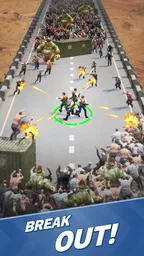




Zombie Waves review
 Analysis by Appsdrops
I judge a mobile action game not only by how exciting a run feels, but by whether its screen, pace, and controls make sense in the situations where people actually play. Zombie Waves is a 3D roguelike shooting game from Fun Formula, built around surviving waves of danger. Its basic appeal is easy to grasp, but the experience is also demanding: visual effects, quick decisions, and repeated attempts are part of the bargain. I’d consider it if you enjoy action that asks you to react and adapt, but I wouldn’t assume it suits every player or every setting.
What the screen tells you, and how the action reads
The first accessibility question for a shooter is whether I can understand what is happening while the screen is busy. In Zombie Waves, the central task is clear: stay alive and deal with incoming threats. That clarity helps newcomers more than a story-heavy opening or a complicated set of objectives would. The roguelike structure also gives each attempt a natural frame, so I can focus on the immediate challenge rather than keep track of a long list of unrelated goals.
That simplicity has a limit. A 3D shooting game can become visually intense when enemies, movement, and attack effects compete for attention. Players who have difficulty distinguishing overlapping objects, tracking fast motion, or reading small on-screen details may find that the action is harder to parse as pressure rises. I recommend trying a short session first and noticing whether you can consistently tell where danger is coming from. If you are squinting or losing track of threats, persistence alone may not make the game more comfortable.
Navigation is less intimidating when a game keeps its main purpose in view, but that does not mean every menu or upgrade choice will be self-explanatory. Roguelike shooters often ask players to make decisions between bursts of action, and those brief pauses can feel rushed if you need more time to read or compare options. My practical advice is to treat early runs as familiarization rather than a test of skill: learn the screen, identify the visual cues you rely on, and make simple choices until the rhythm feels comfortable.
The game has a broad audience in store terms: it is rated Everyone 10+, and its average rating is 4.5 from around 421,000 ratings. Those figures suggest that many players have tried it, but they do not tell me whether its presentation will work for a particular person. A popular game can still be difficult for someone sensitive to flashing effects or fast movement. I’d use the rating as a basic age signal, not as a promise that the visual experience is gentle.
Controls, pace, and sensory comfort
Motor comfort matters especially in a shooter, where small delays or imprecise input can have an immediate consequence. The experience is designed for mobile play, but the fact that a game runs on a phone does not automatically make it easy for every hand or grip. If you have limited reach, pain during repeated movement, or difficulty holding a device steady, test how demanding a run feels before settling in for a longer session. A comfortable grip and a stable surface can help, but they cannot remove the need to respond to active threats.
I would also pay attention to how the game feels over several attempts, not just one. Roguelike play invites retries, and repeating the same kind of movement can be tiring even when each run is short. If your hands fatigue quickly, set a stopping point before you begin rather than letting one more attempt stretch into a long session. That small change makes the game easier to fit around your body and your schedule, instead of treating endurance as part of the challenge.
Sensory load is another real consideration. The premise promises shooting and survival, so players should expect action rather than a quiet, low-stimulation experience. Anyone who is sensitive to sudden visual intensity or finds combat imagery stressful should approach cautiously. I would not recommend it as a calming game for winding down; its appeal comes from tension and response, not from a relaxed pace.
Sound can affect how comfortable and practical a session is, but I would not make assumptions about the available sound controls or settings. If you need to keep the environment quiet, try the game in the way you normally use your phone and see whether the experience remains understandable. In a noisy room, visual cues may matter more; in a quiet shared space, the opposite concern may apply. Testing your own setup is more useful than relying on a general claim that a shooter is suitable for every sensory context.
Where it fits into an ordinary day
The clearest everyday use case is a short break when you want an active game that does not require you to follow a complex plot before you can play. A commute with a seat, a wait between appointments, or a few minutes at home could be a reasonable moment to try a run. I would avoid starting when you may need to put the phone down instantly: the action depends on attention, and interruptions can turn a satisfying attempt into a frustrating one.
For players with fluctuating energy or concentration, the repeated-run format can be both a benefit and a drawback. It gives you a natural point to stop after an attempt, which is helpful when you only have a little time. But the desire to improve or try a different approach can make “one more run” tempting. I find it useful to decide in advance whether I’m playing for a quick break or settling in for a longer session. That keeps the game from quietly taking over a limited window.
It may be less suitable in bright outdoor light, while walking, or in any situation where attention needs to stay on people and surroundings. A visually active shooter is a poor companion to multitasking. If you need a game you can play while listening closely to a conversation or repeatedly switching attention to other tasks, a slower puzzle game is likely a better fit. Here, the more you can give the screen your focus, the fairer the challenge feels.
Storage and device compatibility are sensible checks before downloading any 3D game. The current version is 4.7.9, and the minimum operating system is 8.1. The game is free to download, with in-app purchases ranging from $0.19 to $299.99 per item. That spread makes it worth checking purchase prompts carefully, particularly if a child uses the device or you prefer to keep spending controlled. I’d treat optional purchases as a reason to review your store’s purchase safeguards, rather than assume that a free download means there is no spending involved.
How it compares with other mobile action games
Compared with a slower adventure game, Zombie Waves puts more weight on immediate survival than on exploration or a carefully paced narrative. That makes it easier to understand what you are doing at the start, but it also leaves less room to pause and absorb the screen during intense moments. Compared with a traditional shooter built around longer, structured missions, the roguelike approach makes repeated attempts central to the appeal. If you enjoy learning through successive runs, that can feel rewarding. If you prefer a clearly bounded mission with a predictable tempo, another kind of action game may suit you better.
One useful way to judge the fit is to ask what kind of challenge you want. If you like adapting while pressure builds, this is closer to the mark than a casual game whose main appeal is low-stress repetition. If you want precise, competitive control or a quiet experience, I would look elsewhere. The game’s category and premise point toward active survival, not a broad collection of different play styles.
Its audience is substantial: it has more than 10 million installs, and players have left around 7,700 written reviews. I see that as evidence that the game has found a large mobile audience, not proof that every device, ability, or preference is equally well served. A high level of interest can help a newcomer feel confident trying it, while the more important decision remains personal: can you comfortably follow the action, and do you enjoy repeating a run to improve?
Who should try it, and who may want another game
I’d recommend giving it a try if you want an action-focused mobile game, enjoy learning by doing, and can give the screen your attention. It is also a reasonable candidate for someone who prefers a clear survival goal over a long story, provided that fast combat feels appealing rather than overwhelming. Fun Formula’s game is free to start, so curious players can judge the core experience before deciding whether it belongs in their regular rotation.
I’d be more cautious if you have trouble tracking busy motion, need generous time to make each decision, or find repeated combat visually uncomfortable. The same applies if your hands tire during sustained mobile play, if you need a game that is easy to interrupt at any moment, or if you want a peaceful way to unwind. Those are not minor preferences in a game centered on shooting and survival; they shape whether the central loop feels engaging or exhausting.
Parents should keep both the Everyone 10+ age rating and the in-app purchase range in mind. The rating is useful when considering age suitability, while the purchase range is a prompt to check how spending is managed on the device. For a younger player, I’d review those settings before handing over the phone and consider whether the intensity of the action is appropriate for that child. That is a more practical approach than assuming the age label answers every family’s question.
For a first session, I’d choose a comfortable place to sit, make sure the screen is easy to see, and stop after a few attempts to assess how the pace feels. Notice whether the visual action remains legible, whether your hands feel strained, and whether you enjoy making quick decisions. If the answer is yes, the game’s repeat-run structure may be a good match. If not, switching to a slower adventure or puzzle game is a sensible choice, not a failure to learn it.
A measured verdict on access and appeal
Zombie Waves has a straightforward survival premise and a format that can make a brief play session feel purposeful. Its strongest fit is someone who likes active, replayable mobile action and is comfortable with a visually busy shooter. The main access trade-offs are equally clear: fast combat can challenge visual processing, repeated play can tire hands, and interruptions or sensory sensitivity may make the experience less enjoyable.
I would not describe it as a universal choice, but I do think it is worth trying for the right player. Start with a short session, pay attention to comfort rather than only performance, and keep purchases in mind when deciding whether to let someone else play. If the pace feels exciting and the screen stays readable for you, it can be a satisfying way to fill a focused break. If it feels too intense or demanding, a slower game will likely serve you better.
What we like
- Distinct hero skills make each run feel different.
- Weapon upgrades create satisfying build choices.
- Boss encounters add a welcome change of pace.
- Runs are short enough for casual play.
- The post-apocalyptic art suits the game's theme.
What could be better
- Random upgrade options can make runs feel unfair.
- Later stages can require repeated grinding.
- Frequent effects may clutter the screen.
- Progression can encourage optional purchases.
- The gameplay loop may feel repetitive over time.







