MultiCraft — Build and Mine! review
 Analysis by Appsdrops
I can see why a household might pass MultiCraft — Build and Mine! around: it is a free adventure game built around an open-ended world, so each player can approach a session with a different goal. One person may want to explore, while another prefers to make things or simply see what the world offers. That flexibility is appealing on a shared device, but it also makes boundaries worth discussing: a shared screen does not automatically mean shared progress or a shared play style.
Taking turns in an open-ended world
In my view, the best way to introduce this game at home is to treat it as a creative activity rather than a race to complete a fixed story. The store summary points to adventures and possibilities, and that broad premise suits casual play: a short session can be about looking around, while a longer one can become an attempt to shape a place. It is a different fit from an adventure game that steadily directs everyone through the same sequence of missions.
That freedom has a practical trade-off. Players who enjoy deciding their own next step may find it absorbing, but someone expecting clear objectives, a guided plot, or a neatly signposted finish may feel unsure what to do. Before handing over a shared device, I would agree on whether the next player should continue the current activity or begin their own. This simple conversation prevents the common household disagreement over whether a world is a communal project or one person’s work.
A realistic use case is a quiet stretch after school or during a trip: one person can take a turn exploring, then pass the device to a sibling who would rather build or experiment. The game’s open-ended premise gives each turn room to feel different without requiring the family to coordinate around a single competitive score. I would still keep turns clear if players have different ideas about how a shared world should change.
Decide what “shared” means before playing
There is an important distinction between sharing the device and sharing a game state. I would not assume that a new player gets a separate space, or that one person’s activity is protected from another’s changes. Before anyone invests time in a particular creation, check what the current screen and available options actually offer, then agree on a simple rule: ask before changing something another player made. That advice does not depend on a family-control feature; it is just a useful way to avoid friction in any open-ended game.
Likewise, avoid promising children that their work will be saved, private, or recoverable unless you have checked how the game behaves on your device. I would make a small test first: play briefly, leave the game in the normal way, and see what happens when you return. For a household, this low-stakes trial is more useful than assuming every game handles progress in the same way.
Set device and spending boundaries
The game is free to download, which makes trying it an easy decision, but it includes optional in-app purchases priced from $0.79 to $18.99 per item. That range is worth explaining to younger players before they begin. I recommend setting a clear household rule about purchases and checking the device’s purchase controls rather than relying on a child to infer that an attractive option costs money. Free access does not mean every optional item is free.
On a shared phone or tablet, the device itself may be the main boundary. Decide who is allowed to install or open games, whether purchases need an adult’s approval, and whether the device can be used without supervision. These are household choices, not features I would assume the game provides. If several people use the same device, keeping those expectations consistent matters more than inventing separate game rules after a disagreement has already started.
For a parent wondering whether to let a child explore alone, my answer depends on the child’s age, their experience with app purchases, and how the family handles shared screens. The content rating is Everyone, so it is positioned for a broad audience. That rating is a helpful starting point, not a substitute for checking whether the open-ended format and purchase prompts suit a particular child.
Coordinating without turning play into a chore
Because there is no single obvious household objective in an open-world adventure, coordination works best when it stays light. I would suggest asking each player what they want to do before a turn begins, then letting them pursue that goal. If two people are collaborating, they can decide together what to work on; if their plans differ, taking turns is likely less frustrating than trying to force a joint project.
One useful approach is to give a session a small personal aim: explore a little, test an idea, or continue a project. That creates a natural stopping point without requiring a timer or a formal challenge. It also helps the next person understand what the previous player was doing. I would avoid treating every turn as a chance to make major changes to someone else’s work, especially when players have different ideas about what makes the world enjoyable.
There is a limit to this advice: if your household wants structured co-op, clearly assigned roles, or a shared campaign with dependable milestones, an open-ended game may not provide the coordination you are looking for. A more directed adventure can be a better choice when everyone wants the same objective and a clear sense of progress. MultiCraft is more attractive when each person is happy to make their own fun from the world.
What the game’s reception and age context tell me
MultiCraft is made by MultiCraft and sits in the adventure category. It has a 4.2 average from around 382,000 ratings, with about 11,000 written reviews, and has passed 50 million installs. Those figures suggest that many players have tried it, but popularity alone cannot tell a parent whether its style suits their household. I would use them as context, then judge the actual play experience and the child’s comfort with open-ended games.
The game first appeared on July 31, 2019, and its current version is 2.1.1, with Android 7.0 as the minimum operating system. If you are considering it for an older spare device, check that the device meets that system requirement before planning a shared activity around it. Compatibility is especially worth checking when a family hands down a tablet that may not have been updated recently.
For age and trust, the Everyone rating makes the game more broadly approachable than titles intended for older audiences. Still, I would look at the screen together the first time, especially if a child is unfamiliar with games that leave much of the direction to the player. This is not because the rating signals a problem; it is because children vary in whether they find freedom exciting or confusing, and an adult can quickly see which response applies.
Where it stands beside other adventure games
Compared with a conventional story-led adventure, MultiCraft’s appeal is less about following a carefully paced plot and more about having room to choose what to do. That makes it a good alternative for players who like experimenting at their own pace and do not need every session to end with a completed mission. It is less suitable for someone who wants a strong narrative, explicit objectives, or a clear checklist of achievements to work through.
It also differs from games designed primarily around short competitive rounds. Here, the household can use a session for exploration or creation rather than measuring who won. That can be a welcome change when siblings want to play near one another but do not enjoy head-to-head competition. On the other hand, players who thrive on quick matches and obvious rewards may find the pace too loose.
My practical tip is to try a brief session before deciding whether it belongs on a shared device. Notice whether the player naturally finds things to do, whether they enjoy the freedom, and how they react when it is time to stop. If they need frequent prompts to stay engaged, a more guided game may be a better fit. If they quickly invent their own goals, the open format is doing its job.
My household verdict
I would recommend MultiCraft to households looking for a free, flexible adventure game that can accommodate different play styles on one device, provided everyone understands how turns and shared creations will work. Its broad age rating and large audience make it easy to consider, while its open-ended nature gives it more replay appeal than a game built around a single short sequence. I especially like it for players who are content to explore at their own pace rather than wait for the game to explain every move.
I would skip it for a household that needs robust account separation, a tightly guided campaign, or clear assurances about keeping each person’s work distinct. I would also be cautious if optional purchases could cause arguments and the device’s purchase settings are not already understood. Those are not reasons to dismiss the game outright; they are reasons to establish expectations before sharing it.
Overall, MultiCraft makes the most sense as a low-pressure game that invites players to decide what a good session looks like. I would install it on a compatible device, try it together, and then let the household decide whether the freedom feels welcoming or aimless. If the family can agree on turns, spending, and respect for one another’s projects, it can be a pleasant shared option; if not, a more structured adventure will likely cause less friction.
What we like
- Creative mode lets you build without worrying about survival needs.
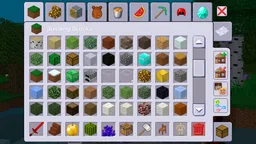
- Procedural worlds offer plenty of space to explore and gather resources.
- Multiplayer support makes shared building sessions possible.
- The block-based controls are easy to learn for casual players.
- Different game modes suit both relaxed building and survival play.
What could be better
- Online play may depend on finding active servers.
- Touch controls can feel imprecise during detailed construction.
- The visual style is fairly simple compared with newer sandbox games.
- Survival play can require substantial time spent collecting materials.
- Ads or in-app purchases may interrupt the experience.







