


Maino's World : Super Run Game review
 Analysis by Appsdrops
I can see the appeal of Maino's World: Super Run Game in a household where one phone or tablet gets passed around: it offers an adventure game with a clear, friendly-sounding goal, and it is free to start. My view is that it is best treated as a casual game to try together or take turns with, rather than as an automatically suitable choice for every child or every shared device. Its store description points to enemies, challenges, and a princess-rescue objective, but that alone does not tell you how demanding the play feels or whether its style will suit everyone at home.
How it fits into a shared-device routine
As an adventure game from TG-Studios, Maino’s World sits in a familiar space: players face obstacles and enemies while working toward a larger goal. I would consider it for short turns during a quiet stretch at home, such as waiting for dinner or sharing a tablet after homework. A simple rescue premise is easy to explain to someone who has not played before, which helps when the device changes hands.
The practical benefit of a shared game is not just that several people can enjoy it. It is that the next player can understand what the current player is trying to do. With this game, I would make that handoff explicit: say whose turn it is, agree on when to stop, and avoid assuming that a new player should continue someone else’s progress. That is useful advice for any shared mobile game, especially when people have different ages or levels of patience.
There is an important boundary, though: a shared device does not necessarily mean shared progress or separate personal spaces. I would not let several household members assume that the game keeps their individual experiences apart. Before anyone gets attached to a particular run or goal, check what appears in the game itself and decide whether it is a one-player-at-a-time activity. If keeping each person’s progress distinct matters, a game with clearly explained separate profiles may be a better fit.
The game is free to download, but it includes optional in-app purchases priced from $1.99 to $49.99 per item. That range is worth discussing before a child plays on a device with a payment method attached. I would check the device’s purchase settings and make the household rule clear: a free download is not the same as a promise that every later option is free. This is a more useful precaution than relying on a child to recognize a purchase screen in the moment.
Agree on turns before the game begins
For siblings or friends sharing one screen, a simple turn-taking routine can prevent avoidable arguments. Decide whether each person gets one attempt, a fixed amount of time, or a chance to play until they choose to stop. The game’s exact structure is not something I would assume in advance; the point is to agree on a fair handoff once you see how a session naturally works.
It also helps to separate coaching from taking over. If one player is stuck, another can offer a suggestion without grabbing the device. That small boundary makes the game more welcoming to a younger or less experienced player, while giving a confident player a way to help without turning every turn into a competition. If the group wants a game built around cooperative play, this may not be the right substitute; the available description frames this as a challenge-and-adventure experience, not a household teamwork mode.
Setup choices and account boundaries
Before installing, I would check that the device meets the minimum requirement of Android 6.0, then open the game once with an adult present if children will use it. That first look is a practical chance to see the opening flow, understand what the purchase prompts look like, and decide whether the game feels appropriate for the particular child. It is also a sensible way to avoid treating a store description as a full preview of the playing experience.
On a shared phone or tablet, the main boundary is the device account itself. Anyone using the same account may encounter the same store environment and payment setup, so I would secure purchases at the device level rather than expect the game to enforce household rules. If a child uses a separate account or a supervised device setup, keep those settings consistent with the family’s usual approach. I would not count on this game to provide family profiles, purchase approval, or separate child settings unless I had checked the current in-game options directly.
One useful routine is to install and inspect the game before handing over the device, rather than making setup part of a rushed handoff. That gives you time to read any prompts and decide whether to allow purchases or ask for an adult to handle them. It also reduces confusion when the next person opens the game and encounters a screen that was not part of the previous player’s turn.
The current version is 1.4.1.185. I would use that as a practical reference when troubleshooting with another household member: first check whether the same version is installed, then make sure everyone is opening the same game and device account. That does not guarantee that progress will behave a particular way, but it prevents a common source of mixed expectations when people compare what they see.
What kind of coordination works best
For a household that likes light competition, the game can become a shared conversation: one person tries a challenge, the next watches, and everyone can talk about what worked. I would keep that informal rather than inventing a scoring system before seeing whether the game naturally supports one. A useful tip is to let a first-time player explore without constant advice, then share suggestions only when they ask; that keeps the experience from becoming a test administered by the most experienced person in the room.
If you are coordinating play around chores or bedtime, set the stopping point before starting. Mobile games are easy to reopen, and a clear rule such as “one turn, then the device goes back on the counter” is more reliable than negotiating once someone is already absorbed. This is especially helpful when the app is being shared between adults and children: the routine stays about device use, not about whether one person is better at the game.
For travel or waiting rooms, I would treat it as an option to have ready rather than assume it will suit every situation. A player who wants a quiet, self-contained activity may enjoy an adventure challenge; someone who needs a game that can be paused instantly at any moment might prefer a different kind of casual game. If interruptions are likely, test how naturally you can stop and resume before relying on it for a long wait.
Age, trust, and expectations
The content rating is Teen, so I would not make the decision based only on the bright, straightforward rescue premise. Ratings are a useful starting point, but the household should still judge the actual game and the child’s maturity. For younger children, an adult should preview it and stay nearby at first, particularly because the game includes in-app purchases. For teens, a brief conversation about spending and shared-device turns may be enough.
Its audience numbers suggest that it has found a substantial group of players: the game has over five million installs, and its average rating is 4.7 from around 57,000 ratings. I see that as a helpful sign that many people have tried it, not as proof that it will suit a particular household. Ratings cannot tell you whether the game’s pace, difficulty, or purchase prompts will feel comfortable for your family, so a short supervised try is still the better test.
The listing also shows 866 written reviews, which gives a prospective player more than a single sentence of feedback to browse in the app store. I would look for comments that match your own concern—such as how the game feels for a new player or how purchases are presented—rather than treating every review as universally relevant. A player looking for a deep story may judge it differently from someone who simply wants an accessible challenge during a spare moment.
Where it stands against other adventure games
Compared with bigger adventure games that emphasize long narratives, elaborate worlds, or extensive customization, Maino’s World presents a simpler promise: challenges, enemies, and a rescue objective. That makes it easier to introduce and potentially more approachable for short sessions, but it also means I would not choose it expecting a sprawling role-playing experience. If your household wants a game everyone can understand quickly, this straightforward framing is a plus; if players want more story depth or a strong cooperative structure, another adventure title may be a better match.
It is also different from puzzle games designed around quiet, turn-based thinking. An adventure challenge may suit someone who wants to react and make progress through obstacles, while a puzzle alternative can be more comfortable for players who prefer a slower pace or do not enjoy facing enemies. I would use that distinction when choosing for a mixed-age group: the question is less “Is this a good game?” and more “Does this kind of challenge fit the person holding the device?”
For a household deciding whether to keep it installed, I would give it a fair trial rather than judge it by the rescue premise alone. Let each likely player try a brief session, observe whether the controls and pace feel comfortable, and then decide whether it works as a shared option. If the game prompts spending or creates friction over turns, those are good reasons to set firmer limits or remove it; there is no need to keep a game just because it is free to download.
My household verdict
Maino's World: Super Run Game is a reasonable choice for households looking for a free adventure game that can be introduced in a few words and tried in short turns. I like the clear challenge-and-rescue framing as a starting point, and the game’s strong average rating makes it worth a look for players who enjoy this style. Its main household trade-offs are the Teen rating, optional purchases, and the need to manage expectations around shared progress and turn-taking.
I would recommend trying it on a device with purchases secured and an adult available for the first session, especially if children will share the screen. It is less suitable if you need confirmed separate player profiles, a clearly cooperative family mode, or a game that is known to be appropriate for younger children without supervision. If those boundaries are handled, it can be a handy adventure option for a spare moment; if they are not, a simpler no-purchase game or a title designed specifically for shared play may serve the household better.
What we like
- Simple controls make the game easy to pick up.
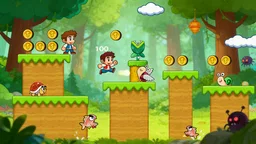
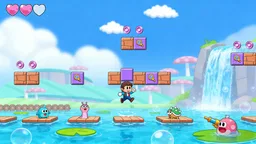
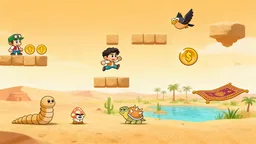
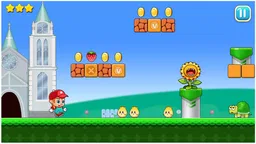
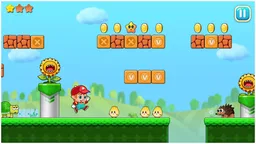
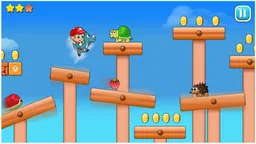
- Bright visuals give the levels a cheerful look.
- Short stages suit quick play sessions.
- Collectible items add goals beyond reaching the finish.
- Familiar platforming makes progress easy to understand.
What could be better
- Repeated level patterns can make later stages feel less fresh.
- Precision jumps may take practice to master.
- Frequent obstacles can frustrate younger players.
- Limited variety may reduce long-term replay value.
- Some players may find the pace too simple.







