




Harry Potter: Hogwarts Mystery review
 Analysis by Appsdrops
Harry Potter: Hogwarts Mystery is an adventure game for players who want to spend time in the Wizarding World through a mobile-friendly experience. Its appeal is easy to understand: it puts the familiar Harry Potter setting at the center and invites you to explore it at your own pace. I find that makes it an approachable pick for fans, while its adventure focus gives newcomers a clear reason to take a look even if they are not looking for a complicated game to learn.
Getting into the Wizarding World
Harry Potter: Hogwarts Mystery is developed by Jam City, Inc. and is available as a free game. It was released on April 24, 2018, and its current version is 7.3.4. The game is rated Teen, so it is worth checking that age guidance before installing it for a younger player. It has built a substantial audience, with more than 50 million installs and an average rating of 4.6 from around 3 million ratings.
The name and setting do a lot of the work in explaining the game’s appeal. This is a Wizarding World adventure, not a general-purpose utility or a quick puzzle app. If you enjoy Harry Potter and want a game connected to that world, the premise should feel immediately familiar. If you are coming in without much interest in the franchise, the setting may be less of a draw, so it helps to know what kind of experience you are looking for before you download.
There is also a practical side to getting started: the game requires Android version 9 or later. Checking your device’s operating system before installation can prevent an avoidable compatibility problem. On iOS, use the app store’s compatibility information for your particular device. Keeping the operating system current where possible is a sensible first step whenever an app will not install or behaves unexpectedly.
Where players may get stuck
Mobile games can feel less straightforward when an installation pauses, a launch takes longer than expected, or progress does not seem to update. Those moments are frustrating, especially when you are eager to get back to a familiar fictional world. Before assuming something is wrong with the game itself, I would start with the simple checks: confirm that the download has finished, make sure the device has a stable connection, and give the app a moment to complete its initial loading.
If the game opens but appears unresponsive, avoid repeatedly tapping the screen or closing and reopening it in quick succession. A short pause can help distinguish a temporary loading delay from a persistent issue. If nothing changes, close the app normally, wait a moment, and launch it again. This kind of basic recovery is useful across mobile games and does not depend on assuming any particular in-game system.
Another common source of confusion is expecting a free download to mean that every optional purchase is free as well. Harry Potter: Hogwarts Mystery is free to download, and it offers in-app purchases priced from $0.99 to $299.99 per item. That wide range makes it sensible to review purchase settings on the device before play, especially if a child may use it. I recommend deciding in advance whether purchases are allowed and checking the amount shown on the purchase screen before confirming anything.
The game has received around 160,000 written reviews, alongside its much larger pool of ratings. That level of attention suggests many players have spent time with it, but individual experiences can still differ depending on device, connection, and personal expectations. I would treat reviews as a way to spot themes rather than as a guarantee that every player will have the same experience.
Setup checks that save time
For a smoother start, first check that your device meets the stated system requirement and has enough available space for the installation and any updates. The minimum Android requirement is version 9. If the app store reports that your device is incompatible, restarting the download is unlikely to solve the underlying issue; check the operating system and the store’s compatibility details instead.
A steady internet connection is another useful basic check. If installation stalls, try switching to a more reliable connection and then resume the download through the app store. When a game does not launch cleanly after installation, restarting the device can clear a temporary hiccup. These steps are general mobile troubleshooting, not a guarantee that they will fix every problem, but they are good first moves before trying anything more disruptive.
It is also worth paying attention to which account is active on the device and which app store is being used. If you have more than one account, make sure you are using the one you intend for downloads and purchases. Keep any purchase confirmations and device-level settings in mind, too. A quick check before starting can prevent confusion later, particularly in a household where several people share a tablet or phone.
Finally, take a moment to review the game’s age rating and the device’s purchase controls. Teen is the stated content rating. The most helpful setup is one that fits the player: the right device, a suitable connection, and clear boundaries around spending. That way, you can focus on the adventure rather than stopping midway to sort out settings.
Recovering your play session
If the game closes unexpectedly, reopen it once and see whether it returns to a normal state. If it does not, restart the device and try again. Make sure the game is installed from the official app store and that any available update has completed. The current version is 7.3.4, but version availability can depend on the platform and rollout timing, so the app store is the practical place to check what is offered for your device.
If progress appears different from what you expected, pause before uninstalling the game. Removing an app can affect locally stored information in some games, so it is safer to try less disruptive steps first: close and reopen the app, restart the device, check the connection, and review any account or save options the game itself presents. Do not assume that reinstalling will restore progress automatically. If the issue continues, consult the game’s support options through the app or app store and describe what happened clearly.
For a download that will not complete, check whether the device is still connected and whether the app store is showing an error. You can also pause and resume the download or restart the device. If other downloads are failing too, the issue may be with the device or connection rather than this particular game. Looking at the broader pattern helps narrow things down without jumping straight to drastic fixes.
When a screen appears stuck, give it a little time before deciding that the session has failed. Some loading delays are temporary. If the delay continues, a careful restart is more useful than repeatedly tapping buttons. I prefer this measured approach because it reduces the chance of accidentally triggering an action while the app is still responding.
When the game may not be the cause
Not every problem that appears inside a game originates in the game. An unstable Wi-Fi or mobile connection can interrupt downloads and online activity. A device that is low on storage may struggle to install or update an app. An outdated operating system can also prevent installation when it falls below the stated requirement. Checking those conditions first can save time and help you choose the right next step.
If the problem occurs in several apps, that is a useful clue. Try another download or app that uses the same connection. If those also fail, focus on the network or device before treating Harry Potter: Hogwarts Mystery as the sole cause. If only this game is affected, make a note of what you were doing, what message appeared, and whether restarting changed anything. Clear details make it easier to explain the issue if you contact support.
Purchases deserve the same careful approach. A payment prompt can be easy to misunderstand if you are moving quickly, so read the displayed amount and confirmation screen before continuing. In-app purchases range from $0.99 to $299.99 per item. Device-level purchase controls can help families manage spending, and checking those settings before handing over a phone or tablet is more convenient than sorting out an unexpected purchase afterward.
It is also sensible to avoid unofficial downloads or advice that asks you to make risky changes to your device. Use the app store for installation and updates, and stick to straightforward troubleshooting. If an issue persists after the basic checks, the game’s support route is a better next step than deleting files or changing settings you do not understand.
A practical verdict for Harry Potter fans
Harry Potter: Hogwarts Mystery makes the most sense for players who want an adventure rooted in the Wizarding World. Its familiar identity is its clearest attraction, and the free download lowers the barrier to giving it a try. The Teen rating, Android 9 minimum, and optional purchases are worth considering before you begin, particularly if you are setting it up for someone else.
My practical recommendation is to approach it with realistic expectations: choose a compatible device, use a dependable connection, and take a moment to review purchase settings. If installation or loading goes wrong, start with basic checks rather than assuming the game is broken or immediately reinstalling it. Most importantly, decide whether the Harry Potter setting is the sort of adventure you want to spend time with. For fans looking for a mobile trip into that world, the game is an inviting option to explore.
Overall, Harry Potter: Hogwarts Mystery is an established free adventure game with a large player audience and a clear franchise focus. It is easy to understand why the setting attracts attention, while its purchase options and device requirements make a little preparation worthwhile. If you are a Wizarding World fan and are comfortable checking those details before play, it is a reasonable game to add to your app-store shortlist.
What we like
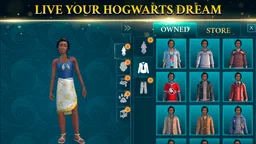
- Create a custom student and choose a Hogwarts house.
- Meet familiar characters from the Harry Potter stories.
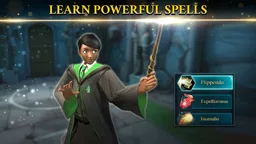
- Unlock new spells and magical skills as you progress.
- Complete quests that reveal original storylines.
- Decorated rooms provide a sense of personal progress.
What could be better
- Energy limits can interrupt quests before they are finished.
- Waiting for energy to recharge may slow progress.
- Some choices have little effect on the wider story.
- Optional purchases can help speed up progression.
- Later chapters may require long waits between activities.







