



Bluey's Quest for The Gold Pen review
 Analysis by Appsdrops
I approached Bluey's Quest for The Gold Pen as a story-led adventure to pick up when I wanted a gentler change of pace, rather than a game built around competition or complicated systems. Its appeal is easy to understand: the familiar Bluey world gives the journey an inviting feel, while the adventure framing suggests there is more to do than simply repeat a quick arcade round. My main advice is to start with modest expectations, check that the game runs comfortably on your device, and give its story room to set the pace.
Getting started without unnecessary frustration
Made by Halfbrick Studios, this free adventure game is available for Android devices running version 8.0 or later. Its current version is 1.1.8, and the age rating is Everyone, making it a natural option for families as well as players who enjoy Bluey. The game has an average rating of 4.6 from around 14,000 ratings, and it has been installed over a million times. Those figures suggest a substantial audience, though they cannot tell you whether its particular style will suit your household.
Before downloading, I would check two basics: that the device meets the operating-system requirement and that there is enough room for the installation and any subsequent updates. If the game does not appear in the app store on an older phone or tablet, compatibility is a more sensible first thing to check than repeatedly searching for another download. Keep the device’s software current where practical, too; an outdated system can make otherwise straightforward app setup less predictable.
The game is free to download, with in-app purchases listed at $14.99 per item. That makes it worth setting expectations with younger players before they begin. I would look over the purchase controls on the device and explain that an item shown inside a game is not automatically part of the free download. This small bit of preparation can prevent a family play session from turning into a conversation about an unexpected purchase.
When opening a newly installed game, give it a little time to finish whatever setup the device needs instead of tapping repeatedly if the first screen feels slow. If it seems stuck, close it once, reopen it, and check whether the device has a stable connection. These are basic troubleshooting steps rather than special Bluey instructions, but they are a useful way to distinguish a temporary launch hiccup from a problem that needs more attention.
When the pace feels slower than expected
A story-driven adventure is a different proposition from a quick reflex game. If you arrive expecting constant action or a score to chase, a narrative-focused experience may initially feel measured. I would try it during a calm stretch when there is time to follow what is happening, rather than between tasks when every pause feels like an obstacle. That is especially relevant for children who want to press ahead immediately: a short explanation that this is a story to explore, not just a race, can make the first session smoother.
There is also a practical distinction between playing alone and sharing the experience. For an adult, the story-led format can make the game a relaxed way to spend a few minutes with a Bluey fan. With a younger child, I would sit nearby at first and let them control the pace, helping only when they seem uncertain. That gives you a chance to see whether the game holds their attention without turning the session into a lesson or a test.
As with many games aimed at a broad audience, the gentler premise is a strength for some players and a limitation for others. If your main goal is a demanding adventure, elaborate planning, or repeated mastery of difficult challenges, this may not be the best fit. The value here is more likely to come from the world and the unfolding journey than from chasing a high level of mechanical difficulty.
Simple checks that save time
If the game will not install, I would first check the operating-system version, available storage, and whether the app store is responding normally. If it installs but will not open, restarting the device and trying again is a reasonable next move. Avoid deleting saved game information as an early fix: first consider whether the issue might be a temporary device or connection problem, especially if the game had been working before.
If a screen appears to stop responding during play, wait briefly before tapping several times. Rapid repeated input can make it harder to tell whether the game is still processing or has genuinely frozen. Then close and reopen the app if needed. If the same issue returns, note when it happens and whether it follows a particular action; that detail is more useful when seeking help than a vague report that “the game is broken.”
For families, another useful setup check is the device’s purchase protection. Since paid items are available, reviewing the account’s purchase settings before handing over a tablet is more effective than relying on a child to understand each prompt. I would also make sure the person playing knows how to return to the game after an interruption, such as a call or a switch to another app. That helps avoid accidental taps and makes a shared device less stressful to use.
Recovering a session and choosing the right moment
For a short everyday session, I would treat this as a game to start when there is enough breathing room to enjoy a story beat, rather than as a guaranteed one-minute diversion. For example, it could suit a quiet period at home when a child wants to play while an adult is nearby. It is less suitable as a distraction that must stop instantly at any moment, since narrative play can be harder to interrupt gracefully than a single short round.
If you need to pause, use the game’s available on-screen controls rather than assuming that leaving the app will preserve every moment exactly as it was. I would avoid making a major device change mid-session if the game seems slow or unstable; first close other demanding apps if the device is struggling, then reopen the game. That is a practical way to test whether the issue is local to a busy device before deciding there is a deeper problem.
When returning after an interruption, take a moment to orient yourself rather than tapping through quickly. In story-led games, rushing can mean missing context that makes the next part more enjoyable. This is a small but useful habit with a game like Bluey's Quest for The Gold Pen: it makes the narrative easier to follow, especially when a child and adult are taking turns or sharing the screen.
When the game may not be the problem
A sluggish or interrupted experience is not always caused by the game itself. An older device near its storage limit, a system update waiting to finish, or several apps running at once can all affect how an app behaves. I would check those possibilities before reinstalling. If the game works better after freeing space or restarting the device, that points toward a device-side cause rather than a reason to abandon the adventure.
Connection problems can also complicate installation or other online activity, so it is worth testing the device’s connection separately if something fails at the same time as other apps. If only this game is affected, updating it through the app store is a sensible check. The current version is 1.1.8; keeping an installed app up to date is a straightforward step, but I would not assume that every issue will disappear just because an update is available.
There is a useful trade-off in how you judge a story game: not every quiet moment is a technical fault. If the game is responsive but moving at a calmer pace than you prefer, restarting it will not turn it into an action title. On the other hand, repeated freezes or failure to launch deserve ordinary troubleshooting. Separating a style mismatch from a technical problem prevents wasted effort and helps you decide whether to keep playing for the story.
How it fits beside other adventure games
Compared with action-heavy adventures, this is the sort of game I would choose for a more relaxed, character-led session. Compared with very simple children’s games, its story-driven identity gives it a reason to be played as a journey rather than just a brief distraction. That middle ground is appealing if Bluey is already part of your family’s routine, but it may be less compelling for someone who wants deep systems, competitive play, or a challenge that depends on precise timing.
The best way to decide is to match the game to the player, not just to its familiar name. A Bluey fan who enjoys following a story is a stronger fit than a player who only wants fast action. Likewise, an adult looking for a demanding solo adventure may prefer a different title, while a parent seeking a free download to explore together may find this a more approachable starting point. The paid items are a reason to set boundaries, not necessarily a reason to rule it out.
My practical verdict
I would recommend Bluey's Quest for The Gold Pen to families and Bluey fans who want an adventure with a story-led feel and are happy to let it unfold at its own pace. Halfbrick Studios has made a game with a clear audience, and its broad age rating and free entry make it easy to consider. The average rating of 4.6 is encouraging, but the more important question is whether the player enjoys a gentler narrative experience.
I would skip it if you need a consistently fast game, a highly demanding challenge, or something that is easy to dip into for seconds at a time. For everyone else, my practical approach is simple: check device compatibility, decide how purchases will be handled, and try a calm first session together. If the story and familiar world click, it can be a pleasant choice for shared downtime; if the pace does not suit you, a more action-focused adventure will be a better match.
What we like
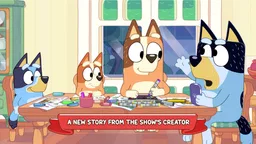
- Bright visuals capture the charm of the Bluey series.
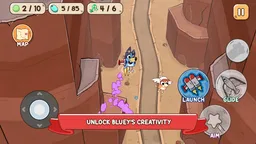
- Simple controls make it approachable for younger players.
- Familiar characters add appeal for Bluey fans.
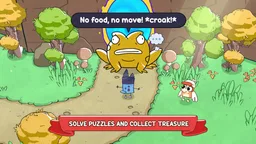
- Exploration encourages curiosity across colorful settings.
- The adventure offers a child-friendly experience.
What could be better
- Young players may need help with some puzzles.
- Gameplay may feel too simple for older players.
- The story may be brief for the price.
- Replay value may be limited after completing the adventure.
- Availability and features may vary by device and region.







