







World of Hyatt: Book Hotels review
 Analysis by Appsdrops
I find World of Hyatt most useful when a hotel stay is part of a broader travel plan rather than a one-off search for the cheapest room. The app brings Hyatt booking and its loyalty program into one place, which can make repeat stays easier to manage. It is free, and its focus is clear: help travelers find and book Hyatt hotels while keeping their relationship with the brand close at hand.
That focus is also the main trade-off. This is a travel app from Hyatt Corporation, not a neutral comparison tool covering every hotel chain. If you already know you want to stay with Hyatt, it can be a practical starting point. If your priority is comparing every nearby property across multiple brands, I would use a broader hotel-search service first and treat this app as the brand-specific step that follows.
From a destination search to a booked stay
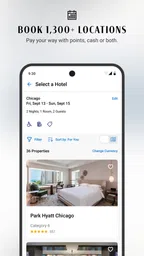
The everyday workflow is straightforward: choose where and when you plan to travel, look through the available Hyatt options, compare the choices that suit your trip, and book. I would begin with the dates and destination I actually need, then pay attention to the details attached to each result rather than choosing by property name or photographs alone. For a hotel booking, the room and rate conditions matter just as much as the building.
A useful habit is to decide what makes a stay successful before searching. For a work trip, location and a predictable arrival may matter most. For a family visit, room arrangements and the practical distance to your plans may outweigh a stylish lobby. Keeping those priorities in mind helps prevent the familiar booking mistake of selecting an appealing property that does not fit the reason for the trip.
After choosing a stay, I would check the dates, room choice, and booking terms once more before confirming. This is especially sensible when travel plans are still shifting. A booking that looks right at a glance can become inconvenient if the room or conditions do not match what you need. The app is useful for making the reservation, but careful reading is still part of using it well.
For a realistic example, imagine planning a weekend in a city where you have an appointment on Saturday morning. I would search the destination for the relevant dates, compare the Hyatt options against the appointment location, and avoid picking a hotel solely because it is the first attractive result. If the trip is short, an easier route and a smoother arrival can be worth more than a small difference in the room’s appeal.
Make the booking fit the trip, not the other way around
One advantage of staying within a single hotel company’s app is continuity. If Hyatt is already your preferred choice, you do not have to begin each trip by learning a new booking interface. You can return to the same place when planning another stay and keep the decision process familiar. That consistency is valuable for frequent travelers, though it does not remove the need to compare the actual options for each destination.
World of Hyatt is in the Travel & Local category, and that describes its role better than calling it a general trip planner. I would not rely on it as the only tool for building a complicated itinerary with flights, restaurants, and activities. It is best viewed as the Hyatt-focused part of travel planning: useful for the accommodation decision, but not a substitute for every other planning task.
Settings and habits worth checking
Rather than assuming the app will remember what matters from one trip to the next, I recommend making a quick pre-search routine. Confirm the destination and dates, think through the room requirements, and decide how much flexibility you need. These simple checks are more dependable than relying on an unverified shortcut or expecting an app to infer the purpose of a trip.
When reviewing a result, pause over the rate and booking conditions before moving on. This is a particularly helpful habit for travelers whose dates might change, or who are booking on behalf of someone else. A reservation is only convenient if its terms suit the person taking the trip. If another traveler will be checking in, make sure the booking details and arrangements are appropriate before you complete the process.
I would also keep the app current when using it for active travel plans. The current version is 26.11.1, and an up-to-date installation is a sensible baseline for any booking app. That does not mean an update changes the quality of a particular hotel or rate; it simply avoids making the app itself an unnecessary source of friction when you need to review a reservation or plan another stay.
Because the app is free, trying it does not require paying for the app itself. Its content rating is Everyone, so it is suitable for a general audience. Those details are helpful for deciding whether to install it, but the more important question is whether Hyatt properties are relevant to your travel habits. A free app has little value if its selection does not match where you go or what you need from a hotel.
Faster patterns for repeat travelers
Experienced users can save effort by making their planning process repeatable without expecting secret features. I would keep a personal checklist of the decisions I tend to forget: exact travel dates, the reason for the stay, room needs, and how much uncertainty I can tolerate. Then I can use the same order whenever I search. The benefit is not a hidden button; it is fewer rushed decisions and less chance of booking a room that looks right but fails a basic requirement.
For regular work travel, it helps to separate the search into two passes. First, identify which properties are practical for the trip’s location and schedule. Then compare the available room and rate choices among those candidates. This is more effective than weighing every detail at once, and it makes the app’s brand-specific scope an advantage: once I have decided that Hyatt is the right hotel group, I can focus on choosing among its options.
For a longer trip with several hotel stops, I would plan each stay as its own decision rather than assuming one booking pattern fits all. A night near a transit connection has different priorities from a few days spent visiting family. Keeping separate notes about the purpose of each stay can prevent a repeat traveler from carrying over the wrong assumptions, such as choosing the same room type or location style simply because it worked on the previous trip.
Another practical pattern is to review a planned stay when the itinerary changes. If an appointment moves, a visit becomes shorter, or the arrival time shifts, revisit the hotel choice and booking conditions rather than treating the original reservation as settled. The app can support the Hyatt booking side of that review, but it cannot decide whether the new plan still makes the chosen property sensible. That judgment remains yours.
Where its limits matter
The biggest limitation is the boundary of the brand. A traveler who wants to compare Hyatt with independent hotels and competing chains will need another search tool to see the wider market. In that situation, I would not start and finish here. I would compare locations and lodging choices broadly, then open World of Hyatt if a Hyatt property is a serious contender or if I have already decided to book within the group.
That distinction matters for price-sensitive trips, too. A familiar brand can be reassuring, but familiarity alone does not prove that a particular option is the best fit. Compare the total value for your dates, location, room needs, and booking conditions. If a different property better matches your budget or schedule, choosing it may be the more sensible decision, even if you have used Hyatt before.
The app is also not the right answer when you want one place to coordinate every part of a journey. Its role centers on Hyatt hotel booking and the associated brand experience. I would still use separate tools for transport and other parts of the itinerary, and I would keep my own travel notes for details that need to be shared across multiple bookings. That division of labor is less elegant than an all-in-one plan, but it is realistic.
There is a further trade-off for occasional travelers: a dedicated brand app can feel like an extra step if you have no particular reason to choose Hyatt. If you are only looking for any available room near a destination, a broad travel service may be a quicker first stop. World of Hyatt becomes more compelling when its particular hotels are already on your shortlist or when repeated use makes a familiar booking process worthwhile.
A useful choice for Hyatt-focused travel
The app has a strong reputation among its users, with an average rating of 4.8 from around 51,000 ratings, alongside roughly 2,000 written reviews. It has passed one million installs, which suggests that it has found a substantial audience. I take those figures as useful context rather than proof that every booking experience will suit every traveler; your destination, room needs, and expectations still determine whether it is a good fit.
My recommendation is specific: install it if you regularly consider Hyatt hotels, want a direct route to booking them, or prefer keeping that part of travel planning in a familiar brand app. Skip it as your main search tool if you need a complete view across hotel companies or want to plan an entire trip in one place. The clearest way to get value from it is to pair a consistent search checklist with a careful review of each stay’s terms.
For me, that makes World of Hyatt a practical specialist rather than an essential app for every traveler. Its free access and focused booking role are appealing, and the repeatable habits around date checks, room needs, and rate review make it easier to use thoughtfully. If Hyatt is already part of how you travel, it deserves a place in your planning routine; if not, compare the wider market first and let the trip—not the app—decide.
What we like
- Search hotel stays by destination and travel dates.
- View reservation details and manage upcoming stays in the app.
- Save eligible stays to a World of Hyatt account.
- Use the app to check in at participating hotels.
- Browse hotel options across Hyatt brands worldwide.
What could be better
- Some features require a World of Hyatt account.
- Hotel availability and rates can change quickly.
- Not every property supports mobile check-in.
- Displayed prices may exclude taxes and fees.
- Booking changes may depend on the property's policies.





