







Vrbo Vacation Rentals review
 Analysis by Appsdrops
Planning a rental for a group is not just about finding a nice-looking place. I want to know whether the rooms suit everyone, whether the location works for our plans, and whether I can compare options without losing track of the details. Vrbo Vacation Rentals is built around booking entire homes, which makes it a natural fit for family trips and group getaways. My view is that it is most useful when the accommodation itself is a major part of the trip—and less compelling when I simply need a bed for one night.
Finding your way through a home-search app
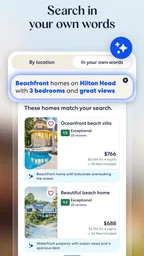
As a Travel & Local app from Vrbo, it has a focused purpose: help travelers look for vacation homes and make a booking. That focus can make the search feel more relevant than browsing a broad travel app where hotels, flights, and other services compete for attention. It also means the app’s value depends on how clearly a property’s details answer the questions that matter to your group.
The listing is where I would slow down rather than choosing from the first appealing photo. For a family, the number and arrangement of sleeping spaces can matter more than the headline image. For a group of friends, a shared living area may be a bigger advantage than extra bedrooms. I would read the description and inspect the photos together, then check the property’s location against the places we actually plan to visit.
A practical way to narrow choices is to settle the non-negotiables before browsing: destination, dates, group size, and the basic layout you need. Then compare a small set of plausible homes instead of continually widening the search. This is especially helpful when one person is booking for several people; it gives the group specific trade-offs to discuss, such as a better location versus more room to spread out.
The app is free to download, and its broad adoption—more than 10 million installs and an average rating of 4.8 from around 381,000 ratings—suggests it is a familiar option for many travelers. Those figures do not tell me whether any particular home will suit my trip, though. I still treat each listing as a separate decision, checking its details rather than relying on popularity as a substitute for fit.
Reading listings with different needs in mind
Good navigation is not only about moving between screens. It is also about being able to locate the right information and understand it without repeatedly asking a host or another traveler to interpret the listing. When I assess a rental, I look for practical details that affect daily routines: how the sleeping spaces are arranged, whether shared areas fit the group, and how the home’s setting relates to our plans.
That approach matters particularly when travelers have different needs. A relative who prefers a quiet evening, a child who needs a predictable bedtime, or a guest who wants more privacy may all judge the same layout differently. I would not assume that a large home automatically makes a trip easier; the arrangement and the way the group uses it are what count.
Photos can help, but I would not treat them as a complete explanation of a property. If an important detail is unclear, I would resolve it before committing rather than infer it from an image. This is a useful habit for any rental search, and it is especially important when a feature affects someone’s comfort or ability to use the home.
Motor and sensory considerations
People use travel apps in different ways: some are comfortable tapping through a long search, while others find repeated choices tiring or need more time to read. I would keep the search focused, work through one decision at a time, and avoid trying to compare a large number of listings at once. A short shortlist is easier to revisit and discuss than a stream of half-remembered properties.
For sensory needs, the central issue is often not the app interface but the rental and its surroundings. A busy setting, an open-plan layout, or shared spaces may feel very different to different guests. I would examine the listing carefully and ask targeted questions about anything that could affect sleep, privacy, or routine. The app helps bring homes into consideration; it cannot determine what a particular guest will find comfortable.
For someone with limited dexterity, a booking workflow that requires many repeated actions can become frustrating, especially if they are comparing properties across several dates or group sizes. I would make the main choices with the group before starting and keep notes on the finalists. That reduces the amount of back-and-forth and lowers the chance of losing track of which home had the layout or location everyone preferred.
Travelers who need information presented in a particular way should judge the app on their own device and with their own settings. I would not assume that a general-purpose rental app will suit every visual, motor, or cognitive preference. If someone relies on a specific way of interacting with their phone, testing the search and booking steps before an urgent trip is a sensible precaution.
When the situation changes the best choice
Imagine arranging a long weekend for relatives who are arriving at different times. A whole-home rental can give the group a common place to gather while letting people keep separate sleeping routines. I would use the app to find a few candidates, then compare location and layout as a group. That conversation can expose a mismatch early: one person may prize a shared living room, while another needs a quieter sleeping arrangement.
For a trip with children, I would think beyond the number of beds. The home should make the family’s ordinary routines workable, and the location should not turn every outing into an unwanted complication. For friends traveling together, privacy and shared space can pull in opposite directions. In both cases, deciding which trade-offs are acceptable before booking is more useful than choosing solely by the most attractive photos.
Vrbo is less obviously the right tool when I need a simple overnight stop, want the predictable format of a hotel, or have not settled on a destination. A hotel-focused service may be easier when I mainly need a room and familiar front-desk-style support; a broader travel service can be more convenient when I am arranging several kinds of travel at once. Vrbo’s narrower focus is an advantage when a whole home is the point, but a limitation when it is not.
It can also be a poor match for a traveler whose plans are highly uncertain. A rental requires more attention to the particular property and its arrangements than a generic room search. If my group cannot agree on the essentials, I would pause before booking rather than assume that a larger space will solve every disagreement.
Where the experience can still fall short
The biggest practical challenge is that the app cannot make every listing equally clear. A property may look suitable at first and still leave a traveler needing more detail about an important aspect of the stay. That is not a reason to guess. I would identify the exact question, seek clarification before booking, and keep the answer in mind while comparing alternatives.
There is also a trade-off in booking an entire home: more room and shared space can be valuable, but they bring more details to evaluate than a straightforward room. A group needs to agree on what matters, and the person handling the booking may end up doing much of that checking. If no one wants to coordinate those decisions, a simpler accommodation choice may be more comfortable for everyone.
For guests with accessibility-related requirements, I would be especially careful not to rely on broad impressions. A property photo or a short description may not answer whether a specific route, room, or everyday task will work. The right next step is to confirm the relevant detail directly before committing. That extra effort is worthwhile when the alternative is arriving to find that a crucial assumption was wrong.
On the app side, a useful search depends on being able to read, compare, and return to relevant information. I would test the whole process—from browsing a listing to reviewing the details needed before booking—rather than judging the app from its first screen. Travelers who find dense browsing tiring can reduce friction by searching with a clear brief and involving the group early, instead of making a long list of candidates that all need fresh inspection.
A considered choice for group stays
Vrbo’s strongest case is clear: it is a free travel app for people considering a whole-home rental, especially for family or group trips where space and layout shape the experience. Its current version is 2026.45.0, it has been available since June 16, 2017, and the content rating is Everyone. The developer is Vrbo. These details help identify the product, but the more important question is whether its home-focused approach matches the way you travel.
I would recommend it to someone who wants to compare private homes for a shared getaway and is prepared to read listings carefully. I would be more cautious about recommending it to someone who needs a hotel-like stay, an especially fast one-night booking, or certainty about a personal requirement that has not been clearly addressed in a listing. In those cases, another accommodation style—or confirming details before using the app to book—may be the better route.
For inclusive planning, my advice is to include the people who will use the home in the decision, not only the person holding the phone. Ask what each traveler needs for rest, privacy, and daily routines; shortlist homes against those needs; then resolve any uncertainty before booking. The best fit is the rental whose details work for your actual group, not simply the one that looks most appealing at a glance. Used that way, Vrbo Vacation Rentals can be a practical starting point for a group stay, while leaving the final judgment where it belongs: with the travelers who know what they need.
What we like
- Search filters make it easier to narrow down suitable stays.
- Property photos help you assess a rental before booking.
- Many listings include useful details about amenities and house rules.
- Guest reviews offer insight into other travelers’ experiences.
- The app keeps booking information accessible while traveling.
What could be better
- Service fees can raise the total price beyond the nightly rate.
- Some listings require host approval before a booking is confirmed.
- Cancellation terms vary by property and may be restrictive.
- Availability and prices can change before checkout is complete.
- Communicating with hosts may take time if they respond slowly.





