



Volaris review
 Analysis by Appsdrops
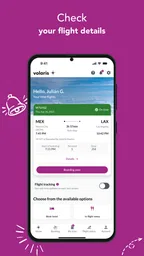
When I’m planning a trip with someone else, the frustrating part is often not choosing a flight; it’s keeping the details straight once the booking is made. I see the Volaris app as a practical travel companion for that stretch of the journey: it puts the airline’s trip-related tasks on a phone, so I can check what I need without treating email, a browser and a paper note as separate sources of truth. It is most useful when the trip itself is with Volaris, rather than as a general-purpose travel planner.
One trip, two people, and fewer crossed wires
Picture a household getting ready for a weekend away. One person booked the flights, while another is tracking the departure time and helping everyone get out the door. In that situation, the app can serve as the airline-specific place to turn when a question comes up. Instead of forwarding every update or asking the person who booked to search through messages, each traveler can use the app for their own trip tasks.
That doesn’t mean a shared phone should become a shared account by default. Travel records are personal enough that I’d keep the booking holder’s login and information under their control, and have other travelers use their own access where appropriate. The useful household habit is to agree on who checks the reservation and who communicates any changes, rather than passing one signed-in device around and hoping nobody loses track of what they were viewing.
For a family or group, I’d also keep a simple backup of the essentials outside the app: the booking reference and the agreed departure plan, for example. That is not a criticism of Volaris in particular; it is sensible travel preparation. If one person’s phone runs low on battery or the group gets separated, everyone should know the basic plan without depending on one screen.
Setting it up around the booking
Volaris is a Travel & Local app from Volaris, and its role is clear: help passengers handle their airline journey from a mobile device. I would install it after choosing a Volaris flight, then make sure the person responsible for the reservation can access the account and trip information before travel day. Doing that at home is less stressful than trying to sort out sign-in while standing in a busy airport.
The app is free, which makes it easy to try as a companion to a booking rather than a purchase that needs weighing against other travel costs. Its current version is 2.19.1, and it supports devices running Android 8.0 or later. On iOS, I’d check compatibility in the app store before relying on it for a particular device. The important practical point is to install and open it in advance, especially if an older phone is part of the household’s travel setup.
I wouldn’t assume that installing the app automatically gives every traveler access to every booking. A useful boundary is to decide who made the reservation, who needs to check the itinerary, and whether each person should use their own account or device. That avoids casually sharing credentials and helps keep responsibility clear if details need attention. For a group, I’d have the booking holder verify that the trip appears correctly before telling everyone to rely on the app.
One small but valuable workflow is to check the itinerary before leaving home, then check it again when the group is ready to travel. The first look is for planning; the second is a last-minute confirmation that everyone is working from the same flight details. The app is most helpful as a direct airline reference, not as a substitute for deciding who is coordinating the group or where to meet.
Coordination without turning one phone into mission control
For a shared trip, I’d use the app to reduce unnecessary relaying, not to centralize every decision. The person who booked can keep an eye on the reservation, while other travelers can independently check what they need. If the group changes plans or has a question, it helps to settle who will take the next step rather than having several people make separate assumptions based on partial information.
This is where an airline app differs from the usual alternatives. A calendar is good for a shared reminder, email is useful for retaining booking messages, and a general travel app may be better for combining flights from different airlines with lodging or sightseeing plans. Volaris is the more focused choice when the task is tied to a Volaris booking. I wouldn’t expect it to replace a household calendar or a broader itinerary tool; those serve different jobs.
A practical division of labor might be: keep the overall meeting time in the shared calendar, use messages for quick coordination, and open Volaris when someone needs to deal with the airline side of the trip. This avoids copying every detail into multiple places. It also reduces a common source of confusion: one traveler quoting an old message while another is looking at the current trip information.
There is a trade-off, though. If a household flies with several airlines, relying on one carrier’s app for the whole journey creates a fragmented picture. I’d use Volaris for the portion it handles and keep a separate overview for connections, accommodation and plans on the ground. Likewise, if the booking was made by someone who won’t be traveling, I’d confirm in advance how the passengers will get the information they need rather than waiting until the airport.
Age, trust and who should handle the account
The app’s content rating is Everyone, so its stated age context is broad. Still, that doesn’t mean every child should manage a travel booking independently. I’d let younger travelers use it with an adult’s guidance, especially where account access or reservation details are involved. The adult who made the booking should remain clear about who is responsible for checking the trip and responding to anything that needs attention.
For teens traveling with family, the app may be useful as a way to become more familiar with the airline portion of the journey. I’d walk through the relevant information together before departure and make sure they know which details are private and which practical instructions are fine to share with the group. That is a general account-safety habit, not a claim that the app has special family controls.
I would not treat a shared household tablet as the ideal place to leave a travel account signed in for everyone. A personal device gives the traveler a clearer boundary, while a shared device can make it harder to know whose information is on screen. If the household does use one phone for coordination, I’d keep the booking holder present when accessing account-specific details and sign out when appropriate.
Trust also means knowing what this app is for. It is the airline’s own travel app, not an independent comparison service or a neutral guide to every flight option. If I’m still deciding which carrier or itinerary suits the group, I’d compare options separately. Once the choice is Volaris, the app becomes more relevant as a companion to that specific journey.
Who will get the most from it
I’d recommend Volaris to someone who has booked with the airline and wants a mobile point of reference for the trip. It makes particular sense for frequent passengers, people who prefer handling travel tasks on a phone, and households where the booking holder wants to coordinate without forwarding every detail by hand. The app has a 4.5 average from around 28,000 ratings, and it has been installed over a million times, suggesting it has a substantial audience among travelers.
It is less compelling if you rarely fly with Volaris, prefer to keep all travel planning in one independent service, or mainly need help comparing carriers before booking. In those cases, an airline-neutral travel tool may be a better first stop. You can still use Volaris for a relevant reservation, but there is little reason to make it the center of trips that have nothing to do with the airline.
The app has been available since March 7, 2025, and it is rated for Everyone. I wouldn’t choose it on those details alone; the deciding question is whether its airline-specific focus matches the trip. Its developer is Volaris, which makes the app a natural place to look for Volaris-related travel tasks, while also making it important to keep a broader itinerary elsewhere if the journey includes other providers.
My household verdict
For a household traveling with Volaris, I’d consider Volaris a useful companion, not a complete family travel system. Its strongest role is keeping the airline part of a trip close at hand and helping the people involved coordinate around a booking. The best results come from pairing it with clear account boundaries, a shared understanding of who is responsible, and a simple backup plan for the basics.
I’d install it before travel day, check that the booking holder can reach the trip, and agree on who will handle airline questions. I would not share a login casually, rely on one phone as the group’s only source of information, or expect the app to organize hotels and plans with other carriers. Used with those limits in mind, it is a sensible free choice for Volaris passengers. If you want one neutral hub for every part of a mixed-airline holiday, a broader travel planner will suit you better; if your immediate need is a Volaris trip, this app is the more direct fit.
What we like
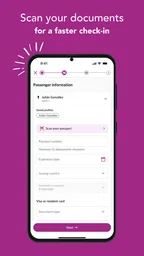
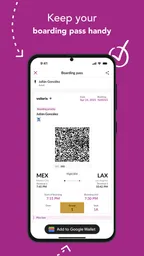
- Quickly check in and access your boarding pass in the app.
- Flight status updates help you track schedule changes.
- Save trips to keep itinerary details easy to find.
- Manage bookings without calling customer support.
- A built-in booking flow makes searching flights straightforward.
What could be better
- Some booking changes may require contacting customer support.
- Flight options can vary depending on route and travel dates.
- App performance may be affected by a weak internet connection.
- Payment options may differ by country or booking method.
- Notifications may not always arrive immediately.





