





Viator Tours & Attractions review
 Analysis by Appsdrops
When I plan a trip, I want to know more than what sights are nearby: I want to compare the actual ways I could spend a morning or an evening, then decide whether booking ahead is worth it. Viator is built for that kind of planning. It is a travel and local experiences app from Viator, with tours, activities, and attraction tickets gathered in one place. I find it most useful when I have a destination and a rough idea of what I want to do, but need help turning that into a bookable plan.
Choose it for breadth and comparison, not just a ticket
The first question I would ask is whether I want a single admission ticket or a wider choice of things to do. If I already know the attraction and only need its official ticketing channel, that venue’s own app or booking service may be the more direct route. If I am still weighing a guided walk against a day trip, a food experience, or a ticketed activity, Viator makes more sense as a discovery tool.
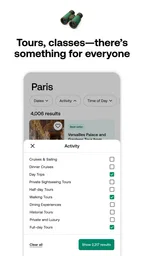
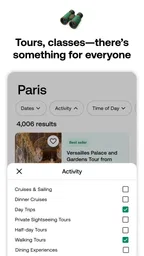
The app’s scale is a practical advantage: it brings together more than 300,000 travel experiences, tours, and tickets. That range can help when a trip is still taking shape, especially in a place where I do not know the local tour operators. It also means I need to be selective. A long list is not a recommendation by itself, and the first appealing result is not automatically the best fit for my schedule or travel style.
I would compare listings by the details that affect the day, not just the headline. Look for what the activity actually includes, where it begins, how long it takes, and whether the timing leaves room for the rest of your plans. A tour can sound ideal until its meeting point is inconvenient or its duration crowds out a meal or another reservation. Checking the practical fit before booking is the habit that makes a broad marketplace genuinely useful.
Where Viator is especially helpful
In my view, the strongest use case is planning an unfamiliar destination when I want several options without researching every local provider separately. Viator can bring unlike activities into the same browsing session, which makes it easier to compare the kind of day each one offers. A guided outing may appeal when I want context and structure; a ticket may suit me better when I prefer to explore at my own pace.
It is also handy for filling a gap in an itinerary. Imagine arriving in a city with one free afternoon and no clear plan. Instead of defaulting to another hour of general web searching, I can browse for an activity that fits the time I have, then check its location and schedule against my other commitments. This is a more grounded way to choose than picking an experience solely because its photos look appealing.
A useful decision trick is to work backward from the day’s constraints. Start with the time you can spare, then consider travel to and from the meeting point, and only then compare the activity itself. This matters most for short trips, when a booking that consumes half a day can shape the whole visit. I would also keep a backup idea in mind when the plan depends on a particular time slot, rather than treating a single listing as the entire itinerary.
Viator is a free app, so browsing it does not require an upfront purchase. The activity you choose may still have its own cost, so I treat the no-cost download as a low-commitment way to research, not as an indication that experiences are free. That distinction is worth keeping clear when comparing activities with a self-guided outing or a visit planned directly through an attraction.
What broad choice does—and does not—solve
With a marketplace, the main benefit is choice; the corresponding trade-off is that the traveler has to do some evaluation. I would read the description carefully and check whether it matches what I personally value: a small-group feel, free time, a specific type of guide, or simply a straightforward entry ticket. Those preferences are not interchangeable, and a polished title cannot tell me whether the day will suit my pace.
Another non-obvious point is that an activity’s convenience depends on the itinerary around it. A well-reviewed tour can still be the wrong selection if it starts far from where I am staying, overlaps with a meal reservation, or leaves no breathing room after a long travel day. I try to assess the listing as one part of a route rather than as a standalone purchase. When the trip has several fixed appointments, I would favor flexibility over squeezing in one more activity.
For a family or a group, I would compare options against the least flexible person in the party. A walking-heavy outing, an early start, or a long stretch without a break may be perfectly reasonable for one traveler and unsuitable for another. The useful question is not simply “Does this look fun?” but “Will everyone in our group be comfortable with the pace and logistics?” That small check can prevent an attractive listing from becoming a frustrating day.
When another approach may be better
If I have a very specific attraction in mind, I would compare Viator with that attraction’s own booking route before committing. A direct source may be simpler when the only goal is entry, while a marketplace is more valuable when I want to browse alternatives or combine a ticket with a guided experience. I would not assume either route is universally better; the deciding factor is whether I need discovery or a direct transaction.
For a traveler who likes wandering without a timetable, a self-guided day may be a better match than a scheduled tour. Viator’s listings are most relevant when I am willing to choose an organized activity, ticket, or planned experience. If I would rather change direction spontaneously as the day unfolds, I should be cautious about booking too much in advance. The app can help me find ideas, but it cannot make a fixed plan feel spontaneous.
Likewise, travelers who already have a trusted local operator or a carefully planned itinerary may not gain much from browsing a large catalog. In that situation, the app is more useful as a comparison point than as a replacement for a plan that already works. I would avoid adding an activity simply because it is available; a worthwhile booking should solve a real need, such as providing local context or securing a place in an experience I genuinely want.
Ratings, platform details, and the booking decision
The app has a 4.9 average from around 85,000 ratings, alongside roughly 3,800 written reviews. Those figures suggest that many users have rated it positively, but I would still judge an individual activity on its own details. A high overall app rating can speak to the general experience of using the product; it cannot guarantee that a particular tour, guide, or schedule is right for me.
Viator has more than 5 million installs and is rated for Everyone. It was released on November 12, 2012, and the current version is 15.33.0, with Android 11 as the minimum operating-system requirement. The app is free to install. Those details make it easy to establish whether it fits a basic device and age-rating check, but they do not change the more important travel question: whether the activity fits the people, time, and energy available on the trip.
Before I switch from browsing to booking, I would settle three things: what is included, whether the location and timing fit the day, and whether the style of the activity suits the group. I would then compare the listing with a direct attraction option if the experience is essentially just admission. This workflow avoids spending time comparing irrelevant choices and keeps the app in its strongest role: helping me discover and assess possibilities.
A practical recommendation for different travelers
I would recommend Viator Tours & Attractions to someone who wants to explore organized experiences in an unfamiliar place and values seeing different kinds of activities in one browsing session. It is especially helpful for a short-trip planner who needs to make a few deliberate choices rather than spend the whole trip searching for ideas. The app’s breadth can turn a vague “what should we do?” into a more concrete comparison between options.
I would be less enthusiastic about it for someone who wants every day to remain open-ended, or who already knows exactly which attraction they are visiting and only needs a direct ticket. Those travelers may be better served by an unstructured plan or the venue’s own booking channel. Even for a good fit, I would treat the catalog as a starting point, read each activity’s logistics closely, and leave enough free time around anything scheduled.
Overall, I see Viator as a useful planning and comparison tool rather than a substitute for judgment. It earns its place when I want to find a guided outing, ticket, or local activity without searching provider by provider. Its breadth is the draw, while careful checking is the price of using that breadth well. If you enjoy choosing experiences in advance and want a broad set of options to weigh, it is worth trying; if your ideal trip is built around spontaneous detours, browse for inspiration and keep the commitment light.
What we like
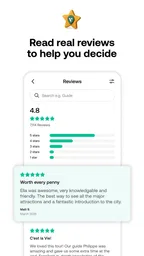
- Verified traveler reviews help set expectations before booking.
- Mobile tickets make entry simpler at many attractions.
- Flexible booking options are available for select experiences.
- Saved activities make it easy to revisit trip ideas.
- Customer support is available if booking issues arise.
What could be better
- Experiences and prices vary widely by destination.
- Some bookings have strict cancellation deadlines.
- Popular tours may sell out during peak travel dates.
- Meeting points can be difficult to find in unfamiliar areas.
- Changes or refunds may depend on individual tour operators.





