



United Airlines review
 Analysis by Appsdrops
Air travel has a way of making a phone feel essential: plans change, gates move, and the detail you need is often the one you did not think to check before leaving home. I find the United Airlines app most useful as a travel companion for keeping United-related information close at hand, rather than as a complete replacement for every travel tool. Its value depends partly on connectivity, so it works best when I treat it as one part of a sensible travel routine—not the only place I keep important details.
When a connection makes the difference
United Airlines is a free travel and local app from United Airlines. Its central appeal is straightforward: it brings useful travel information onto your phone. That matters most during the stretches when you are making decisions—before leaving for the airport, while checking your plans, or when you need to confirm what to do next. The app is available to everyone, and its broad audience makes sense: occasional holiday travelers and frequent United flyers can both benefit from having their airline’s information in one place.
The practical trade-off is that an app is only as helpful as the information you can reach when you need it. Airport and in-flight connectivity can be variable, and a crowded terminal is not the place I would want to discover that I have relied on a live screen without keeping a backup. I recommend checking your itinerary and any important travel details while you have a dependable connection, then keeping essential confirmations accessible in another way as well. That is not a criticism unique to United; it is a sensible habit for any airline app.
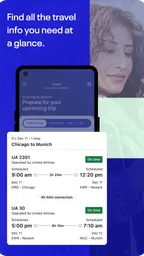
For a realistic example, imagine that you are heading to the airport after work and want to make sure you are still going to the right place and following the latest plan. A quick check before you leave can help you organize the trip around what the app shows, rather than relying on a memory of details you looked at earlier. If something changes while you are on the way, having the airline’s app ready gives you a direct place to check again. I would still avoid treating a single notification or screen as a substitute for paying attention to airport announcements and staff instructions.
The app’s reach suggests that many travelers find it worth keeping around: it has over 10 million installs, a 4.7 average rating, and about 1.1 million ratings. Those figures are reassuring context, not a promise that every journey will be seamless or that the app will suit someone who rarely flies United. The more relevant question is whether your trips involve this airline often enough for its information to earn a place on your phone.
Useful before you leave, and during the journey
I would use it at several points rather than opening it only at the airport. Before travel, check the information you need while you still have time to deal with a change of plan. On travel day, keep the app easy to find so you are not hunting through folders while juggling a bag or walking through a terminal. After a disruption or a long pause between travel stages, check again rather than assuming that an earlier view still reflects what is happening now.
That repeated-check habit is a small but useful workflow. It helps separate two kinds of information: details you can prepare in advance and details that may need a fresh connection. I would also make a point of checking the app before entering a low-signal area, instead of waiting until a question becomes urgent. This is especially helpful if you are traveling with someone else and need to coordinate around the same plan; checking early gives you more time to talk through options instead of making rushed decisions.
On a small screen, in busy places
Airline apps are used in awkward settings: standing in a queue, moving between gates, or trying to read a screen in bright light. That makes quick access and clear habits more valuable than browsing every section. I suggest opening the app before you reach the counter or boarding area, so you can orient yourself without trying to do everything while other people are waiting. If you are helping a less confident traveler, it can also be useful to walk them through where they should look before the travel day becomes hectic.
There is a limit to what any phone app can do in a mobile context. Your battery, screen visibility, network connection, and the pace of airport activity all affect the experience. I would not wait until the last moment to charge a phone or rely on a perfect signal in every part of a journey. Keep the app available, but also make sure you know the basic shape of your trip well enough to continue sensibly if your phone is inconvenient to use for a few minutes.
Compared with a general travel app, United’s app has a narrower purpose: it is most compelling when United is the airline you are dealing with. A general itinerary organizer may be more convenient if you want one place to collect plans from several airlines and other travel providers. On the other hand, a general tool cannot replace the value of going directly to the airline for its own journey information. I would use the United app for United travel and a broader organizer only if managing several providers is a regular part of my trips.
Changes, delays, and getting back on track
Disruption is where a traveler most wants an app to be dependable, but it is also when connectivity and time pressure can make any digital tool frustrating. My best advice is to use the app as a place to check for current information, then act on what you can verify rather than making assumptions based on an old screen. If a connection is weak, try again when you have a better signal and use the airport’s staffed service points or announcements when the matter is urgent. A phone app is useful support, not a guarantee that every problem can be solved from the screen.
A practical recovery routine is to pause, reconnect if possible, review the latest information, and then decide whether you need help from a person. Avoid repeatedly switching between unrelated apps when you are already under pressure; that can make it harder to keep track of what you have confirmed. If traveling with a companion, agree on one person checking the airline information while the other keeps track of bags or the next step. It is a simple division of effort, particularly when a change requires attention in a crowded space.
Another useful trade-off is speed versus certainty. A glance at the app can be faster than searching through old messages, but if the screen does not answer your question, do not keep interpreting it beyond what it actually shows. Confirm important decisions through the appropriate airline or airport channel. I see this as a strength of having the app available and a limitation of relying on any one digital source: it can make checking easier, but it cannot remove the need for judgment.
Using it thoughtfully on mobile data
If you are trying to conserve mobile data, the most sensible approach is to do your planning when you have a stable connection and use the app again when a fresh check matters. I would not assume that a screen will remain current just because it was open earlier. Nor would I depend on unverified offline access. Treat the app as a connected service: check key details ahead of time, and expect to need a connection when you want current information.
This approach is also useful when traveling internationally or using a limited data plan. Before the trip, make sure you understand how you will get online and avoid waiting until a time-sensitive question comes up to discover that data access is inconvenient. If your plan does not include reliable access, keep essential travel confirmations somewhere you can reach without having to reload a page or screen. That backup habit is more dependable than expecting any airline app to cover every network situation.
The app is on version 4.2.103 and requires Android 10 or later. Those details matter if you are setting it up on an older phone shortly before traveling: check compatibility and install it ahead of departure rather than making the airport your testing ground. Since it is free, there is no purchase decision to weigh, but setup time, phone storage, battery, and your willingness to use an airline-specific tool still matter.
Who will get the most from it
I would recommend it to people who fly United and want a direct mobile place to check travel information, especially if they prefer to prepare before reaching the airport. It is also a reasonable choice for occasional travelers who want the airline’s own app available for a particular trip, provided they are comfortable using a phone and have a plan for connectivity. United Airlines has been available since August 23, 2011, and its long presence alongside its current mobile version makes it a familiar option for travelers who prefer dealing with their airline directly.
I would be less enthusiastic about installing it if you almost never fly United, or if your main need is to coordinate a complicated itinerary across several airlines and travel services. In that case, a broader trip organizer may be easier for keeping everything together, while the airline app may still be useful when a United flight is involved. Travelers who do not want to depend on a phone during a journey should also keep their essential details in another accessible form and use staff assistance when needed.
There is a real distinction between having an app and having a complete travel plan. The app can make United information easier to reach, but it does not eliminate airport procedures, network problems, or the need to pay attention when plans change. I like it most when it serves a clear role: check before setting out, revisit it when circumstances call for an update, and use another source of help if the phone does not answer the question.
My connectivity verdict
For United travelers, the app is a practical companion when a working connection is available, but it should not be your only safety net. I would install it before a trip, use it to keep airline information close, and avoid leaving important checks until a moment when signal, time, or battery may be limited. Its strongest case is simple and specific: if United is part of your journey, direct access to the airline’s information can be more convenient than relying entirely on scattered messages or a general travel organizer.
My recommendation is therefore conditional rather than universal. If you fly United, especially more than once in a while, it is an easy tool to justify and costs nothing to try. If you need one hub for every provider, have limited connectivity, or prefer not to manage travel on a phone, pair it with a broader method or skip it until a United trip makes it relevant. That balance is what makes the app useful: it supports a journey without pretending to replace preparation, backup plans, or human help.
What we like
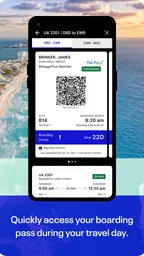
- Mobile boarding passes make airport check-in more convenient.
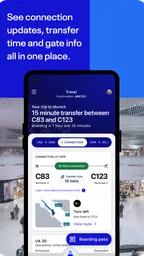
- Flight alerts help travelers stay informed about schedule changes.
- The app supports seat selection on eligible flights.
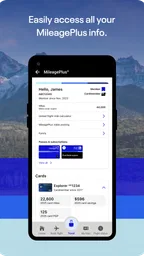
- MileagePlus members can manage their account from the app.
- In-app trip details make itineraries easy to access.
What could be better
- Some features may require a MileagePlus account.
- Flight updates can arrive late during irregular operations.
- The app may use significant battery during travel.
- Not all bookings support every in-app change.
- Some users may find the interface cluttered.





