
UK ETA review
 Analysis by Appsdrops
When I need to sort out a UK travel requirement, I want a clear route through the official process, not another general travel planner. UK ETA is a focused Travel & Local app from UK Visas and Immigration: its job is to help eligible travelers apply for an electronic travel authorisation for a trip to the UK. I see it as a practical administrative tool rather than something I would open throughout a holiday. That distinction matters: it can make one important task easier to handle, but it does not replace checking whether an ETA is the right requirement for your circumstances.
Start with the purpose, then follow the application
The simplest way to use the app is to treat it as a dedicated application channel. Before opening it, I would first establish what travel document and permission apply to my situation, then set aside time to provide the details the application asks for. This avoids beginning in a rush at the airport or while juggling other travel arrangements. The app’s narrow purpose is a strength once you know you need an ETA; it is not a substitute for working out which travel rules apply to you.
UK ETA is free to download, is rated for Everyone, and has passed five million installs. It was released on October 16, 2023, and version 2.42.1068 is the current version identified here. Those details make it a well-established official app, but they do not make every traveler an eligible applicant. I would check the current requirements through official UK guidance before relying on the app, especially if my nationality, travel document, or reason for travel made the situation less straightforward.
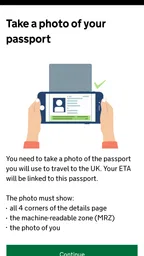
For a straightforward application, my practical advice is to work somewhere calm, keep the relevant travel document close, and read each prompt before moving on. Small mismatches in names or document details can create avoidable stress later. I would also use the same spelling and document information that I plan to use for the journey, rather than relying on memory or copying details from an old booking. This is not a shortcut around the application; it is a way to reduce careless errors while completing it.
The app’s role is specific: it supports an ETA application. It should not be mistaken for a general visa checker, itinerary organiser, airline check-in tool, or guarantee of permission to travel. If you need help deciding between an ETA, a visa, or another requirement, start with official eligibility guidance rather than assuming the app will resolve every immigration question. That boundary is important, and it is where a focused government app differs from a broad travel service.
Prepare before you tap through
I would approach the task like filling in an important form, not like browsing a travel app. Have the document you expect to travel with available, make sure you can read its details clearly, and avoid switching between several people’s information in one sitting. If you are helping a family member, keep each person’s details separate and check whose application is on screen before entering anything. That simple habit is especially useful when coordinating travel for a household.
It is also sensible to leave room for a careful review before submitting. A common travel-planning mistake is to treat an application as a quick box to tick and then discover that a detail was entered incorrectly when there is little time to fix it. I would complete it well before departure, while there is still time to deal with an unexpected snag. The app can support the application process, but good timing and accurate answers remain the traveler’s responsibility.
Settings and habits that reduce friction
There is no reason to hunt for elaborate controls in a tool with one clear administrative purpose. I would first make sure I have the current app version, since updates can improve reliability or adjust the application experience. The version number is 2.42.1068, but what matters in practice is checking the app store for updates before starting an important task rather than assuming an old installation will behave exactly as expected.
My other useful “setting” is really a repeatable personal routine: use a stable internet connection, keep the travel document nearby, and avoid doing the form in a distracting place. If a prompt needs thought, pause instead of guessing. I would not assume that closing the app, changing devices, or reopening an unfinished application will preserve every step unless the app itself makes that clear. When in doubt, follow what the screen says and avoid experimenting with an important submission.
For a household or group trip, I would make a small checklist outside the application: who needs to apply, which travel document each person will use, and whether each person’s details have been checked. This does not add a feature to the app; it prevents the app from becoming the place where the group’s information gets mixed up. A parent handling several applications, for example, can finish one person’s details and verify them before moving to the next, rather than trying to enter everyone’s information from memory in a single sitting.
One easily overlooked distinction is the difference between an application task and the rest of a travel checklist. Booking confirmation, transport arrangements, and entry requirements are related, but they are not interchangeable. I would keep a separate note of what I still need to verify after using the app, including whether the ETA applies to my trip and whether the travel document I intend to carry matches the application. That separation helps prevent the false confidence of thinking that installing an official app means every travel condition has been settled.
Faster patterns for repeat travel planning
Experienced travelers often save time through preparation, not by rushing through official forms. I would keep a reusable pre-trip checklist that reminds me to check eligibility, update the app, gather the right document, and leave time for the application. The checklist can be reused, but the answers should not: each application must be completed with the correct person’s current details. That is a useful trade-off between making the routine faster and avoiding careless copy-and-paste assumptions.
For a work trip, I would handle the ETA task as soon as the UK leg becomes a real plan, rather than leaving it among the final packing jobs. If a colleague is coordinating bookings, I would still personally verify my own document details and application status instead of assuming that a shared itinerary covers immigration requirements. This is a small division of responsibility that avoids a familiar gap: the trip may be organised while each traveler’s individual paperwork remains unfinished.
For a family holiday, the more efficient pattern is to assign one person to coordinate timing while checking each traveler separately. The coordinator can track who has completed the task, but should not treat one person’s application as covering everyone else. I would also avoid entering one family member’s details and then moving quickly through another application without checking the name and document again. Slowing down for that specific check is faster than discovering a mix-up close to departure.
UK ETA is not trying to compete with map apps, hotel platforms, or travel aggregators. Those are useful for comparing plans and managing a trip; this app is for a narrower government process. Compared with searching the web for general advice or relying on a third-party service, using the official app gives the application a direct, focused route. The trade-off is that it is not where I would expect broad travel recommendations or personal support for every complicated immigration situation.
Where the official app has limits
A government application tool can feel more formal than a consumer travel app, and that is appropriate for the task. I would not expect it to explain every edge case in a way that replaces official guidance or professional advice. If your circumstances are unusual, if you are unsure whether you need an ETA, or if your travel purpose does not fit a routine visit, pause and confirm the applicable rules before starting. The app is most useful after the basic eligibility question is clear.
There is also a practical limitation in how narrowly it is designed. Travelers who want one app to manage bookings, check transport, store an itinerary, and handle entry paperwork will need other tools for those jobs. That is not a defect so much as a boundary, but it does mean UK ETA belongs in a small set of travel preparations rather than serving as a complete travel companion. I would keep it for the application and use separate sources for the rest.
The public reception is mixed: the app has a 3.1 average from around 9,100 ratings, alongside roughly 1,000 written reviews. I take that as a reason to approach it with sensible expectations rather than as proof that every user will have the same experience. An official app can be the right channel and still feel demanding when someone is under time pressure, has an older device, or is dealing with an unusual case. A calm setup and early preparation matter more here than clever tapping.
The minimum operating system is version 12. If your device cannot run it, the app is not a practical option on that phone; check the official application route through the app store or official UK guidance instead. For anyone installing it, I would also make sure the developer name is UK Visas and Immigration, particularly when searching among similarly named travel tools. That check helps distinguish the government application app from general information services or unrelated products.
Who should use it, and who should look elsewhere
I would recommend UK ETA to someone who has already established that an ETA applies to their UK travel and wants to complete the process through the official app. It is especially suitable for an organized traveler who can prepare their document, answer carefully, and handle the application ahead of a departure date. The free download and focused purpose make it an easy tool to add to that workflow, though the application itself should still be treated as an important administrative step.
I would not recommend relying on it as the first stop for someone who has not determined what permission they need, or as the only source for a complicated immigration question. A general travel app is better for finding places, planning routes, or coordinating bookings; official guidance is the better starting point for eligibility questions. If your device is below the required operating system, or you simply need broader travel planning, another resource is more appropriate for that part of the job.
My overall view is that UK ETA is most effective when used with a repeatable, low-stress routine: confirm eligibility, update the app, gather the correct travel document, complete one person’s application carefully, and review the result before moving on. It will not organise the trip around you, and it should not be treated as a guarantee that every travel requirement has been covered. But for the specific task it is built to support, I would rather use this focused official app than confuse an application with a generic travel checklist. Preparation and accurate details are the real time-savers.
What we like
- Apply online without visiting a visa office.
- The application process is designed to be completed quickly.
- An approved ETA is linked electronically to your passport.
- One ETA can cover multiple trips during its validity.
- The app guides applicants through the required steps.
What could be better
- An ETA does not guarantee entry at the UK border.
- You need a compatible smartphone to apply through the app.
- Each traveler needs a separate application.
- A new passport requires a new ETA application.
- The application fee is non-refundable if refused.





