



Turo — Better car rental review
 Analysis by Appsdrops
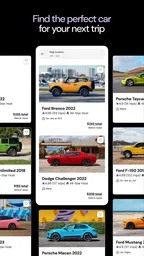
I think of Turo less as a conventional rental counter in my pocket and more as a way to search for a car that suits a particular trip. It is a free travel app from Turo Inc., and its central appeal is the chance to choose a specific car rather than settle for a broad vehicle class. That difference can be meaningful when the car itself affects the plan: perhaps you need room for luggage, want something easier to park, or are looking for a particular kind of drive.
That choice also makes the experience more dependent on details and communication than a simple reservation flow. You are arranging access to an individual vehicle, so checking the listing and keeping the app available around the trip matter. I would consider it when I want more choice than a typical rental desk offers, while remembering that a good match depends on the car, its location, and the arrangements attached to that listing.
Choosing a car is only the beginning
The app sits in the travel and local category, but it addresses a fairly specific need: finding and booking a car through Turo’s marketplace. Rather than treating every vehicle as interchangeable, the experience asks me to compare the actual options available for my plans. That can make browsing more useful, but it also means I should not rush through the decision as if I were selecting only a vehicle class.
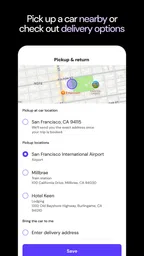
A useful first step is to work backward from the trip. For a city visit, I would prioritize a manageable size and a convenient pickup location. For a weekend with several people and bags, capacity matters more. For a trip with a tight schedule, I would give extra weight to how straightforward the pickup and return arrangements look. The best choice is the car that fits the whole itinerary, not simply the most appealing listing.
The app’s premise is especially helpful when a standard rental option feels too generic. Having a particular vehicle in mind can make the search more personal, and it may help travelers find a style of car that better suits the destination. But specificity cuts both ways: if a chosen vehicle becomes unavailable or does not fit expectations, there may not be an identical substitute waiting in the same category. I would keep a second acceptable option in mind before committing to plans around one car.
Where a live connection matters
Connectivity is part of the practical experience because the app is being used to browse available cars and manage a booking. I would make the important decisions somewhere with a reliable connection, rather than leave comparison and confirmation to a rushed moment on a weak signal. This is not just a matter of convenience: a listing’s details and the arrangements for a particular car deserve enough attention to read carefully.
Before setting off, I would open the trip information and make sure I understand the pickup plan, the location, and any instructions shown for that booking. If something is unclear, it is easier to address it while I have time and a stable connection than when I am already standing outside or trying to coordinate with other travelers. Keeping the relevant trip details accessible in the app is a sensible preparation step, but I would not assume that every part of the experience will work without connectivity.
There is also a timing trade-off. Searching early gives me room to compare options and reconsider a location that looks awkward on a map. Waiting until the last minute may leave less flexibility, especially if the trip depends on one exact vehicle. I would treat the app as part of trip planning, not just something to open at the curb.
Using it in real travel situations
Picture a weekend visit where a train gets you into town, but the place you are staying and the activities you have planned are spread out. I could use the app before traveling to compare cars and pickup locations, then choose an option that makes the rest of the weekend workable. In that situation, the location can matter nearly as much as the vehicle: a car that looks ideal may be a poor fit if getting to it adds a difficult detour.
For a family or group, I would compare the vehicle against the actual luggage and passenger needs rather than rely on a broad impression from a photo. For a solo traveler heading into a dense area, I might make the opposite choice and favor a car that seems easier to handle. These are not details to decide after booking; they are the kinds of practical trade-offs that make browsing individual cars valuable.
Using the app while moving around is less comfortable than planning at home. A traveler may be switching between navigation, messages, and booking information, while also dealing with bags or companions. I would avoid making a complicated change while walking or driving, and instead pause somewhere safe with a connection. That small habit reduces the chance of overlooking an instruction or misunderstanding a location.
When a booking needs attention
A marketplace-style car choice can introduce more coordination than picking up a standard rental from a familiar counter. The car and its arrangements are specific, so I would read the booking information closely and keep an eye on messages or updates related to the trip. If a detail changes, having enough time to respond is better than discovering the issue at the moment the car is needed.
If the app is slow or a connection drops during planning, I would not repeatedly tap through a booking action without checking what has already happened. First, I would regain a reliable connection and review the current trip status. If the situation concerns pickup timing or access, I would use the contact or support options available in the app rather than guess. The practical lesson is to confirm the state of a reservation before making a second attempt that could create confusion.
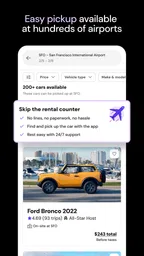
It is also worth building a little slack into the day. If the car is central to reaching an appointment, a flight, or a remote stop, I would avoid arranging the pickup at the last possible minute. That advice applies particularly when the chosen vehicle’s location adds travel time of its own. Turo can broaden the choices, but it cannot make a poorly timed itinerary forgiving.
Using mobile data thoughtfully
For data-conscious use, I would do the heavy browsing and comparison while connected to dependable Wi-Fi, then use mobile data when I need to check trip details or handle something time-sensitive. That is a straightforward way to avoid spending a long stretch loading listings while away from a familiar connection. It also encourages me to decide on the car with care rather than browse endlessly during the trip.
I would not rely on an assumption that all booking information will remain available without a network connection. Before leaving a place with good service, I would review the details I expect to need and make a practical backup of essential travel information where appropriate. The app remains the place to check the current booking, but a traveler should plan for ordinary connectivity gaps rather than assume a phone will always be online.
Data use is only one part of the mobile context. Battery life matters when a phone is also being used for maps and coordination, so I would start the pickup portion of a trip with enough charge and a charging plan if the day will be long. Keeping the phone ready is especially useful when the app is one of several tools involved in getting to the car and completing the journey.
Who will get the most from it
I would recommend considering Turo if choosing the exact vehicle matters to you and you are comfortable comparing individual options. It can suit travelers with a clear idea of what they need, people whose plans do not fit neatly into a standard rental category, and anyone willing to read the pickup details before setting out. Its average rating is 4.9 from around 616,000 ratings, and it has more than 10 million installs, which suggests a broad audience has found the service worth trying.
It is less compelling if your main priority is the simplest possible counter-based rental routine, or if you need an immediate, highly predictable pickup with minimal coordination. A conventional rental company may be a better fit for someone who prefers a familiar desk process or wants to choose from a class of cars rather than evaluate one specific listing. Likewise, travelers with a rigid schedule should be especially careful about location and timing before relying on any particular vehicle.
The app is rated for Everyone, and its current version is 26.45.1, with a minimum operating system requirement of 10. It was released on September 14, 2014. Those details make it easy to identify the current product, but the more important decision is whether its person-to-person vehicle selection suits how you like to travel.
A measured verdict on staying connected
My overall view is that Turo’s most interesting strength—choosing a particular car—also asks for a little more attention from the traveler. The app is most useful when I have time to compare listings, consider the pickup location, and read the arrangements before leaving. Connectivity supports that process, especially when checking details or responding to a change, so I would plan the trip with the app available rather than treat it as a one-time booking screen.
For a traveler who enjoys having a more tailored vehicle choice, that extra planning can feel worthwhile. For someone who wants a quick, conventional rental with as few decisions as possible, a familiar rental counter may be more comfortable. I would use Turo when the car itself is part of the plan, keep a backup option in mind, and make sure I can get online when I need to check the booking. That is a practical balance between the flexibility the app offers and the coordination that comes with choosing an individual car.
What we like
- Browse a wide selection of cars from local hosts.
- Choose pickup options that suit your travel plans.
- Compare vehicle details and prices before booking.
- Find specialty vehicles beyond standard rental choices.
- Manage trip details through the mobile app.
What could be better
- Availability can vary significantly by location.
- Prices may include fees beyond the displayed trip rate.
- Vehicle condition and cleanliness depend on the host.
- Pickup arrangements may require extra coordination.
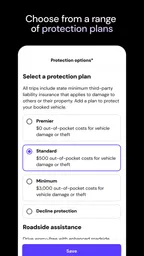
- Cancellation terms can differ between listings.





