
Trusted Traveler review
 Analysis by Appsdrops
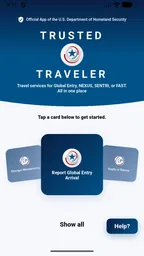
I would approach Trusted Traveler as a practical companion for people who already use, or are considering, U.S. Trusted Traveler Programs—not as a general airport guide. Its focus is narrower and more useful: managing program-related tasks and helping streamline entry processing at airports. If you are flying soon, that distinction matters. The app is most relevant when your trip involves a trusted-traveler benefit; it is not a substitute for airline check-in, a boarding pass, or the usual travel-planning tools.
Published by U.S. Customs and Border Protection, this free Travel & Local app is aimed at everyday travelers who want program management close at hand. I like that the purpose is easy to understand before installing: it is about your Trusted Traveler Programs and airport entry, rather than trying to cover every part of a journey. The audience rating is Everyone, and the app has a 4.9 average from around 2,500 ratings, with over 100,000 installs. Those figures suggest meaningful uptake, though they do not tell me whether the app fits every traveler’s needs.
What to expect from a focused travel companion
Trusted Traveler is best understood as a supporting tool for an existing process. It may help keep program management and airport entry tasks in one place, but I would not assume that installing it automatically enrolls you, grants a travel benefit, or replaces official eligibility and approval steps. Treating it as a convenient access point—not as a shortcut around program requirements—is the clearest way to set expectations.
That narrower role is also its main advantage over broad travel apps. A trip organizer may be better for itineraries, hotel details, and reminders, while an airline app is the natural place for a particular carrier’s check-in and flight updates. Trusted Traveler has a different job: helping with the U.S. government program side of travel. For someone who already needs that, a focused app can be easier to reach for than searching through unrelated travel features.
The app is currently version 1.31.0 and requires Android 9 or later. Before traveling, I would check that the device I plan to carry meets that requirement and that I can sign in successfully. That small check is more useful than waiting until I am in an airport queue to discover I need to update the phone or sort out account access.
Start with the account, not the airport queue
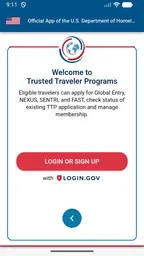
For a first-time user, I would install the app well before departure and begin by following the sign-in or account steps it presents. Keep any relevant program or account details nearby, and use the same information you rely on for official program matters. I would avoid guessing at identity details or creating a second account just because the first attempt feels slow; account mismatches are exactly the sort of issue that is easier to resolve at home than during a travel day.
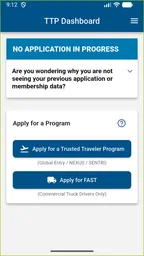
I would also take a moment to distinguish app access from program status. Getting into an app is not the same thing as confirming that a traveler is enrolled, eligible, or ready to use a particular airport process. If you are applying for the first time, still waiting on a program decision, or uncertain about your status, check the relevant official program instructions rather than interpreting an app screen as approval. That is a useful boundary to keep in mind with any government travel tool.
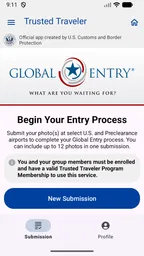
After setup, spend a few minutes exploring the available account and program areas while you have a reliable connection and time to read. I would not tap through quickly just to reach a trip-related screen. Read labels carefully, note what information is attached to your account, and make sure you can return to the relevant part of the app. This is a simple preparation step, but it reduces the chance of fumbling through unfamiliar screens when you are already managing bags, documents, and a departure time.
Make the first useful check before you travel
A realistic first success is not necessarily completing a complicated airport transaction. It can be confirming that you can access the program-management area and understand where to go for your next task. I would do that at home, then revisit the app shortly before departure to make sure I can still reach the information I expect to use. This turns the first meaningful interaction into a calm practice run rather than a last-minute test.
For example, imagine a traveler preparing for an early flight who has not opened the app since installing it. The useful move is to check access the evening before, while there is time to deal with a forgotten credential or an update prompt. On the morning of travel, the phone can then serve as a familiar reference point instead of another unknown. I would still keep required travel documents accessible through the channels I normally rely on; a phone app should not become the only plan for essential travel information.
There is another practical trade-off: a focused app is valuable when its particular program workflow applies, but less valuable if you are simply looking for general airport advice. If your immediate need is a gate change, baggage rule, or airline notification, the airline’s own app or airport information source will usually be the more direct option. Using the right tool for each task keeps Trusted Traveler from becoming a catch-all it was not designed to be.
Where new users can get confused
The biggest potential source of confusion is expecting “trusted traveler” to mean the same thing as a universal fast-pass for every airport and every trip. Program benefits and the processes attached to them depend on the traveler’s situation. I would read the instructions for the specific program involved and follow airport and official guidance on the day. The app can support management and entry processing, but it cannot make every checkpoint, itinerary, or traveler circumstance identical.
It is also worth separating a successful login from a successful travel outcome. A working account does not by itself confirm that a benefit applies to a particular booking, that every companion can use it, or that a traveler can skip other steps. If you are traveling with family or colleagues, I would check each person’s own eligibility and instructions rather than assuming one person’s app access covers the group.
Another sensible precaution is to plan for ordinary phone problems. A low battery, unreliable connectivity, or a device that is not available at the moment you need it can make any mobile-first workflow awkward. I would charge the phone, make sure I know my sign-in method, and keep essential travel documents available in the usual way. That is not a criticism unique to this app; it is simply a better travel habit when a phone is part of the process.
If a screen or instruction does not match what you expect, I would pause rather than infer a policy from a button or label. Use the app’s own guidance and the appropriate official program channel to clarify the issue. For travelers who prefer paper records, avoid using a smartphone for account management, or do not participate in a relevant program, the app may add little to their routine. A standard airline app and conventional document organization may be enough for them.
Who will get the most from it
I would recommend trying Trusted Traveler if you already manage a U.S. Trusted Traveler Program and want a mobile place to handle related tasks. It is especially appealing to frequent flyers who would rather check program matters before leaving home than search for instructions during a busy airport visit. The app is free, which makes trying it a low-cost decision, although the time needed to set up and understand an account is still worth considering.
It is a weaker fit for someone who rarely flies, has no relevant program connection, or only wants a general trip planner. In those cases, installing another travel app may create more clutter than convenience. Likewise, if your priority is airline-specific booking management, a carrier’s own app is likely to answer that need more directly. I see Trusted Traveler as one piece of a travel toolkit, not a replacement for the other pieces.
The developer is U.S. Customs and Border Protection, so the app’s subject is tied to government program administration rather than a private travel service. That makes careful account handling and attention to official instructions particularly important. I would use it for the tasks it is meant to support, keep my account details secure, and avoid treating a brief glance at a screen as a definitive answer to every travel-policy question.
A sensible next step after setup
Once you have checked access and explored the program area, the next step is to make the app part of your pre-trip routine without relying on it for everything. Open it before a relevant journey, review the information and instructions available to you, and resolve account questions while you still have time. Then use your airline’s tools for flight-specific details and follow airport guidance when you arrive. That division of responsibilities is more dependable than expecting one app to cover the entire trip.
Overall, I find Trusted Traveler most useful when a traveler knows why they need it and takes a few minutes to get comfortable before travel day. Its focused purpose is a strength, but that focus also means it will not suit everyone or replace broader travel tools. With version 1.31.0 available for Android 9 and newer, it is a straightforward option to consider if Trusted Traveler Program management is part of your routine. My advice is to install it early, confirm that you can access the relevant account area, and keep official guidance and your usual travel backups close by.
What we like
- Offers a convenient way to access trusted traveler program details.
- May help eligible travelers prepare for enrollment or renewal.
- Useful for checking information while away from a computer.
- Can make travel program research easier to manage.
- A focused resource for travelers exploring expedited screening options.
What could be better
- Program eligibility rules can be difficult to interpret.
- Enrollment may still require an in-person appointment.
- Availability and features may vary by location.
- The app cannot guarantee faster airport screening.
- Some details may change and require verification with official sources.





