




Trip.com: Book Flights, Hotels review
 Analysis by Appsdrops
Planning a trip usually means comparing options while trying to keep costs and details straight. Trip.com is a travel app from Trip.com that brings travel deals and customer service into one place. It is free to download, so trying it does not require an upfront purchase. Whether it earns a spot on your phone depends on how useful its travel offerings are for the way you plan trips.
What free access means
The app is listed as free, which makes the initial decision straightforward: you can install it without paying a download fee. That is useful if you are still deciding where to book or simply want another place to compare travel options. Free access, though, is not the same as a promise that every booking or service connected with travel will cost nothing. I treat the download price and the cost of a trip as separate questions.
That distinction matters with any travel booking app. The value of a service ultimately depends on the options and terms available for the particular trip you are considering. I would review the total shown for a booking and its conditions before committing, rather than assuming that a free app means free travel or automatically cheaper purchases.
The clearest cost advantage is that getting started is free. That lowers the barrier to trying Trip.com and seeing whether its travel deals and customer service suit you. It does not, by itself, establish how much a traveler might save, what a specific booking costs, or whether a particular offer is the best available. Those decisions call for checking the details of the trip in front of you.
A simple way to judge the price
I would use Trip.com as a place to explore and compare, then judge any offer by its complete price and terms. A deal is only worthwhile if it fits your plans, and an attractive first figure may not tell the whole story of a booking. Taking a moment to check the final amount helps keep the free download in perspective: the app costs nothing to install, while travel purchases should be evaluated on their own merits.
This approach also makes the app useful even when you are not ready to book. You can decide whether its presentation and service fit your planning style before treating it as your main travel tool. The important point is not to confuse access with value: free installation is a practical convenience, while the value of a trip depends on what you choose and the terms attached to it.
What value can it bring to trip planning?
The app’s stated focus is travel deals and customer service. That gives it a clear role for people who want to explore travel options through a dedicated service rather than begin every search from scratch. I find that promise appealing because planning is not only about finding an option; it is also about feeling supported when questions arise. The balance between those two parts is what makes a travel app worth keeping around.
Trip.com has a substantial audience, with over 50 million installs and a 4.7 average rating. It also has around 1 million ratings. Those figures suggest that many travelers have chosen to use and rate the app, but they are best treated as context rather than a guarantee of a perfect experience. Travel needs vary, and an app that suits one person may not be the right fit for another.
For me, the practical value is in having another place to check when comparing travel choices. A dedicated travel app can make the planning process feel more focused, especially if you already know you want to look for a deal or would appreciate customer service as part of the experience. The app’s summary emphasizes both, so those are the qualities I would pay attention to when deciding whether it meets my needs.
Deals are only valuable when they fit
“Exclusive travel deals” sounds promising, but a deal is not automatically a good match just because it is presented as an offer. Your dates, destination, preferences, and budget shape what counts as worthwhile. I would compare the full booking details with the alternatives I am considering and ask whether the offer actually works for my plans. That keeps the focus on real usefulness instead of the excitement of a discount label.
Customer service can also add value in a different way from price. When planning a trip, having an award-winning service highlighted by the app may be reassuring, particularly for travelers who appreciate support during the process. Still, service value is personal: some people put a high priority on assistance, while others mainly want to find a suitable option quickly. I would consider both the deal and the support promise rather than judging the app on price language alone.
There is a useful middle ground between relying on one app and ignoring it. Trip.com can be one point of reference in a wider search. If it presents an option that fits your plans and the terms look right, it may offer value; if another choice suits you better, the free download has still made it possible to compare without paying simply to install the app.
Tradeoffs to keep in mind
The main tradeoff is that a free app can be easy to try, but the usefulness of a travel service depends on the booking choices and terms relevant to each trip. The app’s promise of deals does not mean every traveler will find a better price, and a strong overall rating cannot predict how a particular booking will work out for you. I would keep expectations grounded and decide based on the specific options available.
Another consideration is how you prefer to plan. Some travelers like a dedicated app and welcome a service that highlights deals and customer support. Others prefer to compare across several sources before choosing. Trip.com can fit into either approach, but it should not replace careful reading of booking details or your own comparison process. That is not a special drawback so much as a sensible habit for any travel purchase.
The app is rated for everyone, which makes its stated age suitability broad. It was released on July 31, 2013, and its current version is 8.60.0. Those details may help someone checking compatibility or the app’s history, but the most relevant question for everyday use remains whether its travel options and service suit the trip at hand.
Keeping expectations realistic
I would avoid treating ratings, popularity, or the word “exclusive” as a substitute for checking the actual offer. A popular travel app can still present choices that do not suit a particular itinerary or budget. Likewise, a customer-service claim is a useful point of interest, not a reason to skip reviewing the terms of a booking. A little comparison keeps the decision firmly in your hands.
That is why the app’s free status is easiest to appreciate as an invitation to explore, not as proof of savings. There is no download fee, but the overall value comes from what you find and whether the booking works for you. For a careful planner, that is a manageable tradeoff: try the app, compare its options, and make the final call only after reviewing the details.
Who is most likely to get value?
Trip.com may be worth trying if you are actively planning travel and want a dedicated place to look for deals while keeping customer service in view. It can also suit someone who likes to compare options before making a commitment. Since the app is free to install, the initial cost is not a barrier for travelers who simply want to see whether its approach feels convenient.
It may be less compelling for someone who already has a trusted planning routine and sees no reason to add another service. That does not mean the app is poor value; it means value depends on whether it adds something useful to your process. If you rarely plan trips, a travel app may have little immediate benefit. If travel planning is on your mind, having another option to review can be more worthwhile.
For budget-conscious travelers, I would focus less on the word “deal” and more on the complete price and booking conditions. The free download makes it easy to check, but the best choice is the one that fits your needs after comparison. Travelers who place importance on support may also find the customer-service emphasis relevant, while those who primarily want the lowest total should verify that through their own research.
My buy-or-skip verdict
Trip.com is an easy app to consider because downloading it is free and its focus is clear: travel deals and customer service. Its 4.7 average rating and large install base add reassuring context, though they cannot tell you whether a specific offer will be right for your trip. I would treat it as a useful option to compare, not as an automatic shortcut to savings.
My verdict is to give it a try if you are planning a trip and want another place to explore travel choices. There is no upfront download cost, so you can assess whether the experience and available options suit you before deciding how much to rely on it. Just keep the distinction clear: free access is verified, while the value of any travel purchase depends on its own price, fit, and terms.
If you already have a planning method that works, you can skip it without missing a necessary tool. But if you like comparing offers and value customer service as part of travel planning, Trip.com is worth checking out. The sensible approach is simple: use the app to explore, compare the complete details, and book only when the option makes sense for you.
What we like
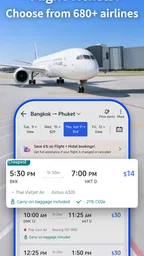
- Compare flight options from multiple airlines in one search.
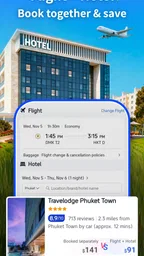
- Filter hotel results by price location and guest ratings.
- Manage bookings and travel details from one account.
- Save selected trips for convenient access while traveling.
- Customer support is available through the app.
What could be better
- Some bookings may include fees or restrictions shown during checkout.
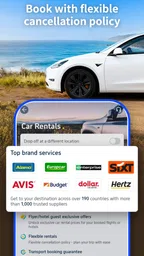
- Flight changes and cancellations depend on the fare rules.
- Hotel room details can vary by property and booking terms.
- Refund processing times may depend on airlines or hotels.
- Prices and availability can change before a booking is confirmed.





