
The Official MTA App review
 Analysis by Appsdrops
When I need to get across New York without guessing whether a train is about to arrive, I want one thing from a transit app: a useful answer quickly. The Official MTA App is built for that job, bringing subway and bus arrival information into an app run by the Metropolitan Transportation Authority. I find it most useful as a practical companion for everyday journeys, rather than a universal trip planner that can replace every map or travel tool.
Using it as a reliable starting point
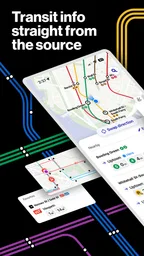
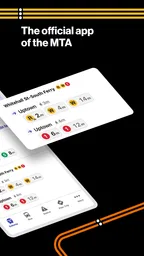
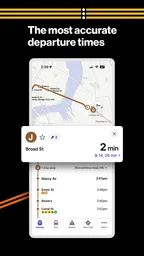
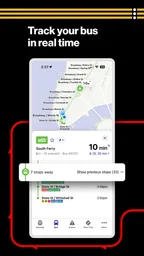
My basic routine is straightforward: check the route before leaving, look at the service information again when a change could affect the trip, and use arrival estimates to decide whether to head out now or wait. That small check can make a difference when a bus is approaching or a subway connection is tight. The app’s focus on live transit information keeps the central task clear instead of burying it beneath unrelated travel content.
For a familiar commute, I would not repeatedly rebuild the whole journey. I would first check the relevant subway or bus information, then keep the route in mind and make a fresh check when conditions or timing matter. For an unfamiliar trip, I would use the app to understand the MTA service picture and pair it with a map if I need help with walking directions or locating an entrance. That division of labor is more dependable than expecting one transit app to answer every question.
A realistic example: I am leaving work and deciding whether to walk to a bus stop or take the subway. I can check the MTA’s current arrival information before committing. If the bus timing makes the walk worthwhile, I go; if it does not, I can switch plans without reaching the stop first. The value is not that every estimate guarantees a perfect journey. It is that I can make a better-informed choice than I could by relying on a timetable remembered from yesterday.
This is a Travel & Local app from the agency that operates the transit network it covers, which gives it a clear role for riders who mainly use MTA buses and subways. It is free, rated for Everyone, and has passed one million installs. The current release is 4.28.0, and the app has been available since July 2, 2018. Those details make it an established option, but what matters more in daily use is whether its information fits the route I am taking.
Make a habit of checking at the right moments
Checking constantly is not the same as checking well. I get more value from a quick look before leaving and another when a service disruption, transfer, or close arrival could change my decision. For a simple trip with plenty of time, repeated refreshes add little. For a connection where missing one train would mean a long wait, a fresh check is more useful than trusting an earlier glance.
I also avoid treating an arrival estimate as a promise. Live information can help me plan, but transit conditions can change between checking the screen and reaching the platform or stop. A sensible habit is to use the estimate as one input, leave some margin when the trip is important, and have a fallback route in mind if a connection is easy to miss.
Settings and choices that affect the experience
I would start by checking the app’s available settings and ensuring that the information I rely on is easy to read in the situation where I use it. A quick glance on the way to a station is different from sitting down to plan a trip at home. Keeping the app focused on the routes and details I actually need can reduce distraction, but I would not assume that a setting exists just because another transit app offers it.
More importantly, I would make a deliberate choice about what I expect the app to do. Its confirmed focus is live subway and bus updates and real-time arrival information. That makes it a natural source for MTA service checks, while a general-purpose map may be better for comparing walking distances, finding a destination, or planning a route that includes several non-MTA legs. Using each tool for its strength is often faster than forcing the MTA app to serve as a complete city guide.
On a regular route, I find it helpful to keep a mental sequence rather than starting from scratch: check the service, confirm the next arrival when timing matters, then reassess if something changes. This is a repeatable habit, not a claim about a special shortcut or hidden function. It also prevents a common mistake: making a decision based on an old estimate after a delay or route change has become relevant.
Faster patterns for repeat trips
Experienced riders can make the app feel quicker by narrowing the question they ask. Instead of opening it and trying to solve the whole day’s travel, I would check one decision at a time: Is the subway running as expected? Is the bus arrival worth waiting for? Should I leave now or take the alternative? That keeps attention on actionable information, especially when a trip is already familiar.
For a journey with a transfer, I would check the first leg before setting out, then verify the next leg when the transfer is approaching. Checking every part too early can create false confidence because the situation may change by the time I reach the connection. This timing is a small but useful trade-off: it means one more check during the trip, but the information is more relevant to the decision I am actually making.
When choosing between bus and subway, I would not compare arrival times alone. The best option depends on where I am starting, how far I need to walk, and whether the route is affected by a service issue. The app can help with the MTA arrival side of that decision; a map or local knowledge can fill in the walking and destination details. That combination is particularly useful for visitors, who may know the destination but not yet know which station entrance or stop makes the most sense.
If I am helping someone else travel, I would use the app to check the relevant service just before they leave and explain a simple backup. That is more helpful than sending a screenshot that may be out of date by the time they see it. The underlying lesson is simple: live transit information works best when it supports a decision, not when it becomes another screen to watch continuously.
Where it fits—and where another option may be better
The MTA app is strongest when the question is about MTA subway or bus service. That direct focus can be preferable to a broad navigation app when I want to consult the agency’s own transit information. A general map, however, may be more convenient if I need door-to-door walking guidance, a broader mix of transport providers, or a quick overview of nearby places. I would keep both types of tool available rather than treating them as competitors with identical jobs.
It is also not the right choice for someone who rarely uses MTA services. A visitor planning a wider trip across different transport networks may get more value from a citywide navigation app as the main planner, then use this one when checking an MTA route. Likewise, someone who wants one screen to handle every part of a journey may find the agency-specific focus limiting, even though it is useful for service details.
The app’s average rating is 3.0 from around 7,600 ratings, with about 2,500 written reviews. I take that as a reason to approach it with realistic expectations, not as proof that every rider will have the same experience. Its one-million-plus installs show that it is widely used, but popularity alone does not tell me whether it will suit my route or habits. I would judge it by whether the live information helps me make a better MTA travel decision.
Limits that matter on a busy travel day
Any live arrival tool has a practical weakness: information is useful only when it is current and when the rider interprets it sensibly. A displayed estimate cannot guarantee that a vehicle will arrive exactly as expected, and a service check made long before departure may no longer answer the question I have at the station. I would avoid planning a close connection with no margin just because the app showed a favorable estimate earlier.
There is also a difference between knowing that a train or bus is due and knowing the best complete route for a specific person. A traveler with luggage, limited time, or an unfamiliar destination may need walking details or a wider route comparison beyond arrival information. I would combine the app with a map for those cases. For a straightforward commute on a known line, that extra planning may be unnecessary; for a complicated first visit, it can be important.
Finally, an official transit app can be valuable without being the smoothest choice for every task. If I am comparing several ways to reach a destination, I may begin in a general navigation app, then turn to the MTA app to check the transit service itself. If my only need is an MTA bus or subway update, I would start here. Knowing which question I am asking avoids much of the frustration people feel when they expect a focused agency app to behave like a full travel concierge.
Who I would recommend it to
I would recommend it to New Yorkers and visitors who use MTA buses or subways and want a direct way to check current arrivals and service. It is especially useful for regular riders who can turn a quick check into a repeatable routine, and for occasional riders who want to verify transit conditions before committing to a route. The fact that it is free also makes it easy to try alongside a general map rather than replacing one immediately.
I would not make it my only travel tool if I needed comprehensive walking directions, planning across multiple transport networks, or a fully guided route from an unfamiliar starting point. In those situations, a broad map app is a better first step, with the MTA app serving as the source I consult for its own transit services. That distinction is the key to getting useful results without expecting too much from either tool.
A practical verdict for everyday riders
My view is that the MTA app earns a place on the phone of anyone who regularly rides MTA buses or subways, provided they use its information as a guide rather than a guarantee. Its value comes from helping me decide when to leave, whether to wait, and when to reconsider a connection. The best routine is modest: check the service before a meaningful travel decision, check again when a transfer or delay makes it worthwhile, and keep a backup for trips where timing is tight.
That approach makes the app more useful than repeatedly refreshing it without a plan. It is an agency-focused transit companion, not a substitute for every map or journey planner. If that is what I need, I would choose it confidently; if I need broader navigation, I would pair it with another tool. For the right rider, that clear division makes it a practical, easy-to-justify addition to an everyday New York travel routine.
What we like
- Real-time arrivals help reduce guesswork while waiting for trains and buses.
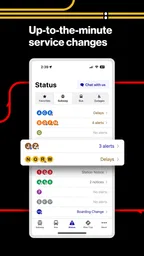
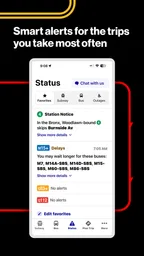
- Service alerts make it easier to spot disruptions before starting a trip.
- A trip planner helps compare routes across multiple transit options.
- Nearby stops are useful when traveling in unfamiliar neighborhoods.
- Fare information helps riders check costs before boarding.
What could be better
- Real-time arrival estimates can be inaccurate during service disruptions.
- The app depends on an internet connection for live travel information.
- Some features may feel less useful to visitors unfamiliar with MTA routes.
- Frequent alerts can make important updates harder to notice.
- The interface may take time to learn for first-time transit riders.





