




Southwest Airlines: Travel App review
 Analysis by Appsdrops
I judge a travel app not only by how quickly it can find a flight, but by whether it stays understandable when I’m tired, distracted, or trying to manage a trip in a hurry. Southwest Airlines is most useful when Southwest is already the airline I plan to fly: it brings airline-related trip tasks together rather than asking me to start with a general travel marketplace. That focus can make the experience more direct, though it also means the app is not a neutral way to compare every carrier.
Developed by Southwest Airlines, this free travel app is for everyone and has been available since November 29, 2010. It has a 4.4 average rating from around 166,000 ratings, with more than 10 million installs. Those figures suggest a widely used tool, but they don’t tell me whether its layout will suit every traveler. I’d make that decision based on how well its airline-centered workflow fits my needs and how comfortably I can use it on my device.
Finding your way through an airline-focused app
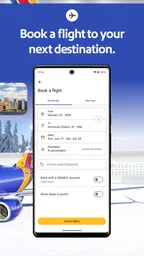
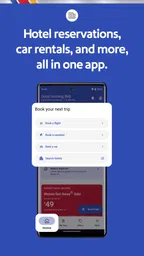
The app’s central appeal is that it keeps Southwest travel in one place. I can use it for flight booking and hotel booking, and its travel focus gives the experience a clearer purpose than a broad app that mixes unrelated services. If I have already chosen Southwest, that narrow scope can reduce the effort of moving between a search service and the airline’s own tools.
There is a trade-off: an airline app naturally guides me toward that airline’s options. When I’m still deciding between carriers, I’d begin with a comparison tool or search across airlines, then use this app once Southwest is a serious choice. That sequence helps prevent convenience from being mistaken for a complete market comparison.
For a traveler who knows the route and wants to handle the booking directly, the airline-specific approach is practical. For someone who wants to weigh several airlines, lodging providers, and travel combinations side by side, a broader travel service may be a better starting point. I see this app as a focused companion to trip planning, not a replacement for every travel tool.
Readable choices matter more than a crowded home screen
Clear navigation is especially important when I’m checking a flight while also keeping an eye on a gate announcement or coordinating with someone else. In that situation, I want the next action to feel obvious: look for the trip task I need, complete it, and get back to what’s happening around me. The airline-specific scope is helpful here because it keeps the app’s purpose easy to understand.
Still, I wouldn’t assume that a familiar brand makes every screen effortless. Travel flows can ask users to move between searching, choosing, and reviewing details, and a person who has difficulty reading dense screens may need to slow down rather than tap through quickly. My practical advice is to explore the booking flow before departure, when there’s time to read each step, instead of learning the layout during a rushed airport moment.
It is also worth separating the app’s overall convenience from the clarity of a particular choice. Booking a flight or hotel involves details that deserve careful review. I’d pause at each confirmation point and check the itinerary information before committing, especially if I’m planning for another person or coordinating several parts of a trip. An app can make a task easier to reach without making the decision itself less important.
Motor and sensory needs change the best way to use it
People use travel apps with different levels of dexterity, vision, hearing, and concentration. I can’t treat one person’s smooth experience as proof that every traveler will find the controls comfortable. If small touch targets, repeated tapping, or reading on a bright screen are difficult for you, try the app in a calm setting before depending on it for a time-sensitive task.
A useful low-pressure test is to open the app at home and see whether you can locate the travel action you expect to use, follow the steps at your own pace, and understand the result. If you use device-level display or interaction settings, check whether those settings make the screens easier to work with. This is a sensible test for any travel app, and it avoids assuming that a particular accessibility feature is present when it may depend on the device or app version.
For sensory overload, the main advantage of a focused airline app is that it has a narrower job than a general travel platform. That can mean fewer unrelated choices competing for attention. But an airport is still a demanding environment: announcements, queues, movement, and time pressure can make even a familiar interface harder to use. I’d prepare the parts of the trip I can handle in advance and avoid leaving every important task until I’m navigating a busy terminal.
When you need the information away from a desk
A realistic use case is a traveler who books a Southwest flight and also wants to arrange lodging without switching immediately to a separate provider. Having flight and hotel booking available in the same airline app can make that planning sequence feel more contained. I’d still compare lodging choices elsewhere if price, location, or a particular type of stay is my main concern; keeping tasks together is convenient, but it doesn’t automatically make one place the best place to shop.
Another useful scenario is planning with a family member. One person can use the app to handle the Southwest-related part of the trip while the other checks broader travel options or helps review details. That division can reduce confusion, but it works best when both people agree on the route and booking choices first. I wouldn’t rely on hurried back-and-forth tapping to settle an itinerary while standing in line.
The app is also a more sensible choice when the trip is already centered on Southwest than when the airline is undecided. If I need a wider comparison before choosing, I’d use an airline-neutral search tool first. If I have settled on Southwest and want a direct airline-specific route into booking tasks, this app is the more natural place to continue.
Where the experience may still create barriers
The most important limitation is scope. This is Southwest Airlines’ app, not a complete view of every airline’s fares and services. Travelers who value cross-carrier comparison above a direct relationship with one airline may find that a broad travel app fits their first step better. The same applies to people whose plans change frequently across providers: a single-airline tool cannot become a universal trip organizer just because it is convenient.
There is also a difference between being able to open an app and being able to complete a task comfortably. A traveler with limited hand movement may find repeated interactions tiring, while someone with low vision may prefer to verify that their device’s display settings work well with the screens. If either concern is important, test a real booking task before relying on the app in a high-pressure setting. That is more useful than assuming an app is accessible simply because it has many users.
Version 13.22.1 is the current version, and the stated minimum operating system is version 8.0. That makes the app relevant to a range of devices, but the operating-system requirement alone doesn’t guarantee the same experience on every phone. I’d keep my device’s software current where possible and check the app store on my own device before travel, particularly if I’m using an older handset.
The age rating is Everyone, which makes the app broadly suitable from a content-rating perspective. That should not be confused with a promise that every interface will work equally well for every age or ability. A child, an older traveler, or someone who needs help with digital tasks may still benefit from a companion reviewing booking details and confirming the plan together.
A practical routine for a less stressful trip
I’d use the app in two stages. Before travel, I would explore the relevant booking steps, review the itinerary carefully, and make sure I know where to return for Southwest tasks. On the day of travel, I’d use it for the airline-specific actions I have already learned rather than trying to understand the whole app while moving through a crowded airport.
If I’m helping someone who finds screens challenging, I’d agree on who is making each decision before opening the app. One person can read and confirm details aloud while the other checks that the intended flight or lodging choice is correct. This simple division is valuable because travel mistakes often come from haste or mismatched expectations, not just confusing controls.
I would also keep a fallback plan for essential information. A phone battery can run low, a screen can be difficult to read in certain light, and a traveler may need help from another person. Having the important trip details available in a way that works for you—whether that means a written note or a trusted travel companion—makes the app a helpful tool rather than the only point of access.
Who should choose it, and who should look elsewhere?
Southwest Airlines is a good fit for travelers who have chosen Southwest and want a direct way to handle airline-related planning, including flight and hotel booking. I’d especially consider it if I prefer keeping the airline portion of a trip in the airline’s own app rather than starting every task in a general travel marketplace.
I would not make it my only planning tool if I’m still comparing carriers, looking for a broad range of lodging choices, or building a trip that depends on several providers. A general travel app or airline-comparison service is better for those jobs. I’d also advise anyone with particular motor, vision, or sensory needs to test the actual workflow on their device before a trip, rather than relying on reputation or popularity as a substitute for a personal check.
Overall, I see this as a focused and useful travel app whose strongest quality is its clear connection to Southwest travel. Its airline-centered approach can make familiar tasks feel more contained, while its limited scope means it won’t suit every planning style. If the airline matches your trip and the interface works comfortably for you, it is worth keeping at hand; if flexibility across providers is your priority, use it alongside a broader option rather than asking it to do everything.
What we like
- Mobile boarding passes make airport check-in more convenient.
- Flight status alerts help travelers stay informed about schedule changes.
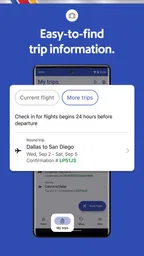
- The app supports booking flights and managing existing reservations.
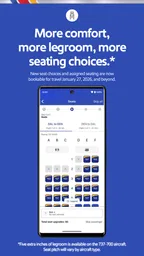
- Users can check in and select seats from their mobile device.
- Rapid Rewards members can access account details and track points.
What could be better
- Some changes to a reservation may require contacting customer support.
- App performance can vary with device compatibility and network quality.
- Seat selection options depend on the fare and available inventory.
- Flight notifications may arrive late during busy travel periods.
- The app is mainly useful for travelers flying with Southwest.





