





Rover – Pet Sitters review
 Analysis by Appsdrops
Finding someone to care for a pet is rarely just a scheduling problem. You want a person who can handle your animal’s routines, quirks, and comfort level—not simply someone who is free. Rover – Pet Sitters is built around that decision: it helps pet owners look for a sitter or dog walker who seems like a suitable match, then gives them a place to arrange the next steps. I see its value less as a shortcut to instant trust and more as a way to make the search and comparison process less scattered.
From a care need to a shortlist
My starting point with Rover would be a specific need, not a vague search for “pet care.” A weekday walk for an energetic dog, a drop-in visit for a cat, and care while you travel are different jobs. Thinking through the routine first makes it easier to judge whether a potential caregiver fits your pet rather than choosing based on availability alone.
Rover is a free Travel & Local app from Rover.com, and its focus is connecting pet owners with sitters and dog walkers. It has a 4.6 average from around 49,000 ratings, with more than 5 million installs. Those figures suggest a well-established service, but they should not substitute for checking the individual caregiver. The person looking after your pet is the part of the experience that matters most.
I would begin by writing down the practical details that are easy to forget in a quick conversation: meal timing, medication instructions, leash habits, how your pet reacts to strangers, and what signs mean they are stressed. This is a useful step even before opening the app. A clear description helps you assess whether a sitter understands the job, and it also makes it less likely that an important detail gets lost during a handoff.
When comparing candidates, I would look for evidence that relates to my own pet’s needs. A caregiver who seems comfortable with dogs in general may not be the right choice for a nervous rescue dog, a senior animal, or a pet with a particular routine. The useful question is not simply “Do they like pets?” but “Can they follow this routine reliably, and can I communicate with them comfortably?”
Choose the service around the pet’s routine
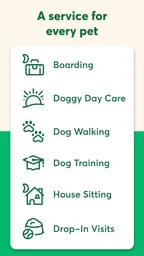
Before arranging care, decide what kind of support would actually keep your pet settled. A dog that needs exercise and company may suit a walking arrangement, while an animal that is happiest at home may be better served by visits or a sitter arrangement that matches the owner’s plans. Rover’s broad purpose is clear, but the right choice depends on the animal, the length of the absence, and how much change the pet tolerates.
For a first-time user, I would avoid booking the most complicated care need in a rush. If you are planning a trip, begin the search early enough to ask questions and compare options. If the need is a regular weekday walk, make the schedule and expectations explicit before relying on it. The app can help organize the search, but it cannot decide whether your pet will feel at ease with a particular person.
One practical tip is to separate essential requirements from preferences. “Can follow medication instructions” or “is comfortable with a dog that pulls” may be essential; a preferred time window may be flexible. This gives you a clearer way to compare candidates and prevents a polished profile from outweighing the details that affect your pet’s daily welfare.
Make the handoff concrete
The most important part of pet care often happens after you have chosen someone. I would treat the handoff as a short briefing rather than assuming that a booking alone communicates everything. Explain the normal routine, where supplies are kept, which behaviors are unusual, and how you want the caregiver to contact you if something changes. Clear instructions reduce guesswork for both the sitter and the pet.
A realistic example is a Friday departure for a weekend away. I would first decide whether my dog needs a walk, a visit, or more sustained care, then look for someone whose experience and schedule make sense. Before leaving, I would share the dog’s usual feeding and walking routine, point out any triggers, and make sure the caregiver knows what to do if the dog refuses food or seems unwell. That preparation is not a special feature of an app; it is the difference between a smooth arrangement and a stressful one.
For a cat, the priorities may be almost the reverse. A cat that dislikes unfamiliar people might need quiet, predictable visits rather than extra interaction. I would explain how much contact the cat welcomes and what normal behavior looks like, so a sitter does not mistake a shy temperament for a crisis—or overlook a genuine change. Rover can help locate a person, but owners still need to translate their pet’s habits into usable instructions.
It is also worth deciding in advance how much reassurance you need while away. Some owners want a brief update; others are comfortable with minimal contact once the plan is clear. State your preference directly. A mismatch in communication style can create unnecessary worry even when the caregiver is doing a good job.
What the process can and cannot settle
The advantage over asking around in a neighborhood group or relying only on personal referrals is that Rover gives the search a dedicated place. Instead of starting from a blank page, you can look for care through a service built specifically around pet sitters and walkers. Referrals may still be better if a trusted friend can recommend someone who already knows your animal, but that option depends on having the right connection.
Compared with arranging care informally by text, an app-centered search can feel more structured. The trade-off is that a listing and a promising first exchange cannot fully show how a person will respond to your pet in a real situation. I would use Rover to find and evaluate possibilities, then use direct questions and a careful handoff to make the decision. It is a tool for narrowing the field, not a substitute for judgment.
It may also be a poor fit if you need guaranteed last-minute coverage, have a pet with complex medical needs, or are unwilling to spend time explaining routines and assessing a caregiver. In those cases, a veterinarian’s recommendation, a specialist, or someone your pet already knows may be a safer starting point. The convenience of a search does not make every arrangement appropriate for every animal.
Owners should also think about contingency plans. If a caregiver cannot make a visit or your travel schedule changes, know who you would contact and what backup care is available. That is not a reason to avoid the app; it is ordinary planning for any arrangement where an animal depends on another person. The more important the care window, the less I would rely on a single untested plan.
Where the workflow can break
The biggest friction is the human part of the process. A search can produce candidates, but comparing them takes attention, and two people who appear suitable may communicate very differently. If replies are unclear or a caregiver seems impatient with reasonable questions, I would keep looking. Ease of booking is not worth the unease of leaving important expectations unresolved.
Another point of friction is the gap between what an owner considers obvious and what a new caregiver actually knows. “He is friendly” does not explain whether a dog jumps on visitors, guards food, or needs time before accepting a leash. Specific examples are more useful than broad labels. I would describe what the pet does in ordinary situations and what response works, rather than expecting a sitter to infer it.
There is also a genuine trade-off between convenience and continuity. A one-off booking may solve an immediate problem, but a pet that thrives on routine may do better with a caregiver who can become familiar over time. If you expect to need recurring walks or visits, I would judge candidates partly on whether the arrangement seems sustainable, not just whether it fills the next slot.
Rover is rated for Everyone, and it is free to download. It was released on August 14, 2013, and the current version is 26.1028.02, with Android 12 as the minimum operating system. The developer is Rover.com. Those details make it straightforward to identify the app, while the decision that deserves most care remains the match between your pet and the person you choose.
Who I would recommend it to
I would recommend Rover to owners who want a focused place to search for pet care and are prepared to vet the people they find. It is especially useful when you do not already have a dependable sitter, when a regular walking need is becoming hard to coordinate, or when travel makes a clear care plan essential. Its strongest role is helping turn an open-ended search into a shortlist and a conversation.
I would be more cautious if my pet were highly anxious, had specialized care requirements, or struggled with unfamiliar people. In those situations, I would favor a known caregiver or seek a recommendation from someone who understands the animal’s needs, then consider Rover only if I could thoroughly assess the fit. An app can make the search easier, but it cannot remove the need to protect a pet’s comfort and safety.
My overall view is that Rover – Pet Sitters is most helpful when you use it as the beginning of a thoughtful care workflow: define the need, compare candidates against your pet’s real routine, ask direct questions, and make the handoff explicit. It is not a guarantee that every match will work, and it is not a replacement for a trusted personal recommendation when one is available. But for owners who need a practical way to find and assess sitters or dog walkers, it offers a sensible starting point—provided the final decision is based on the caregiver, not just the convenience of finding one.
What we like
- Browse sitter profiles with photos and experience details.
- Request in-home pet care through the app.
- Message sitters to discuss your pet’s needs.
- Book care for dogs and cats.
- Use sitter reviews to compare providers.
What could be better
- Sitter availability varies by location.
- Care options can differ between sitters.
- Prices are set by individual sitters.
- A meet-and-greet may be needed before booking.
- Finding a suitable sitter can take time.





