



Priceline: Hotel, Flight & Car review
 Analysis by Appsdrops
I think of Priceline: Hotel, Flight & Car as a practical place to begin when a trip involves more than one booking decision. Its focus is travel reservations, and the app brings hotels, flights, rental cars, and packages together instead of making me start with a separate service for each. That is useful when I am still comparing possibilities, though it does not mean every option will suit every traveler or that a bundled itinerary is automatically the best deal.
Putting trust in a travel-booking app
Travel bookings involve consequential choices: dates, passenger details, accommodation terms, and payment. I would treat this app as a booking tool to use thoughtfully, not as a reason to rush through checkout. Priceline is developed by priceline.com, is free to download, and sits in the travel and local category. Its age rating is Everyone, but that describes the app’s content rating, not whether a particular booking is appropriate for every traveler.
The scale of its audience is one useful point of context. Priceline has over 10 million installs and an average rating of 4.8 from around 614,000 ratings, alongside roughly 63,000 written reviews. Those figures suggest that many people use and rate it, but popularity is not a substitute for checking the details of an individual hotel, flight, car, or package. I would still read the conditions attached to the exact option I plan to book.
The app has been available since November 10, 2010, and its current version is 18.9.410. It requires Android 8.0 or later. That makes compatibility worth checking before relying on it for a trip, particularly if you are keeping an older device. The app is free, but that should not be confused with the cost of travel: the total you pay depends on the booking you select and its terms.
What the combined search is good for
The main advantage I see is breadth at the planning stage. If I know roughly when and where I want to travel but have not decided where to stay or how to get around, having several travel categories in one app can help me explore the shape of the trip. I can consider lodging alongside transport rather than building a plan from unrelated searches and trying to reconcile them later.
A realistic use case is a weekend trip where my arrival time, hotel location, and need for a rental car all affect one another. I would use Priceline to compare possibilities, then check whether a hotel’s location makes the car necessary at all. That simple sequence can prevent a common planning mistake: reserving transport by habit before considering whether the stay is walkable or well placed for the trip.
Packages may also be worth investigating when I am open to combining parts of a trip. I would treat a package as another option to compare, not as an automatic shortcut to savings. The useful question is whether its included arrangements match my actual dates and preferences. If I need flexibility, a carefully chosen separate booking may be a better fit than a combination that looks tidy at first glance.
Comparing choices without rushing
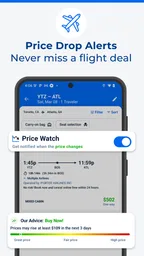
For hotels, flights, and cars, I would compare the details that change the real value of an offer, not just its headline price. A cheaper hotel may be less convenient for my plans; a flight may have timing or connection trade-offs; a rental car may not suit the pickup and return schedule I need. The app is most helpful when I use it to identify candidates and then evaluate them against those practical needs.
Compared with opening separate hotel, airline, and car-rental apps immediately, Priceline offers a broader starting point. That can save effort when I am still deciding what kind of trip makes sense. Dedicated providers or other travel services may be preferable when I already know exactly which airline, property, or rental company I want, or when I want to focus closely on one provider’s options and booking terms.
I would not assume that a single search view will answer every question that matters. Before paying, I would review the selected itinerary and the conditions presented for that specific reservation. In particular, I would check dates, traveler details, locations, and any restrictions that could affect a change of plans. This is not needless caution: a reservation that is unsuitable on one key condition can be poor value even if its price initially catches my eye.
Controls, choices, and careful handling
When an app is involved in travel planning, I want to distinguish visible booking choices from claims about privacy or security. I can assess the options shown to me and decide whether a reservation fits, but I should not infer permissions, data practices, or account controls without seeing them directly. I recommend reviewing the app’s permission prompts and any account or privacy settings available on your device, and making choices based on what they actually say.
One useful habit is to pause before granting a permission that does not seem necessary for the task at hand. If a prompt appears, I would read its explanation and decide whether to allow it, deny it, or revisit the choice later through the device’s settings where available. That is a general way to retain control; it is not a claim about which permissions Priceline requests or how it handles information.
Travel searches can also bring me to a data-sensitive moment before I am ready to book. I might be checking dates and destinations only to understand the likely shape of a trip. In that situation, I would avoid entering personal details until I have chosen an option worth pursuing, and I would review each screen before submitting information. The practical benefit is simple: I do not need to treat early browsing as a commitment to complete a reservation.
At checkout, I would slow down enough to verify the traveler names and itinerary. That matters especially when booking for someone else or coordinating a group, where a small mismatch can be easy to miss. I would also make sure I understand the selected option’s terms before confirming. If I am unsure about a condition, I would seek clarification through the appropriate booking or provider channel rather than assume that another choice will be interchangeable.
Who will get the most from it
I would recommend Priceline to travelers who want one app for exploring several parts of a trip, especially those who are flexible about which hotel, flight, or car option they choose. It can be useful for comparing a few possible trip shapes before making a final plan. Someone organizing a short getaway, for example, may find it easier to weigh a hotel stay and transport together than to begin with a fixed assumption about each.
It may be less suitable for someone who has already committed to a particular provider, needs highly specific arrangements, or prefers to manage each booking directly with the airline, hotel, or rental company. In those cases, a focused provider app may make the relevant details easier to concentrate on. Likewise, if you find multiple travel categories distracting, a dedicated search for the one item you need could be a calmer way to decide.
The app is free, which makes it straightforward to try as a planning aid, but I would judge it by the actual choices and terms available for my own itinerary. A strong rating and a large user base may reassure me that it is widely used; they do not remove the need to compare options or check a booking carefully. I see its value as convenience and range, not as a guarantee that the first result is the right one.
A cautious recommendation for trip planning
My overall view is positive, with a clear qualification: Priceline is most useful when I approach it as a flexible travel marketplace and keep control of the decision. It brings flights, hotels, cars, and packages into a single planning experience, which can make early comparison less fragmented. Its strongest use case is the traveler who has a destination or rough plan but still wants to test different combinations before settling on one.
I would open it when I want to explore options, compare how different parts of a trip fit together, or check whether a package deserves consideration. I would switch to a dedicated provider or another focused alternative when my priorities are narrow, when I need a provider-specific detail, or when its available choices do not fit my requirements. Either way, I would verify the itinerary, terms, and final selection before confirming.
For me, the best way to use Priceline is to let it broaden the search without letting convenience replace judgment. Keep browsing distinct from booking, make deliberate choices about permissions and personal details, and take a final look at every reservation before submitting it. If that measured approach suits you, this well-established travel app is a useful starting point; if you want a single provider or a tightly specialized booking process, a more focused service may serve you better.
What we like
- Compare hotel prices and deals in one place
- Bundle hotels and flights to find potential savings
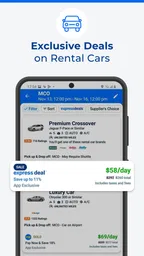
- Use Express Deals for discounted travel bookings
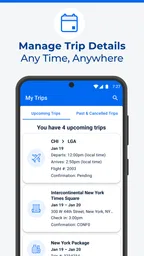
- Manage hotel flight and car reservations in the app
- Browse rental car options alongside travel plans
What could be better
- Express Deals reveal key details only after booking
- Some reservations may have strict cancellation rules
- Prices and availability can change before checkout
- Customer support experiences may vary by booking
- Bundled bookings can be harder to change separately





