


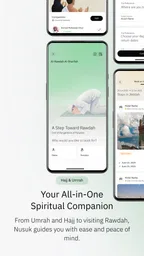
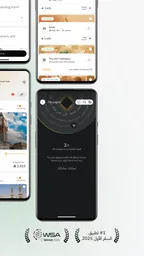
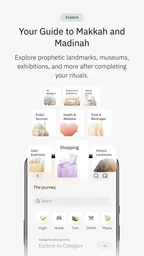
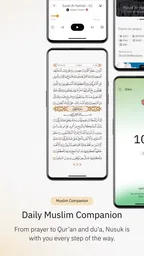


Nusuk | نسك review
 Analysis by Appsdrops
I would treat Nusuk as a practical companion for arranging and managing a journey connected with Hajj or Umrah, not as a general-purpose travel planner. That distinction matters: the most useful reason to install it is its connection to the pilgrimage journey, while ordinary trip details may still call for other tools. My advice is to get familiar with it before you are busy moving between places, so you can understand its role while you have time to check each screen calmly.
Building a calm baseline workflow
Nusuk is a free Travel & Local app from the Ministry of Hajj and Umra. Its focus makes it more relevant to pilgrims than a map or broad travel app, but it is not a replacement for every part of trip planning. I would begin by installing it, opening the available sections, and identifying which parts relate directly to the arrangements I need. That simple orientation is more useful than tapping around under time pressure.
A sensible first session is a short, deliberate one. Check what the app presents for your journey, read any on-screen instructions carefully, and note which details you may need to revisit. I would avoid assuming that every screen applies to every traveler or every stage of a trip. Follow the instructions shown for your own circumstances, and keep any separate travel documents or confirmations organized in the places you normally use.
This approach is especially helpful if you are preparing for a group trip. Rather than having one person rush through the app and explain it from memory, each traveler can get comfortable with the relevant screens. If a family member is helping someone less confident with phones, I would sit together and walk through the actual steps instead of relying on a general description. That reduces confusion without treating the app as a substitute for official instructions.
The app has a 4.2 average from around 265,000 ratings, and it has passed 10 million installs. Those figures suggest that it is widely used, but popularity alone does not tell me whether a particular workflow will suit you. I would judge it by whether the sections you need are clear and whether you can reliably return to them when your plans become busy.
Use it alongside, not instead of, your whole travel kit
For a realistic scenario, imagine checking your arrangements the evening before a planned outing. I would open Nusuk while connected, review the relevant information, and make sure I understand what I need to do next. Then I would keep directions, accommodation details, and other general travel notes in the tools already suited to those jobs. This division of labor is less elegant than forcing everything into one app, but it is easier to trust.
Compared with a general maps app, Nusuk is valuable for its pilgrimage-specific purpose rather than broad navigation. Compared with a travel organizer, its appeal is not that it handles every booking or itinerary detail, but that it is built for the Hajj and Umrah context. If your trip is ordinary sightseeing with no pilgrimage-related needs, a maps app and a standard itinerary tool are likely to be more relevant day to day.
Check the practical details before the journey
The app is free and rated for Everyone, which makes it straightforward to consider for a household or travel group. Its current version is 17.6.2, and it requires Android 8.0 or later. If you are helping a relative prepare, check that their phone meets that minimum before relying on the app. I would also install it well ahead of departure, rather than making the first launch part of an already stressful travel day.
After installing, take a moment to make sure the app opens and that you can move between its relevant areas. If you are responsible for assisting another traveler, let them handle the phone during this practice run. Seeing whether they can find their way back to the information they need is more useful than simply confirming that the app is present.
Settings and habits worth checking
I would begin with the app’s own settings and device settings, but only change options whose purpose is clear. Check that the language and display choices work for the person using the phone, and review any notification preferences the app makes available. I would not turn on every alert by default: keep those that could help with an important step, and avoid adding noise that may make useful prompts easier to miss.
Another good habit is to check that the phone itself is ready for use: the app is installed, the device has enough battery for the day, and the traveler knows how to unlock it and return to the app. These are not special Nusuk features; they are ordinary preparations that make any travel app more dependable. If several people are traveling together, each person should know how to access their own device rather than depending on one shared phone.
For a user who prefers a less cluttered home screen, placing the app somewhere easy to find can save a small but meaningful amount of fumbling. I would also avoid changing system settings or granting access without understanding the prompt. When an app asks for a choice, read the explanation and decide based on what you actually need. Familiarity with the interface is a better shortcut than guessing at permissions or toggling options indiscriminately.
Faster patterns without relying on tricks
The most useful speed improvement is a repeatable routine. When you need to check something, open Nusuk, go to the relevant area, read the instructions, and close it only after you know what action follows. Repeating that sequence helps you remember where information lives. It is a practical advantage for anyone who expects to use the app during a crowded or tiring day, even if it does not involve a special shortcut.
I would also separate preparation from last-minute checking. During a quiet moment, explore the sections that matter to your trip and make a brief personal note of where to return. On the day itself, you can go straight to the area you already recognize instead of exploring the whole interface again. If you travel with someone who may need help, agree on a simple way to ask for assistance and practice the same route through the app together.
One trade-off is that the app’s specialized focus can make it less useful as a universal home for travel information. I would not duplicate every itinerary detail inside it unless the app clearly supports that task. Keeping a concise, separate record of non-pilgrimage essentials—such as where you are staying or how your group plans to meet—can make the overall setup easier to understand. The point is not to create more administration, but to give each tool a clear job.
Likewise, do not assume that opening an app replaces checking current instructions. Before acting on anything important, read the text displayed in Nusuk and make sure it applies to your situation. If your question concerns a personal or changing arrangement, use the appropriate official channel rather than treating an old note or a remembered screen as definitive. That caution is especially worthwhile when several travelers have different needs.
Where the limits matter
Nusuk is not the right choice as your only travel app if you need broad, flexible navigation, a complete itinerary manager, or a place for every booking and reservation. A maps app is better suited to finding and following routes; a dedicated organizer may be better for keeping general trip details together. I would use those alongside Nusuk when the trip calls for them, not expect one pilgrimage-focused app to cover every travel task.
There is also a learning curve for anyone who is not comfortable navigating apps. The best solution is not to hand over the phone and hope the interface feels obvious. Give the traveler a calm practice session, let them repeat the steps, and write down a simple reminder if that helps. If they still find it difficult, a trusted companion can provide support, while the traveler keeps control of their own device and information where possible.
People with older phones should check compatibility before making plans around it: the minimum Android requirement is version 8.0. The app is also available in a rapidly changing travel context, so I would avoid treating a past visit or someone else’s experience as a guarantee that the same screen or process will apply to you. Recheck the app when preparing for your own journey and follow the instructions it presents at that time.
Developed by the Ministry of Hajj and Umra, the app has a clear institutional focus, which is a meaningful reason to consider it for pilgrimage-related use. Still, I would not infer that every travel question belongs inside it. Its usefulness depends on matching its purpose to your needs and keeping other reliable tools available for the tasks it is not designed to handle.
Who I would recommend it to
I would recommend Nusuk to people preparing for Hajj or Umrah who want a dedicated app to consult during their journey, especially those who are willing to learn the relevant sections before departure. It can also be useful for family members helping a traveler prepare, provided they practice together and do not make the less confident person dependent on someone else to operate the phone.
I would be less likely to recommend it to someone who has no pilgrimage-related use for it, or to a traveler expecting a single app to handle every route, booking, and personal reminder. In those cases, general travel tools will do more of the everyday work. For pilgrims, though, it makes sense as one part of a small, intentional set of tools rather than a catch-all solution.
A measured verdict on using it well
My strongest recommendation is to make Nusuk part of your preparation, not something you first explore in the middle of a busy day. Install it early, check that it runs on the phone you will carry, learn the sections that apply to you, and decide which other apps will cover ordinary travel needs. Those habits make a specialized tool easier to use without relying on imagined shortcuts or treating it as a complete travel system.
Nusuk is worth considering when its pilgrimage focus matches your plans. Its scale—more than 10 million installs—and its substantial rating history make it a familiar option, but the real test is whether its instructions and sections help with your own journey. My verdict is positive with a clear boundary: use it for the purpose it serves, prepare before you need it, and keep general navigation and trip organization in tools built for those jobs.
What we like
- Combines key pilgrimage services in one app.
- Supports Arabic and English for a wider range of visitors.
- Official platform helps users access trusted pilgrimage information.
- Digital permits can make required bookings easier to manage.
- Useful for checking services before and during a pilgrimage.
What could be better
- Some services may only be available during specific periods.
- Booking availability can be limited during peak pilgrimage seasons.
- Account setup may require personal details and verification.
- Features may vary depending on location and eligibility.
- A stable internet connection is needed for most app services.





