

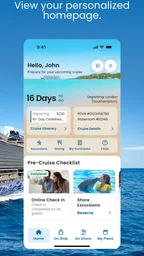





Norwegian Cruise Line review
 Analysis by Appsdrops
Choosing a cruise companion app is less about collecting another travel tool and more about deciding where you want your trip information to live. Norwegian Cruise Line is aimed at people whose vacation is built around a Norwegian Cruise Line sailing. I would consider it if I wanted a single cruise-focused place to start planning and keep the company’s travel experience close at hand; I would not choose it as my general-purpose travel organizer.
That distinction matters. A cruise has a different rhythm from a city break: plans are tied to a ship and a sailing, and travelers may need to revisit trip details at several points before departure. A cruise-line app can make sense as a companion to that specific journey, while a broader travel app is usually the better hub for a trip involving several airlines, hotels, or providers.
How to decide whether it belongs on your phone
Start with the trip you are taking. If Norwegian Cruise Line is the company arranging your cruise, its app is the natural place to investigate first. If you are only comparing cruise options, traveling with another operator, or looking for an app to manage unrelated bookings, its focus is a limitation rather than a benefit.
I would also think about how you prefer to plan. Some travelers want one dedicated app for each provider; others would rather keep every reservation in a general travel organizer, email, or calendar. The dedicated approach can make a cruise feel easier to follow, but it also means information may be spread across several apps when the rest of your holiday involves separate bookings.
Norwegian Cruise Line is a free travel app from Norwegian Cruise Line Holdings LTD. It has an average rating of 4.8 from around 40,000 ratings, with about 2,300 written reviews and over one million installs. Those figures suggest that many travelers have found it worth keeping, though they cannot tell me whether it suits a particular sailing or planning style.
The app is rated for Everyone, and its current version is 1.46.0. It was released on August 8, 2024, and requires Android 7.0 or later. For an iPhone user, the practical step is to check the app store listing for device compatibility before relying on it; I would not assume that Android requirements apply to iOS.
Why a cruise-specific app can be useful
The strongest reason to use a cruise-line app is relevance. A general travel planner may be good at collecting flights and hotel reservations, but it is not necessarily built around the relationship between a passenger and a cruise operator. A dedicated app is a more sensible starting point when the cruise itself is the center of the trip.
My useful planning habit would be to install it well before departure, open it while I still have time to sort out any account or booking questions, and then check it again as the trip approaches. That is not a claim about a particular feature; it is a way to avoid discovering too late that I need to revisit a login, booking detail, or device setting.
There is also a practical case for keeping the app separate from a crowded inbox. Cruise planning can involve information arriving at different times, and an app made for the cruise company may be easier to return to than searching through unrelated messages. I would still keep important confirmations somewhere I can access independently, especially when traveling with someone who may need the same details.
A less obvious advantage of a dedicated tool is that it can help keep the cruise portion of a mixed holiday mentally separate. If I were flying to a port and staying overnight first, I would use a general organizer for the flight and hotel, then treat the Norwegian app as the cruise-specific companion. That division is often clearer than trying to force one app to be equally useful for every part of the journey.
Where it may not be the best fit
The app’s focus is also its main trade-off. If you want one place to compare prices, manage bookings across several travel companies, and arrange a whole multi-city itinerary, a general travel platform is more likely to match that job. Norwegian Cruise Line is not a substitute for an airline app, a hotel booking tool, or a broad itinerary manager simply because it sits in the travel category.
It may also be unnecessary if you prefer paper records or already have a reliable routine for keeping cruise details in email and a calendar. I would not install a dedicated app just because it exists. The case is strongest when you expect to refer to cruise-related information often enough that having a company-specific companion is more convenient than searching elsewhere.
Travelers sailing with another cruise company should look to that company’s own app or the tools they already use. A Norwegian-focused app is not a neutral cruise dashboard for every operator. Likewise, someone who only wants destination maps, local recommendations, or a general trip checklist may get more value from a local travel guide or a flexible planner.
There is a small but real organizational cost to using it: every dedicated travel app adds another place to check, update, and remember. Before a trip, I would decide which app is the source for each kind of information rather than copying everything into several places. For example, I might keep the cruise relationship in this app, transport in the relevant provider’s app, and my overall schedule in a calendar.
A realistic way to use it before and during a trip
Imagine I am preparing for a cruise and have booked a flight and a night near the departure port separately. I would first install Norwegian Cruise Line and confirm that I can reach the relevant trip information. Then I would keep the flight and hotel arrangements in their own reliable sources, adding only the key timings to my calendar. This avoids treating a cruise-line app as a complete travel wallet.
As departure gets closer, I would make one deliberate check of the cruise app rather than assuming that an old screenshot or saved note is current. I would also make sure my travel companion knows where the relevant information is, or has access to their own copy. That is especially useful when one person normally handles all the planning: a second traveler should not have to rely on the planner’s phone for every detail.
For a trip with several separate pieces, I would avoid duplicating every detail in both this app and a general organizer. Duplication can feel reassuring, but it creates a chance that an old note will conflict with a newer one. A better approach is to use the cruise app for the cruise-specific side and a calendar or itinerary tool for the overall sequence, while checking the original source when a decision depends on exact booking information.
On the other hand, a traveler who wants everything in one broad timeline may prefer to use a general organizer as the main view and treat the cruise app as a secondary companion. That is a sensible compromise: the dedicated app can serve the cruise relationship without becoming the only place the traveler looks.
What switching involves
Trying the app costs nothing, since it is free, but switching your whole planning routine still takes attention. You may need to get used to another interface, decide which details belong there, and make sure the other people traveling with you know how to find what they need. I would start with the cruise information rather than trying to migrate every reservation and note into a new system.
If you already use a broad travel planner, there is no need to abandon it. Use each tool for the job it handles best, and avoid relying on any one app as the sole backup for important travel records. If you later decide the cruise app does not fit your routine, you can continue with your existing organizer; the sensible test is whether it makes your Norwegian cruise easier to follow, not whether it replaces every tool on your phone.
For someone who is not sailing with Norwegian, the switching decision is simpler: there is little reason to rearrange a working setup around an app tied to a different cruise experience. For someone who is sailing with the company, a brief early trial is a low-commitment way to see whether the dedicated approach feels clearer than email and a general itinerary app.
My recommendation
I recommend Norwegian Cruise Line to people taking a Norwegian cruise who are comfortable using a dedicated app alongside their other travel tools. Its narrow focus is the point: it is more relevant to that company’s passengers than a generic travel organizer, and it is free to try. The strong average rating and broad adoption are reassuring signals, but I would still judge it by whether it makes your own trip easier to manage.
I would skip it as a primary travel app if your plans center on another cruise operator, if you need one hub for many unrelated bookings, or if you rarely use apps for trip planning. In those cases, a general itinerary tool, the relevant provider’s app, or a simple calendar may suit you better. For a Norwegian sailing, though, I would install it ahead of time, test that I can reach what I need, and use it as a focused companion rather than expecting it to organize the entire vacation.
Overall, Norwegian Cruise Line makes the most sense when the cruise is the trip’s anchor and you want a company-specific place to return to. My advice is to pair it with the tools you already trust for flights, lodging, and your wider schedule. That keeps its role clear, reduces duplicate records, and gives you a practical way to decide whether the convenience is worth adding another app to your travel routine.
What we like
- Browse itineraries and ship details in one place.
- Save cruise options while comparing trips.
- Access reservation information from your phone.
- Check onboard schedules and activity listings.
- Useful for planning before departure.
What could be better
- Some features may require an active booking.
- App performance can vary by device.
- Itinerary details may change without notice.
- Not every onboard service may be available in the app.
- A stable internet connection may be needed for updates.





