



My Disney Experience review
 Analysis by Appsdrops
Planning a Walt Disney World visit often means juggling a map, a ticket, dining plans, and the question of what to do next. My Disney Experience brings those jobs together in one travel app from Disney. I find it most useful not as a magic shortcut through a busy resort, but as a central place to check plans and make small decisions while the day unfolds.
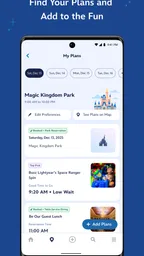
From trip plans to the first park decision
Before a visit, I would start by working out what needs to be ready on the phone: the ticket information, any dining arrangements, and the places I hope to reach. The app is free, rated for Everyone, and sits in the travel-and-local category. It has a 4.5 average from around 166,000 ratings, and has passed 10 million installs. Those numbers suggest it is a familiar tool for many visitors, but they do not remove the need to learn where its different planning pieces live.
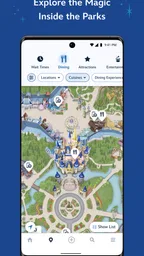
The first practical benefit is having resort maps and visit information alongside the plans themselves. That matters because a park day is not just a list of attractions. It is a sequence of choices shaped by location, queues, meals, and the people in your group. I would use the map to orient myself before committing to a route, then check wait times when deciding whether the next stop is worth the walk.
A useful habit is to plan in broad strokes rather than treating the app as a minute-by-minute script. Pick a few priorities, note where they are, and leave room to change course. If a queue is longer than expected or someone needs a break, the map and current information can help you choose a nearby alternative instead of crossing the park simply because it was on the original plan.
Set up the essentials before the day gets busy
Tickets are one of the central reasons to use the app, so I would check that the relevant ticket details are available before arriving at the entrance. This is a small preparation step with a large practical payoff: it avoids trying to sort out access while people are waiting behind you. If you are coordinating a group, make sure everyone understands whose phone or account is being used for which part of the plan. The app can be a shared planning hub, but the group still needs a clear handoff.
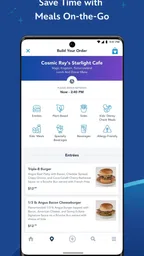
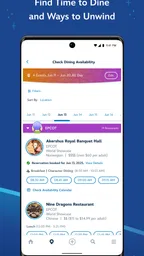
Dining deserves its own check rather than being treated as an afterthought. A meal can anchor the middle of a long day, especially for families or visitors who want a predictable pause. I would confirm the dining plan in advance, then use the surrounding map to make the meal fit the day’s geography. A reservation or intended meal location is less useful if the rest of the route leaves you rushing across the resort to reach it.
One non-obvious planning tip is to think in clusters. Rather than listing attractions in the order you happen to find them, group intended stops by area and decide which one is the priority. Then use wait times to adjust within that cluster. This reduces avoidable backtracking and makes the app’s map more than a reference image: it becomes a way to compare the cost of a detour against the likely benefit.
Use wait times as a decision aid, not a promise
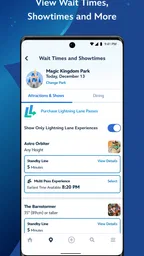
Wait-time information is valuable because it gives you a basis for choosing between options, but I would not build the whole day around a single reading. Conditions can change while you walk, and a number on a screen cannot tell you whether the queue is worthwhile for your particular group. Treat it as a snapshot that helps narrow choices, then be ready to reassess when you reach the area.
For example, imagine arriving at a park with two attractions on your must-do list and a meal planned later. If the first attraction shows a wait that makes the detour unattractive, you can check nearby options on the map and choose something that keeps you moving toward the meal location. If the wait improves later, return to the priority. That flexible loop is more realistic than assuming every planned stop will happen in a fixed order.
I would also avoid checking the app so often that it becomes the activity. A quick look before leaving one area, followed by another when the group is ready to choose, is more useful than constant refreshing. The goal is to make decisions with less guesswork, not to turn a holiday into an exercise in monitoring a screen.
Handing plans between the phone and the group
The app’s greatest strength is keeping several kinds of visit information close together, but the human handoff still matters. One person may be navigating while another is keeping track of tickets or meal plans. Before splitting up, agree on the next meeting point and who is responsible for checking the plan. A map can help everyone understand where to go, but it cannot resolve a group that has different expectations about whether to wait, eat, or move on.
For a family with children, I would make the next step simple: name the area, the intended stop, and the fallback if the queue feels too long. That is easier to follow than asking everyone to interpret several screens at once. For a couple or solo visitor, the same approach is useful in a lighter form: save the must-do choices mentally, then let the live conditions shape the rest of the route.
There is also a practical trade-off in relying on one phone as the control center. It keeps information consolidated, but the person holding it can become the group’s unofficial help desk. If several people are comfortable managing their own plans, agree in advance how to communicate changes. If only one person is handling the app, keep the decisions visible and explain changes as they happen.
What a successful day looks like
When the workflow works well, the app helps turn scattered information into a more coherent day: check the ticket, orient yourself on the map, choose a manageable route, use wait times to compare options, and keep a meal or other planned stop in view. The result is not a guaranteed short queue or a perfect schedule. It is fewer avoidable surprises and a clearer sense of what to do next.
That difference is important. A resort visit can be tiring even when everything goes smoothly, and no app can make every attraction convenient or every group member agree. I value the app most when it reduces small bits of friction: finding the right area, remembering the planned meal, or changing direction without having to reconstruct the day from separate tools.
Compared with the usual alternative of switching among a general map, notes, and separate ticket or dining references, a resort-specific app has the advantage of putting relevant planning in one place. A general mapping app may still be more familiar for ordinary navigation outside the resort, while a paper note can be faster for a short list of priorities. For the park-focused parts of the visit, though, a dedicated tool is easier to keep aligned with the day’s decisions.
Where the workflow can become frustrating
The main limitation is that having many useful pieces together can also mean more to manage. Visitors who prefer to arrive with no plan may find ticket, dining, map, and wait-time checks distracting. The app is less compelling if you are not visiting Walt Disney World or do not need its resort-specific information; a general travel map is a better fit for an ordinary city trip.
There is also a learning curve in deciding which information deserves attention. A visitor who tries to plan every movement may spend too much time looking at the phone and may feel disappointed when the day changes. I recommend choosing a few priorities, checking the relevant details at sensible moments, and accepting that the order may shift. The app supports flexibility best when you use it as a guide rather than a contract.
Another point to keep in mind is that a displayed wait time is only one input. It does not account for how far your group is willing to walk, how much time remains before a meal, or whether a particular attraction matters to everyone. In practice, the better decision may be the less popular nearby option if it keeps the day comfortable. That is a judgment call the app can inform but cannot make for you.
Who I would recommend it to
I would recommend My Disney Experience to anyone preparing for a Walt Disney World visit who wants tickets, maps, wait times, and dining plans within one resort-focused tool. It is especially helpful for first-time visitors, families coordinating several priorities, and anyone who prefers to make decisions as the day develops rather than relying on memory alone.
I would be less likely to recommend it to someone who wants a completely screen-free day, is not visiting the resort, or only needs a basic map and a short personal checklist. In those cases, a simpler alternative may involve less setup and less checking. The app earns its place when its resort-specific planning tools solve real problems, not merely because it offers more information.
Disney released the app on January 31, 2018, and its current version is 8.26.1, with Android support beginning at version 10. Those details are useful to check when deciding whether your device can run it. My overall view is that it is a practical companion for the planning and decision-making side of a park visit, provided you keep expectations realistic and leave room for improvisation.
For me, the best approach is to prepare the essentials before arriving, use the map and wait times to make informed choices, and keep the group’s next step clear. My Disney Experience does not replace good judgment or a flexible attitude, but it can make a complicated resort day easier to navigate. If that is the kind of help you want, I think it is worth having ready before the trip.
What we like
- Mobile check-in can save time when arriving at eligible Disney Resort hotels.
- The app keeps park tickets and reservations easy to access in one place.
- Wait times help you adjust plans while exploring the parks.
- Mobile food ordering can reduce time spent waiting at participating locations.
- Interactive maps make it easier to find attractions and amenities.
What could be better
- Some features require location access and a reliable internet connection.
- Wait times can change quickly and may not reflect the actual queue.
- Not all restaurants or services support mobile ordering.
- Managing tickets and plans can feel confusing for first-time visitors.
- Using the app throughout the day can drain your phone battery.





