






MSC for Me review
 Analysis by Appsdrops
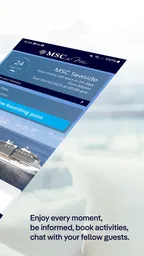
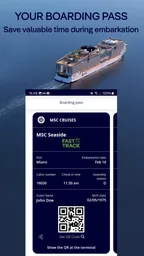
On a cruise, the small question “What should I do next?” can turn into a surprising amount of walking, checking notices, and trying to keep plans straight. MSC for Me is intended to make that onboard routine easier by putting cruise-related information and planning in one place. I see its main value less as a general travel guide and more as a companion for navigating the particular rhythm of an MSC cruise: a day split between activities, meals, time ashore, and plans that may change.
A cruise companion, not a general travel planner
This free Travel & Local app is developed by MSC Cruises S.A. Its focus is deliberately narrow: it is for people taking an MSC cruise, rather than anyone looking for a broad trip planner or a replacement for maps and destination research. That distinction matters. If your main concern is finding a hotel or building a sightseeing itinerary before you travel, a general travel app will be more useful. If you want a handy digital point of reference during an MSC sailing, this one makes more sense.
The app’s strongest idea is to reduce the effort of keeping track of the cruise itself. Instead of treating a holiday as one fixed itinerary, I find it more useful to think of the day as a sequence of decisions: what is happening, what you want to join, and how that fits around time in port or downtime onboard. A dedicated cruise app can help with that kind of planning in a way a standard calendar or notes app cannot, because its purpose is tied to the cruise experience.
That focus also sets expectations. I would not install it expecting a universal tool for every part of a holiday. It is a companion to an MSC trip, not an independent source for comparing cruise lines or choosing excursions across different operators. Its usefulness depends on whether you are actually sailing with MSC and want cruise-specific information close at hand.
Why keeping cruise plans together helps
On a ship, plans can compete for attention. You may be deciding whether to spend time relaxing, attend an activity, or get ready to go ashore. When the relevant cruise information is easy to consult, you can make those choices without relying entirely on memory or repeatedly asking another traveller what the plan was. That is a practical benefit, especially for groups whose members want different things from the same day.
I would treat the app as a useful reference, not as permission to stop paying attention to the ship’s announcements or the information provided by the crew. A phone is convenient, but it can be put away, run low on battery, or simply be in someone else’s hands. For anything time-sensitive, I would still make sure everyone in the group understands the plan rather than assuming one person’s screen is the plan for everyone.
Making a routine out of checking it
The most helpful way to use a cruise companion is to build it into a light routine instead of opening it only when something goes wrong. I would check it while deciding the day’s outline, revisit it when plans shift, and use it as a shared reference point when travelling with family or friends. That approach can prevent the familiar onboard scramble of trying to reconstruct arrangements from memory.
A useful habit is to separate “what I need to know now” from “what I might want later.” Before heading out for the day, settle the immediate plan; leave less urgent possibilities for a quieter moment. This keeps the app from becoming another source of distraction. It also helps when people in a group have different priorities: one person can be ready to explore while another wants a slower morning, without either treating every choice as a major negotiation.
I would also keep essential details in a form the whole party can access. If one traveller is the only person checking the app, the rest may be left guessing when that phone is unavailable. A brief verbal recap, or a note of the main plan, is a sensible backup. The point is not to duplicate everything, but to avoid making a shared holiday depend on a single device.
A realistic day where it earns its place
Imagine waking up on a port day with a family group that has not agreed on how to spend the morning. One person wants to go ashore early, another is moving slowly, and someone else is hoping to fit in an onboard activity. I would use the app as a common reference while the group decides what is realistic, then settle on a clear plan before everyone scatters. The value is not that an app makes the decision for you; it is that a cruise-focused reference can make the decision less vague.
Later, if the group’s timing changes, having a familiar place to check cruise information is more convenient than hunting through old messages or relying on a half-remembered conversation. This is the sort of ordinary, repeated coordination where the app’s focused purpose can matter. It is less about a dramatic feature and more about reducing small bits of friction throughout a trip.
For couples or solo travellers, the same habit can be useful in a quieter way. You can keep your own day organized without carrying a paper schedule, while still making room for spontaneous choices. I would not try to plan every hour in advance, though. A cruise is also a holiday, and the app is most helpful when it supports flexibility rather than turning leisure into a tightly managed checklist.
Where it differs from familiar alternatives
A general calendar is good for personal reminders, but it does not have the same cruise-specific purpose. A notes app can hold plans, yet it depends on you entering and maintaining everything yourself. A paper itinerary is easy to glance at and never needs charging, but it is less convenient when you want to keep information together with the phone you already carry. These options can still work well, especially for someone who prefers a simple offline routine, but they do not serve precisely the same role.
Conversely, broad travel apps are better suited to comparing destinations, organizing flights, or keeping details for a trip with several different providers. I would use those for the wider journey and regard MSC for Me as a trip companion for the cruise portion. That division is more realistic than expecting one app to manage every travel task from departure to return.
Trade-offs to consider before relying on it
The most obvious limitation is its audience: the app is designed around MSC Cruises, so it is not a useful everyday travel tool for someone who does not have an MSC sailing planned. That is not a flaw for the intended user, but it does mean you should not choose it as your main organizer for unrelated holidays.
There is also a practical distinction between having cruise information on a phone and having dependable access to it at every moment. I would prepare before a busy day, keep the device charged, and avoid assuming a screen will replace all other ways of communicating. Anyone who strongly prefers not to use a phone on holiday may be happier with the printed or spoken information available through the cruise experience, supplemented by a simple personal note.
Another trade-off is that a digital companion can encourage over-planning. When every part of the day feels easy to check, it is tempting to keep revisiting plans instead of enjoying the moment. My advice is to use it to answer practical questions, then put the phone away. It should make the cruise feel easier to manage, not create a new obligation to monitor it constantly.
Who gets the most from it
I would recommend trying it if you are sailing with MSC and want one familiar place to consult while organizing your onboard routine. It is particularly relevant for travellers who like to plan loosely, families coordinating different preferences, and anyone who would rather not rely on memory alone. The app has a 4.7 average from around 57,000 ratings, and it has been installed over 5 million times, which suggests it has found a substantial audience among cruise travellers.
It is less compelling for someone who wants an all-purpose travel organizer, is not taking an MSC cruise, or is happiest keeping the phone out of sight throughout a holiday. If you are comparing cruise operators, this app is not a substitute for researching each company independently. Its role begins once the MSC trip is the relevant context.
The app is rated for Everyone and is currently at version 5.7.0, with support for operating systems from version 10 onward. Those details make it straightforward to judge whether it suits your device and household, but they do not change the basic decision: its value comes from being tied to an MSC cruise rather than from serving every traveller.
My take before you set sail
For me, the best reason to use MSC for Me is not to fill every spare minute with planning. It is to make cruise-day decisions easier to coordinate and easier to revisit. I would install it before travelling, establish a simple routine for checking the day, and keep a backup way of sharing important plans with anyone travelling alongside me.
That makes it a sensible companion for the right trip, but not a must-have for every traveller. If you are booked with MSC and appreciate having cruise-focused information within reach, it is worth trying at no cost. If your needs are broader, or you prefer paper and spontaneous decisions, a general travel planner—or no extra app at all—may suit you better.
What we like
- Check your onboard account balance and view recent transactions.
- Browse ship itineraries and port information in one place.
- Use the app to make specialty dining and excursion reservations.
- Review daily schedules and onboard activities from your phone.
- Contact shipboard services without searching for a crew member.
What could be better
- Many features are available only while sailing with MSC Cruises.
- Some app functions depend on a reliable internet connection.
- Onboard account updates may not appear immediately.
- The app offers limited value for travelers who are not booked with MSC.
- Compatibility and feature availability can vary by ship and device.





