


Mobile Passport Control review
 Analysis by Appsdrops
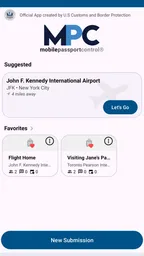
When I think about a border-crossing app, convenience matters, but trust matters just as much: I want to know who operates it and what I can actually choose to do. Mobile Passport Control is an official travel app from U.S. Customs and Border Protection, which gives it a clear role: helping eligible travelers prepare information for U.S. entry, rather than replacing the border process itself. I find that distinction important. It is a practical tool for a specific moment in a trip, not an all-purpose travel planner or a promise of automatic passage.
What the app can—and cannot—stand in for
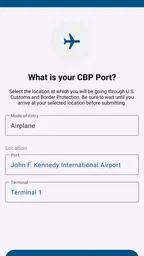
In the Travel & Local category, the app is aimed at travelers entering the United States who want to use Mobile Passport Control. The basic appeal is straightforward: handle the app’s part of the arrival process on a phone, instead of treating every step as something to sort out only after reaching the airport. That can make an unfamiliar, tiring arrival feel more organized, especially when you already have your travel documents close at hand.
The name can sound broader than the job it does. I would not approach it as a replacement for a passport, visa, or other travel authorization, nor assume that installing it means I can bypass instructions from airport staff or officers. It is best understood as a channel for a particular entry workflow. Before relying on it, I would check that I am eligible to use the process and follow the current directions in the app and at the point of entry.
That narrow purpose is also a strength. Many travel apps try to cover bookings, maps, itineraries, and airport services, but those features do not help much when the immediate task is completing an entry procedure. This one focuses on that moment. If I wanted help comparing flights or finding a restaurant, I would choose a different app; if I wanted to prepare for U.S. arrival through the supported process, this is the more relevant tool.
Why the official operator matters
Because the app is published by U.S. Customs and Border Protection, I have a stronger reason to treat it as the agency’s own tool rather than a third-party shortcut. That does not answer every question about data handling, and I would not take an official publisher as a substitute for reading the app’s current privacy and permission disclosures. It does, however, make the app’s purpose and institutional role easier to judge than an unofficial service claiming to speed up entry.
The app is free and rated for Everyone, so there is no purchase decision to weigh before installing it. It has a 4.9 average from about 149,000 ratings, with roughly 3,100 written reviews, and more than a million installs. Those figures suggest broad interest, but they are not proof that a particular traveler is eligible or that every airport experience will be the same. I would use them as background, not as a guarantee of a quick arrival.
Controls are worth checking before travel
For a data-sensitive task, I would review the permissions the phone actually requests rather than guess what the app needs. Android and iOS show permission prompts and provide settings where access can be changed. I would grant only what the app requests for a feature I intend to use, and I would reconsider any permission that seems unrelated to the task. The exact prompts can depend on the device and operating system, so I would make this check on my own phone rather than rely on someone else’s screenshots.
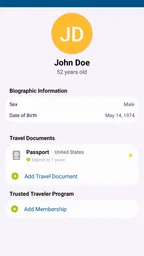
I would also look for the app’s privacy information and any account or profile controls it presents before entering personal details. Those are practical checks, not assumptions about specific settings: I would confirm what information is being requested, whether a profile can be reviewed or edited, and what choices are offered for managing it. If a screen is unclear, I would pause instead of entering information just to get through setup quickly.
One useful habit is to do that inspection at home, not while standing in a crowded arrivals area. On a calm connection, I can read prompts, check that I have installed the intended app, and understand the steps without feeling rushed. I would also make sure my phone is charged and that I can unlock it easily after landing. These small preparations reduce the chance that I start typing sensitive details in a hurry or discover a basic setup issue when I have little time.
Data-sensitive moments call for a deliberate pace
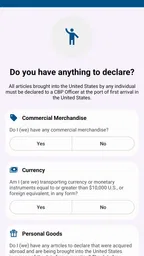
The most consequential part of using a border-entry app is not browsing a map; it is handling personal and travel information for an official process. I would enter only what the app asks for the workflow, check names and document details carefully, and avoid using a public or borrowed device for that task. A typo can create confusion at precisely the point when I want the process to be clear, while entering information casually on someone else’s phone raises obvious privacy concerns.
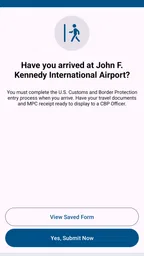
Consider a realistic arrival: I land after a long flight, my family is tired, and the airport is busy. If I have already checked the app and understand the steps, I can focus on completing the required actions calmly rather than trying to interpret everything for the first time in line. I would still keep passports accessible and pay attention to staff instructions. The app can help me prepare; it cannot remove the need to follow the official process in person.
A further trade-off is timing. Airport connectivity, battery life, and the pressure of an arrival can all affect how comfortable a phone-based workflow feels, even when the app itself is functioning normally. I would not wait until the last possible moment to learn the interface. If I cannot complete a step or the app does not behave as expected, I would follow the airport’s directions and use the available standard process rather than assume the phone must be the only route.
Keep a fallback and make your own choices
My preferred approach is to treat the app as one option in a travel plan, not the plan itself. I would keep the required travel documents with me, make sure my device remains usable, and be ready to follow instructions that do not involve the app. That is especially sensible for travelers who are uncomfortable entering personal information on a phone, have limited access to their device, or prefer to ask an official in person when something is unclear.
The alternative is not necessarily another app. For some travelers, the ordinary airport process is a better fit because it avoids learning a digital workflow or relying on a charged phone. For others, the app may be worth trying because preparing on a personal device feels more manageable than handling every step amid arrival crowds. I would decide based on eligibility, comfort with the app’s visible requests, and the practical conditions of the trip—not on an assumption that one route is always faster.
There is also a difference between having a choice and having complete control over an official process. The traveler can decide whether to install the app, review what it asks, and choose whether to proceed with it. Once taking part in an entry procedure, though, the traveler still needs to meet the applicable requirements and follow official directions. I see that as a reason to use the app thoughtfully, rather than as a reason to expect it to make decisions on the traveler’s behalf.
Who should consider it
I would consider it if I were preparing for U.S. entry, had confirmed that the process applies to me, and felt comfortable using a phone for the relevant steps. It may be particularly useful for someone who likes to organize arrival tasks before reaching the counter area and who can spare a few minutes in advance to understand the screens. For a family or group, I would avoid assuming one person’s eligibility or entries automatically cover everyone; I would check the app’s own instructions for how each traveler should be handled.
I would skip it, at least for a particular trip, if I could not establish that I qualify, if I did not trust the information or permissions being requested, or if my phone was unreliable. I would also skip it if I expected it to serve as a visa checker, passport substitute, or general airport guide. Those expectations do not match its focused purpose. In those situations, using the standard official process and consulting authoritative travel guidance is more sensible than trying to force the app into a role it was not designed to play.
The current release is version 4.7.3, and the app requires Android 7.0 or later on Android devices. I would check the app store on my own device before travel to confirm that it is available and compatible, then open it before departure to see the current workflow. The release number alone does not tell me whether a particular screen has changed, so I would rely on what the app actually displays rather than instructions saved from an old trip.
A measured recommendation for arrival day
Overall, I see Mobile Passport Control as a focused official utility whose value depends on the traveler’s circumstances. Its strongest case is simple: it gives eligible travelers a phone-based way to handle a defined part of U.S. entry preparation. Its limits are equally important: eligibility matters, official directions remain in charge, and a phone workflow is not ideal for everyone. I would install it only after checking the process and its visible privacy choices, complete any preparation before arriving, and keep a practical fallback.
For me, that is a cautious recommendation rather than blanket praise. The app is worth considering when its purpose fits the trip and I am comfortable with what it asks me to do. If I want broad travel planning, a guaranteed shortcut, or a way to avoid official entry requirements, I would look elsewhere—or simply use the ordinary process. Used with realistic expectations, it can make one narrow but stressful part of travel feel more deliberate without asking me to mistake convenience for certainty.
What we like
- Free to use with no in-app purchase required.
- Official app provided by U.S. Customs and Border Protection.
- Lets eligible travelers submit passport details before reaching inspection.
- Digital receipt helps organize the arrival process.
- Supports passport holders from several eligible traveler groups.
What could be better
- Only works at participating U.S. entry points.
- Does not replace a passport or guarantee faster processing.
- Each traveler needs a separate submission.
- An internet connection is needed to submit information.
- Eligibility rules may exclude some international travelers.





