




KAYAK: Flights, Hotels & Cars review
 Analysis by Appsdrops
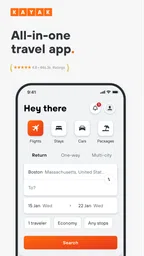
I’d use KAYAK as a starting point when I’m comparing a trip, rather than treating any travel-search app as the final authority on every booking. Its appeal is straightforward: one place to look across flights, accommodation and rental cars, then decide which option deserves a closer check. That can save time when I’m still shaping a trip, especially if my dates or budget are flexible. The important distinction is that comparison and booking are not the same thing as a guarantee that every displayed option is the best fit for my circumstances.
What I trust it to do—and what I still check
KAYAK is a free travel and local app from KAYAK.com. It has a 4.8 average from around 437,000 ratings, and more than 10 million installs. Those figures suggest it is a widely used tool, but popularity alone would not settle my own trust questions. For travel, the details that matter are practical: what a fare includes, who will handle a booking, and whether the conditions suit the actual journey.
I find a comparison app most useful for narrowing the field. Instead of opening separate airline, hotel and car-rental searches immediately, I can get a sense of the options and identify a few worth examining. That is particularly handy at the early planning stage, when I want to compare the shape of a trip before committing to a specific provider.
My cautious approach is to treat a result as a lead, not as a complete explanation. Before I pay, I would check the final booking screen for the total cost, baggage or room conditions where relevant, cancellation terms, and the identity of the company handling the reservation. A price that looks attractive in a list can be less appealing once restrictions and practical details are considered.
How I would use it during a real trip plan
Imagine I’m arranging a short visit and have some room to adjust the departure day. I’d first compare flight possibilities to see whether moving the trip by a day changes the options enough to matter. Then I’d look at places to stay and, only if the destination and itinerary call for it, compare a rental car as well. This sequence helps me avoid choosing a hotel or car plan before I know what the travel dates and arrival arrangements look like.
A useful, easily overlooked habit is to keep the comparison fair: use the same dates, passenger details and broad requirements each time, and note what each option actually includes. If one flight is cheaper but has conditions I would not accept, I would not call it the better deal. Likewise, a lower hotel total is not a meaningful win if its location or cancellation rules make the trip harder.
This is where the app’s broad scope can help and hinder. Seeing air, lodging and car searches in one travel tool makes it easier to think about the whole itinerary, but each category has its own trade-offs. I would not let a convenient overview replace reading the details for the particular airline, property or rental provider I’m considering.
Trust, controls and the limits of what I can judge
The editorial question I apply to any travel app is not simply whether I like its interface; it is whether I can understand the choices I’m making. I avoid assuming anything about permissions, tracking, data retention or account controls unless those details are clearly presented in the app’s current privacy and settings screens. Those practices can change, and a general impression from a search page is not enough to establish them.
For that reason, I’d inspect the available settings and privacy information before entering details I don’t need for a search. I’d also pause before saving personal travel information or signing into an account, and decide whether the convenience is worth it for my particular trip. If I can compare options without providing extra information, I would prefer to begin there; if a later step asks for details, I’d judge that request in context rather than treating it as automatically necessary.
That is not a claim that the app asks for any specific permission or offers a particular account control. It is a sensible way to use a travel service when the details of its current choices are what matter. I would look for clear explanations in the app itself, review the options shown, and avoid entering sensitive information until I understand why it is needed and who will receive it.
When booking details deserve extra attention
Travel searches can involve personal plans and payment decisions, so I slow down at the point where browsing turns into a reservation. I check whether I am still comparing or have moved into a provider’s booking flow, read the terms on that screen, and make sure the itinerary details are correct. If the final conditions are unclear, I would stop and confirm them with the company responsible for the booking rather than relying on a short result summary.
This matters most when plans could change. A traveler with uncertain dates should give cancellation and change terms more weight than a small difference in the initial price. Someone planning a tightly timed connection should pay close attention to the itinerary rather than choosing solely by a low headline fare. For a rental car, I would verify the pickup arrangements and terms with the provider before treating the comparison as a completed plan.
I also separate convenience from commitment. Finding several possibilities in one place is useful; it does not mean I must book the first result there. I can use KAYAK to orient myself, then compare the most promising option with the provider’s own final offer and conditions. That extra check takes time, but it is worthwhile when the trip is expensive, complicated or difficult to change.
Who gets the most from this approach
I’d recommend KAYAK to people who are still exploring a trip and want to compare several parts of it without beginning with a single airline or hotel brand. It is especially useful when the destination is chosen but the exact travel arrangements are not, or when I want a quick overview before deciding which providers merit a deeper look.
It may be less useful for someone who already knows exactly where they want to book and values dealing directly with one familiar provider. In that situation, going straight to the airline, hotel or rental company can make the terms and booking relationship easier to follow. It can also be the better route when a traveler needs a specific policy or service and would rather confirm it directly than sift through broad comparison results.
Compared with searching each provider separately, KAYAK’s strength is the wider initial comparison. Compared with booking directly, the trade-off is that I need to pay close attention to who is handling the reservation and which terms apply. Neither route is always best: I’d use the app to discover and compare, then choose the booking path that leaves me most confident about the details.
A practical decision before installing
The app is rated Everyone, and the current version is 267.2 for devices running OS 10 or later. Those basics make it straightforward to assess compatibility, while the free price removes an upfront cost. Still, I would judge its usefulness by the trip I’m planning and by how comfortable I am checking provider terms before I commit.
If I were preparing a multi-part trip, I’d start with a focused search, compare a few realistic options, and write down the trade-offs that matter to me: total cost, timing, flexibility and location. I would then confirm the details at the point of booking and review the app’s visible privacy and account choices before sharing information beyond what I need. That workflow keeps the app in its strongest role—as a comparison aid—without asking it to replace my own checks.
My cautious verdict
KAYAK is worth considering if you want one place to begin comparing flights, stays and car rentals. I like the idea of using it to make an initial shortlist and understand the available choices, particularly when the itinerary is still flexible. Its large audience and strong average rating are reassuring signs of broad use, but they are not substitutes for checking the specific terms and data choices that apply to me.
I would skip it as my primary route if I prefer to deal only with a known provider or need unusually specific booking conditions confirmed before I search. For everyone else, my recommendation is measured: use it to explore, keep control of what information you share, and verify the final offer with the party responsible for the reservation. That approach makes its convenience useful without turning a comparison result into a promise.
What we like
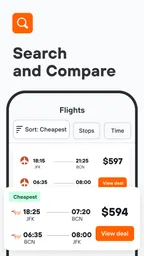
- Compare flight options from many airlines in one search.
- Price alerts help track fares for selected trips.
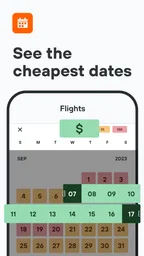
- Flexible date tools make it easier to find lower fares.
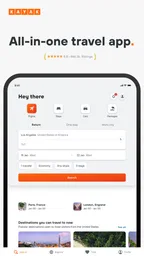
- Searches include hotels and rental cars alongside flights.
- Explore helps discover destinations that fit your budget.
What could be better
- Displayed prices may change before you complete a booking.
- Some bookings redirect you to an airline or travel provider.
- Price alerts can require notification permissions.
- Filters may feel overwhelming when planning a simple trip.
- Hotel and car results can vary by destination.





