




JetBlue review
 Analysis by Appsdrops
I see the JetBlue app as a practical companion for people who already fly with JetBlue, rather than a general-purpose travel planner. Its job is to bring airline-related tasks together on a phone, so the useful question is not whether it replaces every travel tool, but whether it makes the moments around a JetBlue trip easier to manage. In my view, it is most valuable when you want to check your plans or handle a task while away from a computer; it is less compelling if you rarely fly with this airline.
Where travel tasks can get stuck
Air travel tends to create small interruptions at inconvenient times: you need to look up a trip while packing, confirm a detail while heading out, or revisit your plans when the day does not go as expected. A dedicated airline app can reduce the need to search through old emails, but it also makes your experience depend on having the right trip information and being able to sign in. That is the practical trade-off I would keep in mind with JetBlue.
If a trip does not appear where you expect it, I would first check that I am signed into the account associated with the booking and that the details I entered match the reservation. That is a sensible first check for an airline account, not a promise that every booking will appear automatically. If the app still does not show the information, I would use JetBlue’s other official support channels rather than repeatedly trying the same screen.
The app comes from JetBlue Airways Corporation, which gives it a clear focus: managing the airline’s own travel experience. That focus can be an advantage when your plans are with JetBlue, because you do not have to sort through unrelated carriers or generic travel content. It is also a boundary. If your itinerary involves several airlines, a separate trip organizer or your email may remain the better place to keep the whole journey in view.
Start with a few simple checks
Before relying on the app during a travel day, I would install it, open it while I have a stable connection, sign in, and check that I can reach the trip information I expect to use. Doing this at home is less stressful than trying to troubleshoot at an airport. I would also make sure I know which account or reservation details I used, since confusion between personal and booking information can look like a missing-trip problem.
JetBlue is a free travel and local app, so there is no purchase decision to make before trying it. It is rated for Everyone, and its current version is 9.15.0. Those details help set expectations about access and compatibility, but they do not guarantee that every function will behave identically on every phone. If the app will not install or open, checking that the device meets its minimum operating-system requirement of 8.0 is a useful first step.
One non-obvious tip is to treat the app as a preparation tool, not just something to open at the airport. Confirm that you can sign in and find the relevant trip before you leave, then keep your confirmation information somewhere you can reach independently, such as your email. This gives you a fallback if you lose connectivity, switch devices, or encounter a login snag at a busy moment. It is a modest precaution, but it can prevent a small technical problem from becoming the center of your travel day.
Recover the workflow without making things worse
When a screen seems stale or a task does not complete, I would avoid rapidly repeating the same action. First, I would check the connection, return to the relevant part of the app, and see whether the information has updated. If the issue is limited to one task, I would avoid assuming that the entire trip or account is broken. Keeping track of what I was trying to do and what I saw makes it easier to explain the issue if I need help from JetBlue.
There is a useful distinction between an app problem and a booking problem. A screen that fails to refresh may call for a basic connection check or a fresh attempt later; a reservation detail that looks wrong deserves more care. I would compare it with the confirmation I received and contact the airline through an official channel if the mismatch affects travel. I would not rely on repeated edits or guesses in the app when the underlying reservation itself is uncertain.
Another practical workflow is to use the app for airline-specific tasks while keeping broader trip planning elsewhere. For example, I might use it to review my JetBlue arrangements, but keep a multi-stop itinerary, hotel details, and plans with other carriers in a calendar or travel organizer. That division avoids expecting one airline’s app to act as a complete travel hub. It also makes it easier to tell whether a missing detail belongs to the airline booking or to another part of the trip.
If something is not working, I would also consider whether the timing matters. Airport networks can be crowded, and a weak connection can make a perfectly ordinary app task feel unreliable. Trying again over a more dependable connection, where practical, is a reasonable troubleshooting step. If the same issue continues across attempts, switching to an official alternative is more useful than spending valuable time cycling through the same screen.
When the app is not the cause
Not every travel disruption can be fixed on a phone. A change in plans, an unclear reservation, or a question about what the airline can do may require direct assistance rather than another app refresh. The app is a convenient access point, but it should not be treated as a substitute for airline staff or official support when a decision has real consequences. I would use it to stay organized, then escalate promptly when the issue is about the booking itself.
The same caution applies when several people share travel arrangements. A traveler may be using a different account from the person who made the booking, or may simply have incomplete details at hand. Before concluding that the app has lost a trip, I would check who made the reservation and which information is being used to look it up. That small bit of detective work can separate a sign-in mismatch from a genuine booking concern.
For a trip involving multiple airlines, I would not make this the only place I store critical information. JetBlue’s app is naturally centered on JetBlue, while an itinerary spanning carriers needs a broader view. A calendar, email search, or independent trip organizer can make connections and non-JetBlue arrangements easier to track. In that situation, the airline app is a useful companion, not the master record for the entire journey.
How it fits beside other travel tools
Compared with a general travel organizer, an airline’s own app has a narrower job. It is the more natural place to begin when your question concerns a JetBlue trip; a general organizer is often more convenient for collecting plans from different companies in one view. Email remains a dependable backup for confirmations and written details, though it can be slower when you are searching through a crowded inbox. I would use each for what it does best rather than force one tool to cover everything.
That division is especially helpful for occasional travelers. If you fly with JetBlue only once in a while, installing the app before the trip can still be worthwhile, but there may be little reason to keep it central to your daily routine. Frequent JetBlue travelers are more likely to appreciate having the airline’s own app ready whenever a trip comes up. People who primarily use other airlines, or who want one app to manage every part of a mixed-carrier vacation, should choose a broader organizer as their main tool.
The public response suggests that many people find the app useful: it has a 4.5 average from around 98,000 ratings, with roughly 17,000 written reviews and over 5 million installs. I take that as evidence of an established audience, not proof that it will solve every travel snag. Airline apps are judged in stressful situations, and a good experience still depends on account access, the booking, and the connection available at the time.
Who will get the most from it
I would recommend JetBlue to someone with an upcoming JetBlue flight who wants an airline-specific option on their phone, especially if they prefer checking travel details without digging through messages. It is also a sensible choice for a frequent customer who wants to keep the airline’s own tools close at hand. Since it is free, trying it before a trip is a low-commitment way to see whether its workflow suits you.
I would be more cautious about recommending it as a single solution to someone planning a complicated journey across several carriers. It is also not the right answer when the immediate need is human help with an uncertain reservation or a disruption that cannot be resolved by checking an app. In those cases, a broader itinerary tool or direct contact with the airline is more appropriate. The best setup is often a combination: the JetBlue app for its own travel tasks, plus an independent place for everything else.
My practical verdict
JetBlue is a focused airline companion, and I like that its purpose is easy to understand: it is for people who want JetBlue-related travel tasks available on a mobile device. It is not a universal travel manager, and I would not depend on any single app as the only record of an important trip. A little preparation—signing in before departure, checking the right account, and keeping confirmation details accessible elsewhere—makes it more useful and gives you a calm backup plan.
Developed by JetBlue Airways Corporation, the app has been available since October 18, 2012, and its latest listed release is version 9.15.0. For a free app in the travel category with broad adoption, those details make it an easy option to consider if you fly with JetBlue. My recommendation is straightforward: install it for a JetBlue trip, test the basics before travel day, and keep another route to your itinerary handy. It works best as a focused airline tool, not as your only safety net.
Overall, I would choose it for convenience around JetBlue travel, while setting realistic expectations about what an airline app can solve. If your plans are simple and centered on this carrier, it should be a natural place to start. If your trip is spread across airlines or requires hands-on help, pair it with a broader organizer or contact the airline directly when needed. That combination is more dependable than asking one app to do every job.
What we like
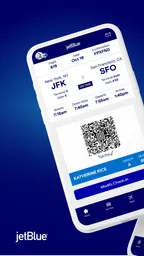
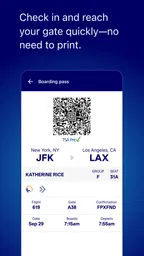
- Mobile boarding passes make airport check-in more convenient.
- Flight alerts help travelers keep track of schedule changes.
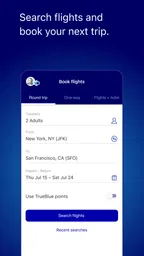
- The app supports booking and managing trips in one place.
- Seat selection is available for eligible flights.
- TrueBlue members can access loyalty account details.
What could be better
- Some bookings may require contacting customer support for changes.
- Flight prices and seat options can change before checkout.
- App performance may vary on older devices.
- Not every airport feature is available for every itinerary.
- A stable internet connection is needed for most trip features.





