

Instant Voice Translate review
 Analysis by Appsdrops
I like a translator best when it helps a conversation keep moving rather than turning every sentence into a small technical exercise. Instant Voice Translate is built for that face-to-face setting: it brings voice, image, and text translation together in an app aimed at helping people understand one another in the moment. My impression is that its strongest appeal is practical immediacy. It can be useful when neither person wants to stop, type a full message, and pass a phone back and forth.
It is a free travel and local app from Erudite, with a 4.8 average from around 332,000 ratings and more than 10 million installs. That level of adoption makes it an easy option to consider, but it does not guarantee that every translation will suit every conversation. I would treat it as a helpful bridge for everyday communication, not as a substitute for a human interpreter when a misunderstanding could have serious consequences.
How quickly a conversation can get going
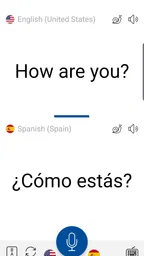
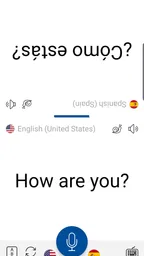
The app’s central idea is simple: use spoken language when you are talking to someone nearby, and turn to text or images when those suit the situation better. That flexibility matters more than a promise of instant results. In a café, at a station, or while asking for directions, speaking can be faster than composing a sentence in a language you do not know. For a name, address, or short written notice, typing or using an image-based approach may be more comfortable.
I would still plan for a pause. A voice translator has to capture what someone says and produce something the other person can understand, so rapid speech, background noise, unfamiliar pronunciation, or a long sentence can make an exchange less smooth. The best way to keep the pace up is to speak in short, complete thoughts and allow the app a moment to respond. If a result sounds odd, try rephrasing rather than repeating the same sentence louder or faster.
That small change in habit can make a noticeable difference in how usable a live translation feels. Instead of asking a complicated question all at once, break it into a greeting, the main request, and any detail that matters. This is especially helpful when ordering food or explaining a simple travel need: shorter phrases are easier to check, and the other person can answer one point at a time.
Useful when speech is not the whole story
Having voice, text, and image translation in one app gives me a practical fallback when speaking is awkward. You might be in a quiet place where talking would disturb people, or dealing with a phrase that is easier to show than pronounce. An image can also be a sensible starting point for printed information, while text is more discreet for a short exchange. I would not assume that every sign or document will translate perfectly; layout, small print, and unusual wording can complicate interpretation.
A good workflow is to use the mode that fits the source, then verify the important detail in a second way. For a menu item, I might use an image to understand the options, then type a specific question about an ingredient. For a spoken address, I would ask the other person to confirm the place name on screen or in writing. This is not extra fuss for its own sake: it reduces the chance that a plausible-sounding translation hides a small but important mistake.
When the phone is under pressure
Travel often brings several demands at once: people are waiting, the surroundings are loud, and the question may involve more than one detail. In those moments, I would avoid treating the app as a continuous interpreter for a long conversation. Use it for the immediate exchange, keep each turn focused, and pause if the conversation starts to drift. A simple sequence—state the request, check the translation, listen to the reply, then confirm the key point—is more dependable than trying to translate a rapid back-and-forth without stopping.
For example, imagine arriving at a guesthouse after a delayed journey and needing to ask whether there is a room available and where to leave a bag. Those are separate questions with different answers. Translating them one at a time gives both people a chance to catch misunderstandings. If the answer includes a time, room number, or price, I would repeat or type that detail for confirmation rather than relying only on memory of a spoken translation.
Noise is another realistic pressure point. A busy platform or crowded street can make voice input less clear, regardless of how quickly an app responds when it hears speech correctly. I would step somewhere quieter if possible, hold the phone so the speaker can be heard, and avoid speaking while walking through a noisy area. When that is not practical, switching to text can be less frustrating than repeatedly trying to make a voice exchange work.
Reliability means knowing when to check
No translator should be treated as an unquestionable authority. A sentence can be translated into fluent wording and still miss tone, context, or a word with several meanings. I would be comfortable using Instant Voice Translate for routine questions, greetings, and basic coordination. For medical symptoms, legal matters, safety instructions, or a payment dispute, I would seek a qualified person or another reliable source to confirm the meaning.
It also helps to watch for signs that a translation needs another pass. If the reply does not fit the question, if a person looks confused, or if a key noun seems to have changed, pause and simplify. You can restate the idea with familiar words, show the relevant object, or type a short version. This is one of the most useful habits for any live translator: the app can help create understanding, but the people in the conversation still need to notice whether understanding has actually happened.
In a short exchange, I would also avoid stacking unrelated thoughts together. A long sentence that mixes a destination, a time, and a special request gives the translation more room to lose a relationship between details. Separate those details and confirm the one that matters most. The trade-off is a slightly slower conversation, but that is often preferable to walking away with the wrong instruction.
What to expect from the phone itself
Instant Voice Translate is available for Android devices running version 7.0 or later, and its current version is 15.2.0. Compatibility is useful, but a supported operating system does not mean every phone will feel equally quick. Older or busy devices can behave differently from newer ones, and any translation task that relies on audio, text, or images can feel less comfortable if the phone is already struggling or the screen is difficult to read.
I would open the app before reaching the counter or asking for help, rather than waiting until a person is standing by. That gives me time to choose a suitable mode and check that the device is ready. Keeping the phone charged is sensible on a travel day, too, since relying on a translation tool is less helpful if the battery is nearly empty. These are ordinary preparations, but they make the experience feel more dependable without assuming anything about the app’s resource use.
Costs are worth understanding before making the app part of a routine. It is free to download, with in-app purchases ranging from $1.99 to $99.99 per item. I would check the purchase details in the app store before buying anything and decide whether the free experience already covers the situations I expect to face. A traveler who only needs occasional basic help may have different needs from someone who expects to use translation frequently.
The app is rated for Everyone, so its intended audience is broad. Still, the person using it should be comfortable handling a phone during a conversation and checking the result rather than accepting it automatically. For a child who needs to communicate independently, or for a situation where an adult must understand precise instructions, I would make sure someone capable of verifying the translation is involved.
How it compares with familiar alternatives
Compared with a basic text translator, Instant Voice Translate is more suited to a conversation where typing every line would slow both people down. Its voice and image options also give it ways to handle spoken requests and printed material without forcing everything into a text box. That is the clearest reason I would choose it over a simple dictionary-style tool for travel.
A general-purpose translation app may be a better fit if you mainly want to translate a document, save language notes, or work through carefully edited text. A phrasebook can be more reassuring when you need a handful of predictable expressions and want to learn them in advance. And for a high-stakes meeting, a professional interpreter remains the stronger choice. Instant Voice Translate is most compelling in the middle ground: ordinary, immediate exchanges where a little help can make the next step easier.
I also would not choose a live translator as my sole preparation for a trip. Learning a few greetings and essential phrases helps even when the phone is unavailable, and it signals effort to the person you are speaking with. The app can then handle what I cannot express confidently, rather than becoming the only route through every interaction.
Who will get the most from it
I would recommend Instant Voice Translate to travelers who want a convenient way to handle short face-to-face exchanges, and to anyone who occasionally needs to bridge a language gap in a local setting. It is particularly appealing if you like having speech, images, and typed text available in one place instead of switching between separate tools. Erudite has made a broadly accessible app, and its large audience suggests it has found a clear everyday use.
I would skip it as a primary solution if you need guaranteed precision, a formal interpreting service, or a tool for lengthy, nuanced discussions. I would also look elsewhere if your main goal is structured language learning rather than getting a particular message across. Those are different jobs, and a live translator is not automatically the best choice just because it can process several kinds of input.
For me, the best way to use it is as a conversational aid with a simple safety net: keep phrases short, pick voice, text, or image according to the situation, and confirm names, numbers, and instructions that matter. That approach makes the app more useful while respecting the limits of machine translation. It is a practical travel companion when speed and convenience matter, provided I stay engaged in the conversation instead of treating the screen as the final word.
My verdict: this is a sensible free starting point for everyday translation, with a particularly useful focus on speaking face to face. It earns its place when a quick question or simple request is all that stands between you and getting on with the day. I would keep it handy, but I would switch to a human expert whenever accuracy has serious consequences.
What we like
- Supports quick voice translation for face-to-face conversations.
- A simple interface makes core translation tools easy to find.
- Useful for basic communication while traveling abroad.
- Can help users practice speaking in another language.
- Voice input can be more convenient than typing short phrases.
What could be better
- Translation accuracy may vary with accents and background noise.
- Some features or languages may require an internet connection.
- Spoken translations can be awkward for idioms and complex sentences.
- Using voice features in public may feel inconvenient or expose private speech.
- Language availability and tools may differ between app versions.





