
Hertz Rent-a-Car review
 Analysis by Appsdrops
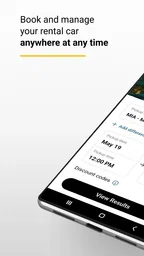
I think Hertz Rent-a-Car is easiest to judge as a practical travel tool rather than as a promise that every part of renting will feel effortless. Its purpose is to help me arrange a Hertz rental on a phone, which is useful when a trip depends on having a vehicle ready at the right place and time. The app is free, and its Travel & Local focus makes sense for airport pickups, local errands, and journeys where public transport is inconvenient. I would consider it when I already want to rent from Hertz; I would not treat it as a neutral comparison service for every rental company.
Trust begins with a clear job
The app is published by The Hertz Corporation, the rental company whose vehicles and service I would be arranging. That relationship is worth keeping in mind: the app is a direct route into one provider’s rental process, not an independent marketplace weighing every company on my behalf. I find that distinction helpful rather than alarming, as long as I compare the actual terms and vehicle options before committing.
Hertz Rent-a-Car has a 4.7 average from around 53,000 ratings, and it has been installed over a million times. Those figures suggest that many people use it, but they do not tell me whether a particular branch, vehicle class, or rental arrangement will suit my trip. I would use them as broad context, not as a substitute for checking the pickup details that matter to me.
It is an app for everyone, and it runs on Android 8.0 or later. Its current version is 5.8.0. The useful takeaway is straightforward: this is a mainstream rental app with a wide potential audience, but the experience still depends on the trip and the local rental location. I would keep the reservation details accessible and read the terms attached to my own booking rather than assuming the app alone answers every practical question.
What it is useful for—and what it is not
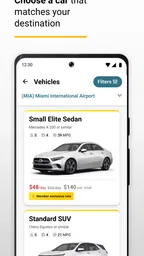
The range of rental categories makes the app relevant to more than a standard airport sedan. I might look for an SUV when luggage or passengers need extra room, a van for a group move, or a truck for a specific hauling job. Sports cars and electric vehicles are also among the kinds of rentals it covers. That variety is useful when I have a concrete need, though availability and suitability should be checked for the location and dates I choose.
Compared with calling a branch, a phone app can make it easier to handle a booking while travelling or planning away from a desk. Compared with a rental aggregator, however, Hertz’s app naturally keeps me within Hertz’s own offering. If my priority is to compare several rental brands side by side, I would start with a comparison service and then check the final terms directly with whichever company I choose. If my priority is booking with Hertz, using its own app is the more direct path.
Making a booking with fewer surprises
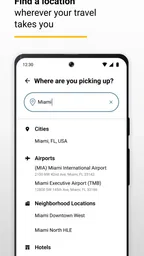
My practical approach would be to settle the details before I tap through a reservation: confirm the pickup location, dates, vehicle category, and return plan. Airport and neighborhood pickups can serve different needs, and a low-friction booking is not much help if I have selected a location that does not fit my arrival or onward journey. I would also compare the displayed vehicle category with what I actually need rather than choosing by name alone.
A useful, easily overlooked trade-off is that a vehicle class is a planning choice, not a guarantee that a particular model will be waiting. I would book around the space, passenger capacity, and driving needs I require, and avoid building an itinerary around a specific car unless the reservation clearly supports that expectation. This matters especially for an electric vehicle: I would think through charging access on my route before choosing one, rather than assuming the rental app can solve charging logistics for me.
For a family arriving at an airport, for example, I would use the app to plan a rental that can accommodate the people and bags, then check the pickup and return details against the flight schedule. If the journey includes a late arrival or a tight connection, I would leave breathing room rather than relying on a perfectly timed handoff. The app can help organize the rental; it cannot make traffic, flight delays, or branch conditions predictable.
Trust, controls, and sensitive moments
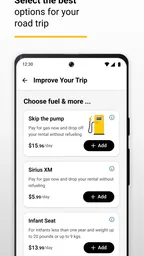
Rental planning involves decisions that can affect both money and personal information, so I pay attention to what I am agreeing to at each step. A reservation may involve entering trip and account details, and payment-related choices deserve a careful read before confirmation. I would review the terms shown in the booking flow and save the confirmation in a place I can reach during the trip. That is a sensible habit with any rental provider, not a claim about a particular privacy setting.
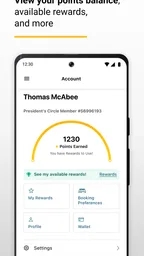
I also avoid assuming that an app’s presence on my phone means every permission or data practice is obvious. I check the device’s permission controls when installing or using travel apps, allow access only when it is needed for a function I want, and revisit those choices if my needs change. Where the app presents account or booking choices, I would use the controls actually shown there; I would not infer a privacy feature or account-management option that I have not seen.
That cautious approach is especially relevant when a rental is booked quickly on a phone. Before confirming, I would pause over the selected branch, rental period, vehicle class, and any terms presented for that reservation. If I am uncertain about a condition, I would seek clarification through Hertz’s available customer-service channels before relying on an assumption. A fast checkout is convenient, but a few seconds of review can prevent a mismatch that is much harder to fix at pickup.
Who should choose it, and who should look elsewhere
I would recommend Hertz Rent-a-Car to someone who has already decided to rent from Hertz and wants a mobile way to arrange a trip. It is particularly sensible when the rental is one part of an airport itinerary, a local journey, or a vehicle need that calls for something beyond a basic car. The availability of several vehicle types gives me a reason to check the app when the job is specific, while the direct connection to Hertz keeps the decision-making within one rental provider.
I would look elsewhere if my main goal were to find the cheapest option across multiple companies, or if I needed a detailed comparison of rental policies before choosing a provider. I would also avoid treating an app rating as proof that every location delivers the same experience. For an unusual trip, a tight schedule, or a vehicle requirement that cannot be compromised, I would verify the terms and pickup arrangements directly before booking.
The app is free to download, but that does not make the rental itself free; I would assess the cost and conditions of the specific booking before committing. That distinction is worth making plainly because the app is a booking tool, not a rental offer with one universal price. I would compare the total shown for my own itinerary with alternatives if budget is the deciding factor.
A cautious recommendation
Overall, I see this as a useful, provider-specific tool for people who want a Hertz rental and value handling the planning on a phone. Its strongest case is convenience: I can explore the kinds of vehicles Hertz offers and organize a rental around a real journey. Its limits are just as important. It is not a multi-company comparison app, and it cannot remove the need to check local availability, reservation conditions, and travel timing.
I would install it when Hertz is already on my shortlist, use the booking flow deliberately, and keep the confirmation details close at hand. I would choose another route if I wanted broad market comparisons or if the booking terms did not fit my needs. That is a measured recommendation: useful for the right renter, provided I treat the app as a way to manage a Hertz reservation—not as a guarantee that every part of the trip will take care of itself.
What we like
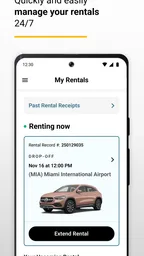
- Reservations can be managed from a mobile device.
- Vehicle options are easy to compare before booking.
- Digital receipts help keep rental records organized.
- Roadside assistance is available for added peace of mind.
- Hertz Gold Plus Rewards can provide benefits for members.
What could be better
- Prices may rise with taxes and optional extras.
- Some locations have limited vehicle availability.
- Drivers may face age requirements and extra fees.
- Returning a car outside business hours may not be available everywhere.
- The app experience can vary by location and rental type.





