


Greyhound: Buy Bus Tickets review
 Analysis by Appsdrops
I judge a travel app by what happens when I’m tired, in a hurry, or trying to make a decision on a small screen—not just by whether I can find a ticket. Greyhound: Buy Bus Tickets is a free travel app from Greyhound Lines Inc, built around booking bus journeys. It has a clear, narrow purpose, which can be a real advantage: if Greyhound is the carrier you want, you can start with your trip rather than sort through a general travel service first.
My overall impression is that it is most useful when you already have a reasonably clear route and want to handle the booking on your phone. It is less compelling as an all-purpose trip planner or as a way to compare every possible carrier. That distinction matters for accessibility, too: a focused booking flow can reduce unnecessary choices, but it cannot solve every barrier involved in travelling by bus.
Finding your way through the booking process
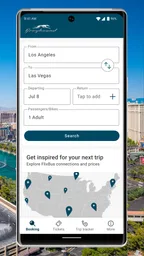
The app’s purpose is easy to understand from the outset: it is for Greyhound bus tickets. That focus helps keep the task in view. Rather than beginning with a broad travel search across flights, hotels, trains, and buses, you can concentrate on a bus journey. For someone who already knows their origin and destination, this can make the first step feel less cluttered.
I find that kind of clarity valuable when planning a familiar trip. If I am travelling between places I know, I want to move through the essentials without being nudged into unrelated options. A dedicated carrier app has a practical edge over a general travel app in that situation: the search is directly tied to the company whose service I intend to use.
That focus is also a limitation. A Greyhound-only search is not the same as a complete comparison of bus travel. If your priority is finding the cheapest departure across several operators, or identifying a route that another carrier serves more conveniently, you will want to compare elsewhere before committing. I would treat this as a booking tool for Greyhound, not as a neutral directory of every bus option.
The app is listed in the Travel & Local category, and its purpose is more specific than that broad label suggests. Its audience is not simply anyone visiting a new place; it is particularly suited to people considering Greyhound for an intercity journey. The developer is Greyhound Lines Inc, so the app sits close to the carrier’s own ticketing experience rather than acting as an independent travel marketplace.
There is a reassuring amount of public use behind it: Greyhound’s app has a 4.7 average from around 127,000 ratings and more than a million installs. I see those figures as a sign that the app is established, not as proof that every traveller will find it comfortable or that every trip will go smoothly. Ratings cannot tell me whether the screen presentation works for my eyesight, or whether a particular route suits my needs.
Readable information is only part of the journey
Readable design is not just a matter of text size. A traveller needs to distinguish the important details, understand what a choice means, and keep track of where they are in a booking. In a ticket-purchase app, I would pay special attention to the route and departure details before confirming anything. A calm moment at home is a better time to check them than a crowded station or a low-battery phone on the way out.
One useful habit is to decide the exact journey you want before opening the app: note the departure and arrival cities, the day, and whether your timing has any flexibility. That does not add a feature to the app, but it reduces the mental load of making choices on-screen. If you are comparing several possible departures, write down the acceptable time window first; otherwise it is easy to focus on a convenient-looking result without considering the rest of the day around it.
Version 9.88.0 is the current release identified for the app, and it runs on Android 6.0 or later. That makes it relevant to people using older Android devices, though compatibility alone does not guarantee that every device will feel equally responsive or that every screen will be comfortable to read. The app is also marked for everyone, which describes its content rating rather than a promise that its controls or booking process meet every person’s access needs.
Motor and sensory needs call for practical workarounds
People who find precise tapping difficult may prefer to complete a booking when they can hold the phone steadily and take their time. A moving bus, a queue, or a one-handed reach while carrying bags can turn a simple selection into a frustrating one. My practical advice is to avoid leaving the most important decisions until the last moment. Confirm the journey while seated, then keep the phone somewhere easy to reach when you need to refer to your travel details.
For someone with low vision or sensitivity to dense screens, the key question is whether the information is comfortable to inspect on their particular device. I would not assume that a travel app’s familiar brand name means every text element, contrast choice, or screen transition works well for every person. If you rely on a device’s system-level display or assistive settings, it is sensible to test the search and booking screens before depending on the app for an urgent trip.
Sensory demands also change with context. A bright display can be hard to use in strong daylight, while a busy terminal can make it difficult to concentrate on small details. I would reduce the number of decisions I make in that environment: settle on the route and departure beforehand, and use the app at the station mainly to check information you already understand. That is a workflow recommendation, not a claim that the app provides a particular sensory or accessibility mode.
For travellers who use screen readers or alternative input, the safest approach is to try the actual tasks they depend on before a travel day: searching a route, reviewing a choice, and reaching the point where a booking is confirmed. A brief test can reveal whether the labels and navigation work with their setup. If the process is confusing or a key control is hard to reach, it is better to arrange another way to book than to discover the problem under time pressure.
Using it at home, on the move, and with limited attention
A realistic use case is a weekend visit to family in another city. I might check the route at home, compare the departure times that fit my plans, and complete the purchase before packing. Later, I can use the phone as the convenient place to return to my travel arrangements instead of relying on a paper note that may be misplaced. The main benefit here is keeping the booking task close to the person making the trip.
Another helpful workflow is to separate comparison from purchase. First, decide whether Greyhound’s route and timing suit you; if you are unsure, check other carriers or travel modes independently. Then use the Greyhound app when you are ready to book with Greyhound. This avoids treating the first available result in one company’s app as the best option across the whole market.
If you are planning for someone else, do not assume that buying a ticket on their behalf settles all practical questions. The traveller still needs to be comfortable with the journey and able to access the information they need. I would make sure they can review the details on their own device or have a clear plan for receiving them. That is especially important if they have limited vision, dexterity, hearing, or confidence using a smartphone.
When travelling with a tight connection or a schedule that cannot shift, I would also avoid relying on an app as the only part of my plan. Keep enough time around the journey for the realities of getting to the departure point, and know what information you need to consult if your phone is unavailable. The app is useful for buying a Greyhound ticket; it should not be mistaken for a complete answer to every disruption or travel-support need.
Where the convenience stops
The biggest trade-off is the boundary of the service. If you want a single place to compare bus companies, trains, and other ways to travel, a broader travel search tool may be a better starting point. If you are already committed to Greyhound, the company-specific focus is more useful. These are different jobs, and I would choose the app according to which one I need rather than expecting it to do both equally well.
There is also a difference between booking a journey and assessing whether the journey is accessible for you. Travellers may need to consider their ability to reach the departure point, manage luggage, understand announcements, or get support during the trip. I would check the arrangements relevant to my own circumstances before purchase, especially if I need assistance or have a requirement that could affect boarding. A booking screen cannot replace that personal planning.
For some people, the phone itself is the barrier. Someone without reliable access to a smartphone, with limited data, or who finds app-based forms stressful may prefer another booking route. Likewise, if a companion is helping a traveller with access needs, it may be easier to plan together on a larger screen or use a method that allows both people to review the details comfortably.
The app is free, and its content rating is Everyone. Those points make it straightforward to try, but they do not remove the need to check whether the interface suits you or whether Greyhound is the right carrier for your route. I would test the basic search before depending on it, especially when using an older phone or accessibility tools that are essential to completing a purchase.
Who I would recommend it to
I would recommend Greyhound: Buy Bus Tickets to someone who has chosen Greyhound, knows roughly where and when they want to travel, and prefers to handle the ticket purchase on a phone. It is also a sensible option for people who travel occasionally and want a direct path to the carrier’s booking process rather than a broad travel-planning interface.
I would be more cautious about recommending it as the first stop for someone still exploring every route and operator, or for a traveller whose plans depend on particular access arrangements. In those cases, comparison and support questions should come before convenience. The app can play a part in the decision, but it should not be the only source used to decide whether a trip will work for a particular person.
Greyhound’s app has the reach of a well-established service, with a 4.7 average and around 13,000 written reviews, and it remains free to use. What matters more to me, though, is the fit: it keeps Greyhound ticket booking in one focused mobile experience, while asking the traveller to do some of the wider planning themselves.
My inclusive verdict is cautiously positive. I like the clear, carrier-specific purpose and the convenience of handling a booking on a phone. I would still test the screens with any assistive settings I rely on, check the journey details without rushing, and compare other options when flexibility or access needs matter. It is a useful tool when Greyhound is already the right choice, but not a substitute for comparing the trip or planning around individual needs.
What we like
- Compare fares across multiple bus companies in one place
- Book tickets directly from your phone
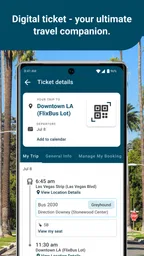
- Save mobile tickets for convenient boarding
- Find routes serving destinations across the United States
- Manage trip details without printing a ticket
What could be better
- Available routes depend on participating bus operators
- Ticket prices can change with demand and travel dates
- Some trips require transfers between buses
- Changes or cancellations may involve fees
- Bus stations and onboard amenities vary by operator





