





GetYourGuide: Travel & Tickets review
 Analysis by Appsdrops
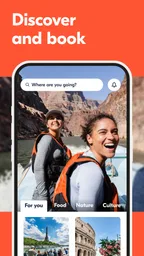
When I’m planning a day in a new city, the hard part is often not finding things to do; it’s narrowing the options while I’m on the move. GetYourGuide is most useful as a place to browse and book tours, tickets, and activities together, rather than as a complete trip planner. Its value depends on what you want from a day out: it can make choosing an organized experience easier, but it cannot remove every practical barrier that comes with travel.
Finding your way through the choices
As a Travel & Local app developed by GetYourGuide, it focuses on experiences at your destination. That gives browsing a clearer purpose than a general search engine: I can look for something to do, compare possible outings, and decide whether an organized tour or a ticketed attraction suits the day. The app is free to download, and its Everyone age rating makes it broadly accessible as a product, though that does not tell you whether a particular activity is suitable for every traveler.
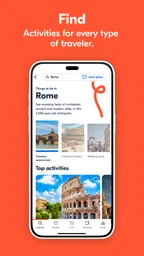
The main advantage over piecing together options through separate attraction pages is the ability to explore activities in one place. That can be helpful when I know the kind of outing I want but not the exact venue, or when I have a free afternoon and need to make a decision without researching every operator from scratch. It is less of a substitute for a map or a detailed itinerary: I would still check where an activity starts and how it fits with the rest of my route before committing.
There is a lot to weigh when comparing experiences, and a long list can become tiring rather than helpful. I find it best to begin with a practical question—such as how much of the day I can spare, or whether I want a guided visit—then judge listings against that. This keeps browsing from turning into endless scrolling. If I am traveling with someone who needs a slower pace, I would also discuss the plan together before booking rather than treating a promising listing as proof that the whole outing will work for both of us.
The app has a 4.9 average from around 386,000 ratings, alongside roughly 4,700 written reviews. That level of public feedback can offer useful perspective when I’m deciding whether to investigate an experience further. I would still read individual comments with care: one traveler’s comfortable pace, clear meeting point, or enjoyable guide may not match another person’s needs. Reviews are a starting point for questions, not a guarantee of a particular experience.
Making comparisons more useful
Compared with searching the web for each attraction, a dedicated activities marketplace can save the effort of switching between unrelated pages. Compared with asking a hotel desk or choosing spontaneously on the street, it lets me look at possibilities before I arrive. The trade-off is that a marketplace view can make activities seem easier to compare than they really are. A museum ticket, a walking tour, and a day trip may all be bookable experiences, but they demand very different amounts of stamina, time, and preparation.
My practical approach is to compare the shape of the outing, not just its appeal. I ask whether I want a fixed schedule or a flexible visit, whether getting to a meeting point is straightforward, and whether the activity leaves room for rest. A listing that sounds exciting may be the wrong choice if it takes up the only open part of the day or adds a difficult transfer. This is especially worth considering when traveling with children, older relatives, or anyone who prefers a predictable routine.
Reading for different needs
Readable navigation matters most when I’m using an app in unfamiliar surroundings, where attention is divided between the screen and the street. I would browse and compare options while seated or somewhere calm, then use the resulting booking information as part of my plan. Trying to evaluate several tours while walking through a crowded station is a poor time to make a careful choice, regardless of how straightforward the app feels at home.
For travelers who find dense text or too many choices difficult, a narrow search goal can make the experience more manageable. Rather than trying to plan the whole trip at once, I would decide on one outing and set a limit on how many options to compare. Someone with low vision, reading difficulties, or a preference for larger text should check how the current app behaves on their own device and system settings before relying on it for an important booking. I would not assume that a readable listing automatically means every stage of browsing and booking is equally easy.
People who are sensitive to busy screens or who tire quickly from extended browsing may benefit from treating the app as a shortlist tool rather than a place to plan every hour. I would save the research for a quiet moment, compare only the few activities that fit the day, and take a break before making a final choice if the details start blending together. That is a simple workflow, but it helps keep the decision focused on the experience rather than the volume of options.
Motor, sensory, and on-the-go use
Travel often means using a phone one-handed, in bright sunlight, with limited time or attention. That context can make precise tapping and reading small details more demanding. If hand movement is tiring or unreliable, I would avoid leaving booking decisions until I’m balancing luggage or standing in a queue. Planning ahead in a stable setting gives me more time to review the details and reduces the chance of tapping through a choice too quickly.
For travelers who use assistive settings or depend on particular input methods, the sensible step is to try the relevant tasks on their own device: browse an activity, inspect its details, and see whether the booking flow is comfortable to use. I can’t infer a person’s experience from the app’s age rating or popularity. Nor would I assume that a screen-reader user, someone with limited dexterity, or a traveler with sensory sensitivities will encounter the same barriers as I do. Individual needs and device settings matter.
One useful habit is to make the decision before entering a noisy or rushed situation, then keep the essential plan easy to find on the phone. A traveler who is easily overwhelmed by crowds might choose a quieter time or a less demanding outing, but the suitability of that choice depends on the specific experience. The app helps discover and book activities; it does not make the physical setting, group size, route, or sensory environment predictable by itself.
Planning around real-world access
Situational access is where I would be most cautious. An activity can look convenient in a listing while still involving a long walk, stairs, uneven ground, a crowded gathering point, or a tight timetable. Those are not details I would guess from the category or title. Before booking, I would look closely at the experience information and, when a need is important, contact the relevant provider to ask direct questions about the route, seating, rest opportunities, and what happens if someone cannot keep up.
A realistic example: I arrive in a city after a long journey, and the next morning is my only open slot. I might use the app to find a guided visit, but I would avoid choosing solely because it sounds like the most popular option. I would check how long I’ll be away, whether the starting point fits my transport plan, and whether I can comfortably manage the pace. If those answers remain unclear, a self-guided visit or a nearby attraction with a flexible schedule may be a better choice than a fixed group tour.
This distinction matters for disabled travelers and anyone managing fatigue, pain, anxiety, or a temporary injury. A booking platform can help locate activities, but the access experience is ultimately shaped by the venue, route, guide, and local conditions. I would treat the app as a research and booking layer, not as confirmation that an outing is accessible. For a high-stakes need, direct clarification before paying is more dependable than relying on assumptions or a short description.
Where the convenience has limits
GetYourGuide is not the right tool for every trip. If I already know exactly which attraction I want and need highly detailed information about its facilities, I may prefer to consult the venue directly. If my priority is building a route between transport, meals, and accommodation, a mapping or itinerary app is a better fit. And if I want the freedom to change plans at the last minute, a fixed-time activity may feel restrictive even when booking it is easy.
There is also a decision-making cost to having many possible experiences in one place. Browsing can encourage me to fill a trip with paid activities when a slower, unstructured day would be more enjoyable. I try to choose one or two experiences that genuinely suit the group rather than treating every open hour as a booking opportunity. The app is strongest when it helps answer a specific question; it is less useful when I expect it to decide what kind of trip I should have.
The current version is 26.47.1, and the app has been available since October 9, 2013. It has passed 10 million installs, which suggests that many travelers use it, but broad adoption does not settle whether its interface or any particular activity will suit an individual. I would judge it by the task in front of me: can I find an outing that fits my time, needs, and comfort level, and can I verify the details that matter before booking?
Who I would recommend it to
I would recommend GetYourGuide to travelers who want to discover organized activities and compare possible outings without beginning every search from scratch. It is especially handy for a visitor with a free afternoon, a family trying to choose a shared activity, or someone who prefers to settle plans before arriving. The free app makes it easy to start exploring, while its focus on tickets and tours keeps the experience centered on things to do rather than every aspect of travel.
I would be more hesitant to recommend it as the sole planning tool to someone whose access needs require detailed, reliable answers about a venue or route. It can help identify possibilities, but I would verify essential arrangements directly and keep a flexible alternative. For travelers who prefer spontaneous choices, dislike scheduled group activities, or already have a trusted way to book a specific attraction, a different approach may be simpler.
Overall, I see it as a useful discovery and booking companion, not a guarantee of a smooth or inclusive day out. Its strongest contribution is helping me turn a broad idea—“I want to do something memorable here”—into a shortlist I can evaluate. The best results come when I slow down, check the practical details, and choose an experience that fits the people actually making the trip. That makes the app worthwhile for many travelers, while leaving room for direct research and a different option when individual circumstances call for it.
What we like
- Clear booking details make it easier to compare tour options.
- Instant confirmations help simplify last-minute travel planning.
- Mobile tickets can reduce the need to print vouchers.
- Traveler reviews offer useful insight before booking.
- Saved bookings are convenient to access while traveling.
What could be better
- Some activities require meeting at a specific location.
- Popular tours may sell out during peak travel periods.
- Availability and prices can change between searches.
- Cancellation rules vary by activity and provider.
- Customer support may be harder to reach during busy periods.





