



FlixBus: Book Bus Tickets review
 Analysis by Appsdrops
I find FlixBus most useful when I want to compare and book a coach journey without making the trip-planning process a project of its own. It is a travel app from Flix SE, focused on long-distance bus routes across the United States. The basic appeal is straightforward: check whether a coach fits the journey, weigh the fare against other ways of travelling, and book in one place. In my view, it works best as a practical option to check early—not as a guarantee that a bus will suit every route or schedule.
FlixBus: Book Bus Tickets is free to download and is rated for Everyone. Its average rating is 4.7 from around 1.1 million ratings, with roughly 6,700 written reviews. Those figures suggest that many travelers have found a reason to keep it installed, but they don’t tell me whether a particular departure is convenient or whether the bus stop works for someone’s plans. I’d judge it by the route details and timing I need, not by its popularity alone.
What the app is useful for today
The app sits in the travel and local category, but its strongest role is narrower than a general-purpose trip planner: it helps me look at long-distance coach travel. That focus is useful when I already know where I’m going and want to see whether a bus is a sensible way to get there. It is less of an all-in-one answer for planning every part of a trip, especially if I also need to coordinate local transit, lodging, or activities.
FlixBus has been available since February 3, 2014, and has passed 50 million installs. The current version is 9.89.0, and the app supports Android 6.0 and later. I take that long-running presence as a sign that this is an established booking service rather than a temporary route-search tool. Still, an established app can only help with the choices it presents: I’d check the actual departure and arrival points before committing, not assume that a city name means a stop is right beside my destination.
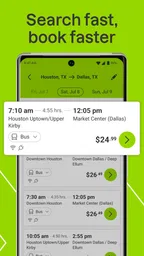
My first step would be to search the whole journey rather than focus only on the headline fare. A coach can look attractive until I account for the time of departure, the arrival hour, and how I’ll reach the stop at either end. If I’m comparing several options, I’d keep the dates and passenger details consistent, then compare the bus against the train, driving, or another coach service. That makes the app useful as part of a decision, rather than the decision-maker.
Where a coach booking fits into real plans
Consider a weekend visit to a friend in another city. I might search for a Friday departure and a Sunday return, then look beyond the cheapest-looking choice: does the departure leave after work, does the arrival leave enough time to reach the place I’m staying, and does the return get me home at a manageable hour? Those practical checks can matter more than saving a little on the ticket. I’d also plan how to get to the boarding stop, since a low fare loses some of its value if reaching the coach is awkward.
That same habit helps with a one-way trip. If I’m moving between cities and have flexibility, I would compare a few travel days before settling on a booking. If I have a fixed appointment or a tight connection afterward, I’d give schedule suitability more weight than price. A coach is not the right choice just because it appears in a search: when arrival time is critical, I’d compare faster or more predictable alternatives and leave room for the rest of the journey.
The most useful way to use the app is to treat the fare as one part of the trip’s total cost. I’d consider the time spent travelling, transport to and from the stops, and any inconvenience caused by an early or late schedule. This is especially important when travelling with luggage, meeting someone at a specific time, or trying to make a same-day connection. The app can help me find a bus option; I still need to decide whether that option makes sense door to door.
How it compares with other ways to book
Compared with calling a carrier or searching one company’s site at a time, a dedicated booking app is a more convenient place to begin when I’m considering FlixBus service. Compared with a broad transport-comparison app, its value is more focused: I’m looking at a bus journey rather than expecting one screen to settle every train, plane, and local transit choice. That focus can make the decision easier, but it also means I’d use another source when I need a broader view of transport options.
For short trips within a city, I would normally turn to local transit information rather than a long-distance coach booking app. For a route where speed matters most, I’d compare rail or air travel if available. And if I’m driving with others, I’d weigh the shared cost and flexibility against the coach fare and schedule. FlixBus is most compelling when a bus route serves the places I need and its timing is compatible with my plans—not simply because I already have the app.
What the version history tells me—and what it doesn’t
The version number gives existing users a clear way to identify the app they’re using: the current release is 9.89.0. The release date and the fact that the product remains actively versioned point to a service that has developed over time. But a version number alone doesn’t tell me which screens have changed or what a particular update has improved, so I wouldn’t infer specific new capabilities from it.
For someone who has used the app before, the sensible approach is to keep expectations grounded in what is visible now. I’d check that the installed app is up to date through the app store, then use the booking flow and route information as they appear on my device. If I’m returning after a long break, I would not assume that an old routine or remembered screen still matches the present version. The useful test is whether I can find and assess the journey I need today.
That distinction matters because app updates and travel-service changes are not the same thing. A newer version can reflect ongoing maintenance, but it doesn’t establish that a route has gained departures, that a stop has moved, or that a fare has changed. Those are trip-specific details to review while planning. I’d make a fresh search for my dates rather than rely on a previous journey or an old screenshot.
Small planning habits that reduce booking surprises
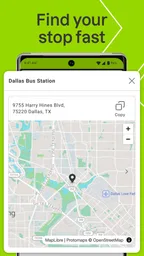
Before booking, I would read the departure and arrival details carefully and note the actual stops, rather than treating the city names as precise addresses. This is a useful check for anyone arriving in an unfamiliar place: look up how far the stop is from the destination and decide on local transport before travel day. If the arrival is late, I’d think through that last leg in advance instead of assuming I can sort it out easily on the spot.
I’d also compare the outward and return journeys separately. A return option that looks convenient at first may leave too little time for a visit, or require an awkward start the next morning. Searching each leg with the real plans in mind helps avoid choosing a tidy-looking round trip that doesn’t fit the actual itinerary. For an important event, I’d avoid building the plan around a connection with no spare time.
When price is the main reason for choosing a coach, I’d still set a limit on what inconvenience I’m willing to accept. A lower fare may be a good trade if I’m travelling light and have a flexible day. It may be a poor trade if I need to arrive rested, make a time-sensitive meeting, or manage a difficult transfer after getting off the bus. That is the kind of judgment a booking screen can’t make for me.
Where I’d be cautious
The biggest limitation is that a bus booking app cannot make a long-distance coach behave like a door-to-door service. Stops may not be where I’d ideally want them, and the departure that suits my budget may not suit my timetable. Those aren’t reasons to avoid the app; they are reasons to check the full journey rather than booking on fare alone. I’d be particularly careful when travelling with a fixed arrival deadline or when the destination is far from the stop.
I would also skip this as my main tool if I needed a broad comparison across every transport mode. It is aimed at booking FlixBus journeys, not replacing every airline, rail, or local travel service. If I’m deciding between a coach and several other ways to cross the country, I’d use a wider comparison process and then return to the app if a FlixBus option looks promising. That extra step is worthwhile when journey time or convenience matters as much as ticket cost.
Likewise, someone who rarely takes intercity buses may not need to install a dedicated app before knowing whether a suitable route exists. I’d first think about the route, timing, and stop locations. If those line up, having a booking app on hand is convenient; if they don’t, downloading it won’t solve the underlying problem. The app is a useful tool for a particular kind of trip, not a reason to choose that kind of trip.
Who I’d recommend it to
I’d recommend FlixBus to travelers who are open to coach travel, want to check long-distance bus options in the United States, and are willing to compare schedules with the rest of their plans. It can be especially handy for flexible trips, visits between cities, or journeys where a direct coach stop is convenient. Its free price and broad adoption make it easy to try, while its Everyone age rating means it is not restricted to an adult audience.
I’d be less likely to recommend it as the sole planning tool to someone with a strict arrival time, a complicated multi-mode itinerary, or a destination that is poorly served by the stops available to them. In those cases, I’d compare alternatives first and use FlixBus only if the route and timing genuinely fit. That is a more useful test than assuming a bus is the cheapest or simplest answer.
Overall, I see FlixBus: Book Bus Tickets as a focused way to explore and book coach travel, with the most value coming from careful route and schedule checks. Its long history, current version, and large user base make it a familiar option to consider, but my recommendation comes with a practical condition: compare the whole journey, not just the ticket. If the stop locations and timetable work for you, it is worth checking; if getting there quickly or arriving at a precise time is the priority, a different mode may be the better choice.
What we like
- Compare bus fares and schedules for many routes in one place.
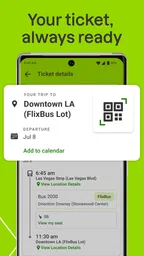
- Mobile tickets make boarding easier without printing a paper ticket.
- Trip details and booking information are accessible in the app.
- Seat reservations are available on many journeys.
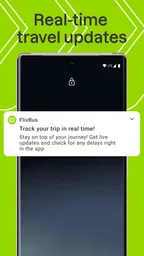
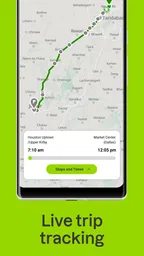
- The app can help track your bus and stay updated on trip changes.
What could be better
- Routes and departure times can vary by location and date.
- Some trips involve transfers or long waits between buses.
- Changes and cancellations may be subject to fees or fare rules.
- Bus comfort and onboard amenities can differ by operator.
- Customer support response times may vary during busy periods.





