


Flightsky: Flight Tracker 3D review
 Analysis by Appsdrops
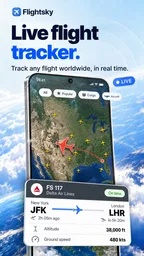
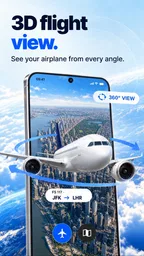
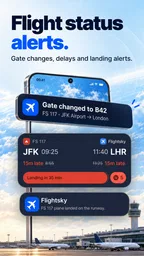
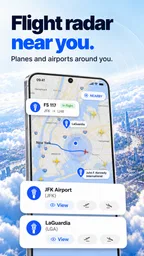
I find a live flight tracker most useful when it answers a practical question quickly: has the plane taken off, where is it now, and should I expect a change to my pickup plans? Flightsky: Flight Tracker 3D aims to make that information easier to explore visually, with a map, 3D and augmented-reality views, a cockpit perspective, and flight-status details. That mix gives it a more engaging feel than a basic departures board, though the extra visual layers will not suit everyone or every situation.
Finding your way around the flight information
Flightsky is a free travel and local app from Ocean Float Mobile. Its focus is live aircraft tracking rather than trip booking or itinerary management, so I would treat it as a companion for following a particular flight, not as a replacement for an airline’s app or an airport’s official updates. The app is rated for Everyone, and its current version is 1.10.
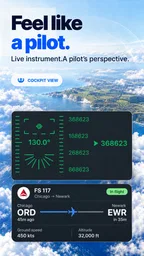
The core idea is straightforward: locate an aircraft on a map, then use additional views to get a stronger sense of its position and movement. The 3D presentation can make a route feel less abstract than a line on a flat map, while the cockpit view offers another way to look at a flight’s progress. These perspectives are the app’s most distinctive draw, but the ordinary map remains the useful starting point when all I need is orientation.
For a first-time user, I’d begin by searching for or selecting the flight I want to follow, then check its status before switching to a more immersive view. That order matters. A visually rich display can be enjoyable, but it is not automatically the fastest way to confirm whether a flight is delayed or still moving toward its destination. Keeping the status information as the main reference helps prevent the map from becoming a distraction.
The app has a 4.7 average from around 94,000 ratings, and it has been installed over a million times. Those figures suggest broad interest, but they do not tell me whether the interface will work well for a particular person. I would judge it by the actual task: quickly checking a flight, exploring where a plane is, or using the visuals to explain a route to someone else.
When the visual views help—and when they don’t
A useful, slightly less obvious way to use the 3D and cockpit perspectives is as a teaching aid. If a child or a travel companion is curious about where a plane is going, showing its movement can make the journey easier to discuss than reading a flight number and a status label aloud. It can also help a nervous traveller connect the abstract idea of a route with the plane’s progress, although the map should not be treated as a promise about arrival time.
For a more practical workflow, I’d use the tracker before leaving home or work to check whether a flight is underway, then return to it closer to the planned pickup. This helps avoid repeatedly checking a screen while driving or standing in a busy area. If the app’s visual view is hard to interpret in the moment, switch back to the clearest available status information rather than trying to read the aircraft’s position from a complex scene.
There is a trade-off between visual detail and speed. A three-dimensional representation can make direction and location more intuitive, but it can also take more attention than a compact list. If I only need a gate, a terminal change, or an airline’s latest service message, I would go directly to the airline or airport instead. Flightsky is most appealing when the aircraft’s movement itself is what I want to understand.
Comfort, movement, and sensory load
Different people respond differently to moving maps and immersive visual scenes. A live aircraft display may be absorbing for one user and tiring or disorienting for another, especially on a small phone screen or in a bright, crowded setting. I would not assume that 3D or augmented reality is automatically easier to understand just because it looks more lifelike. The flatter map and written flight details may be the calmer choice for someone who prefers less motion or visual complexity.
There is also a motor-control consideration: moving between views, selecting a plane, and keeping the right information in view can require deliberate taps and attention. If a person finds precise touch interactions difficult, the most useful approach is to decide what they need before opening the app and avoid unnecessary mode switching. For example, check the flight status first, then use one visual view only if it adds something. That reduces the number of interactions without making assumptions about specific controls or accessibility options.
For users with low vision, the value of a map depends on whether labels and status text are comfortable to read on their own device. I would test the information in the ordinary map and status presentation before relying on the more detailed views. A companion can help identify the flight or interpret a dense screen, but that is a workaround, not a substitute for readable text. If the important details are difficult to distinguish, an airline’s text-focused flight page may be a better choice.
Sound and motion can matter in public as well. I would not rely on audio cues or assume that a particular alert style is available; instead, I’d use the app as a visual check when it is safe and convenient to look at the screen. In a quiet room, a close-up 3D view may be enjoyable. At a noisy gate, on a moving bus, or while navigating a terminal, a quick status check is usually more useful than an immersive perspective.
Using it in real travel situations
Imagine I’m collecting a friend after work. I can check the flight before leaving, see whether it is already in the air, and use the aircraft’s position as a rough indication of progress. If the plane is still far away, I can avoid arriving too early; if it is nearing the destination, I can head toward the airport. I would still confirm timing through the airline or airport before making a tight connection or paying for parking, because a tracker is not the authority for every operational update.
For someone travelling alone, the app can add context while waiting: instead of repeatedly refreshing a departure board, I can see the flight’s movement and understand why the expected timing may be changing. Yet it is not a substitute for the airline’s gate announcements. Gates, boarding instructions, baggage details, and disruption handling are the kind of information I would check through the carrier or airport, even if I enjoy following the plane here.
Augmented reality is best treated as an optional exploration tool rather than the main method of tracking. It may be fun when I have time and a suitable place to look around, but it is less practical in a crowded terminal or when I need discreet, fast information. Likewise, the cockpit perspective can make the experience distinctive, but it is not necessarily the clearest view for answering a simple question about status. Choosing a view to match the task is more useful than leaving the most dramatic one open by default.
Where Flightsky fits among alternatives
Compared with a standard airline app, Flightsky is more focused on the aircraft’s position and visual experience. The airline’s app is usually the more direct place to manage a booking or follow instructions for a specific trip. Compared with a basic airport board, Flightsky offers a more spatial way to follow a plane, while the board may be quicker for checking several departures at once. I see it as a complement to those tools, not a universal replacement.
That distinction matters for accessibility and for busy travel days. A traveller who prefers concise text, predictable menus, or minimal visual motion may find an airline’s status screen easier. Someone who learns through spatial cues or enjoys exploring a route may prefer Flightsky’s 3D presentation. Neither approach is inherently better; the right choice depends on whether the user needs a fast operational answer or a more visual understanding of the flight.
The app is free to install, with in-app purchases ranging from $4.99 to $299.99 per item. I would look carefully at what a purchase unlocks inside the app before spending, and I would not assume that a paid option is necessary for basic use. The wide range makes it sensible to treat any purchase as a separate decision rather than part of the cost of simply trying the tracker.
Limits to keep in mind
The biggest practical limitation is that a live map can feel more certain than it really is. A plane icon gives a clear visual impression, but travel decisions should still be based on the flight status and official airline or airport communication. If I am meeting someone, I would use the map to guide when I start travelling and confirm the final plan elsewhere, especially if timing is tight.
Another limitation is the attention the interface can ask for. Switching between map, 3D, augmented reality, and cockpit views may be appealing, but it adds choices when a user might simply want one answer. People who are sensitive to moving imagery, have difficulty with small visual details, or prefer keyboard-like simplicity may be better served by a text-led alternative. I would also avoid using any flight tracker while driving; check it beforehand or ask a passenger to handle it.
Flightsky was released on October 28, 2025, and it requires Android 7.0 or later. The release date and system requirement are useful when checking compatibility, but device suitability also depends on screen size, performance, and the way a person interacts with visual content. The experience is likely to be most comfortable on a device where the map is easy to inspect without constant zooming or holding the phone in an awkward position.
Who I’d recommend it to
I’d recommend Flightsky to curious travellers, people who regularly collect friends or family from airports, and anyone who finds it easier to understand a journey by seeing an aircraft move across a map. Its visual modes give it a clear identity, and the combination of location and flight status can make waiting feel more informative. It is also a good option for someone who wants to explore a flight rather than simply read a departure time.
I would steer someone toward another tool if they mainly need booking management, gate changes, baggage instructions, or a clean list of airport departures. I’d also be cautious recommending it as a primary tool to anyone who finds animated maps uncomfortable or needs highly legible text above all else. In those cases, the airline’s own app or an airport information display is likely to be more direct.
Overall, Flightsky: Flight Tracker 3D is a focused and visually engaging travel app, and I like that it gives people more than one way to make sense of a flight’s progress. Its strongest experience comes when the user chooses the simplest view that answers the question, then turns to the 3D or AR presentation only when that extra perspective is genuinely helpful. For visual flight tracking, it is worth trying; for essential trip changes, pair it with the airline’s own updates.
What we like
- 3D route views make flight paths easy to follow.
- Flight details are presented in a clear layout.
- Useful for checking a flight without visiting an airline site.
- Can help travelers monitor arrivals and departures.
- Flight tracking can make airport pickups easier to plan.
What could be better
- Flight information may be delayed or incomplete.
- Some features may require a paid subscription.
- An internet connection is needed for current flight data.
- The 3D map may be harder to use on smaller screens.
- Coverage can vary by airline and region.





