


FlightAware Flight Tracker review
 Analysis by Appsdrops
When I use a flight tracker, I want it to answer a practical question quickly: is the plane moving, and does the timing still work for the person waiting at the airport? FlightAware Flight Tracker is most useful when I have a flight to follow and a steady connection to check its progress. It is less compelling as an all-purpose travel planner, but for keeping an eye on a specific journey, its focused approach makes sense.
Tracking works best when the network cooperates
Flight tracking is inherently tied to changing information, so the quality of the experience depends on being able to reach current flight details. With a reliable mobile connection, I can check a flight while making plans or waiting for an update. If the connection is weak, the app becomes less useful precisely when I may be tempted to refresh it most. I treat what I see as a helpful status check, not a guarantee that every change will appear instantly.
That distinction matters when a friend is collecting someone from the airport. Rather than leaving home based on the original schedule, I can check the flight’s progress before setting off, then check again closer to arrival. It gives me a more informed basis for timing the drive, while leaving room for traffic, airport procedures, and other factors the flight tracker cannot resolve.
The app is a travel and local tool from FlightAware, a developer whose focus is evident in its flight-tracking purpose. It is free to install, with optional in-app purchases ranging from $0.99 to $5.99 per item. I would start with the free experience and decide whether I need anything beyond it only after seeing how often I track flights.
Make a flight check answer a specific question
My most useful habit is to open the tracker with a concrete decision in mind: should I leave now, should I wait before heading to the airport, or is the flight still progressing? That keeps the app from becoming a screen I refresh without purpose. It also helps me avoid treating a status display as a complete picture of someone’s arrival, since landing and being ready to meet are not the same event.
For a traveler following their own flight, the value is different. Checking progress can help put a journey into context, especially when a departure or arrival time is the main concern. I would still use the airline’s own communications for instructions about check-in, boarding, gates, or changes that require action. A tracker is a useful companion for monitoring a flight, not a substitute for every travel notice.
On the move, keep the workflow simple
Flight tracking fits naturally into mobile moments: on the way to collect a passenger, during a layover, or while waiting for a connection to improve. In those situations, I prefer to check the relevant flight and then put the phone away rather than repeatedly reopening the app. This is both easier on my attention and less frustrating if a tunnel, crowded terminal, or patchy signal interrupts access.
A practical workflow for a pickup is to check the flight before leaving, reassess while still somewhere convenient to pause, and then focus on driving. If I am the passenger, I can use a check to understand whether the flight’s progress broadly matches expectations, while relying on the airline and airport for the steps that govern what I do next. The tracker is most helpful when it informs a decision without becoming the decision-maker.
The app is listed for Everyone and requires Android 8.0 or later. Its current version is 5.16.3. Those details make it straightforward for many Android users to assess compatibility, although the broader experience still depends on whether a phone can get a useful network connection where the user needs to check.
What to do when updates are hard to reach
If a flight page seems slow or a status has not changed, I would first check whether the phone has a usable connection, then try again when service improves. A missing refresh should not automatically be read as proof that the aircraft has stopped or that the flight is unchanged. Connectivity can affect what reaches the screen, so I avoid making a time-sensitive plan from one stale-looking check.
For important arrangements, I use a second source suited to the decision. If I need to know whether to leave for the airport, flight progress can inform the timing; if I need a gate change or boarding instruction, I look to the airline’s own updates. This division of roles is a sensible fallback rather than a flaw unique to this app: a flight tracker cannot replace every source of travel information.
It is also worth having a simple backup plan for a pickup. Agree on a meeting point and a way to communicate before travel, especially if either person may have unreliable service. The app can help estimate when to act, but a shared plan is more robust than depending on a live screen at the exact moment a signal drops.
Use mobile data deliberately
Because the app’s usefulness comes from checking changing flight information, opening it repeatedly can be tempting. I would avoid constant refreshing when there is no decision to make. A few purposeful checks—before setting out and again when circumstances warrant—are easier to manage than watching the screen continuously.
For anyone trying to limit mobile-data use, the practical approach is to open the app when connected to a dependable network where possible, then check only when the result may change a plan. I would not assume that a flight status will remain current without access to the network; this is a live-tracking use case, so connectivity is part of the experience. If a user needs a travel tool that works independently of a connection, this is not the one to choose for that need.
Notifications and background behavior can influence how much a tracking app interrupts or consumes, but I would make those choices based on the controls actually available on my device and in the app. I would not enable every alert by default. For a single pickup, occasional deliberate checks may be enough; for someone monitoring several flights, alerts may be more useful if they are offered and configured carefully.
Where it fits among travel apps
Compared with a general airline app, FlightAware’s appeal is its flight-following focus. An airline app is usually the more relevant place for the passenger’s booking and airline-specific instructions. Compared with a broad travel-planning app, this tracker is narrower: it is for checking flight progress rather than organizing an entire trip. I see those tools as complementary, not as direct replacements for one another.
That focus will suit people who regularly meet arriving passengers, keep track of family travel, or want a dedicated way to follow a flight. It may be excessive for someone who only needs a one-off departure time and already gets everything they need from an airline app. It is also not the right choice for someone expecting a complete itinerary manager, airport guide, or guaranteed access in places without service.
The app has an average rating of 3.8 from around 45,000 ratings, and it has passed 10 million installs. Those figures suggest a widely used tool with room for mixed experiences, which matches my view of its trade-off: it can be handy for a clear tracking task, but its usefulness depends on the user’s expectations and connection.
A focused tool, with a connection-shaped limit
FlightAware Flight Tracker earns a place on my phone when I have a real reason to follow a flight rather than simply browse travel information. The strongest use case is checking progress to make a practical timing decision, especially before collecting someone. Its main limitation is equally clear: a tracker that depends on current information is less reassuring when the network is unreliable, and no status screen should be treated as a promise about every part of an airport journey.
I would recommend it to frequent airport pickups, travelers who like to monitor flights, and anyone who wants a dedicated flight-tracking app alongside airline-specific tools. I would skip it if I only need booking management or if I expect dependable updates with no connection. Overall, FlightAware Flight Tracker is a useful, focused option when I use it as one source of context, check it with purpose, and keep a sensible backup for the moments when mobile service lets me down.
What we like
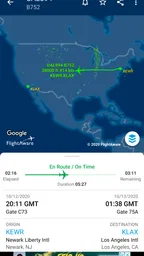
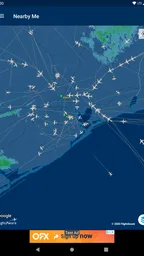
- Live flight maps make it easy to follow aircraft in real time.
- Search by flight number quickly finds a specific trip.
- Alerts can notify you about delays and gate changes.
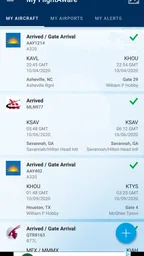
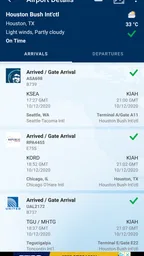
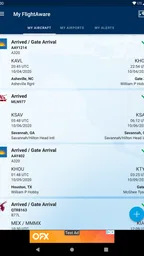
- Airport activity views help monitor arrivals and departures.
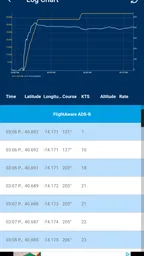
- Flight history lets you review past trips and routes.
What could be better
- Some flight details may be delayed or unavailable.
- Push alerts can arrive late during busy travel periods.
- The map can be difficult to read on smaller screens.
- Advanced tracking features may require a paid subscription.
- Frequent location updates can use extra battery power.





