
Flight Tracker - Track Plane review
 Analysis by Appsdrops
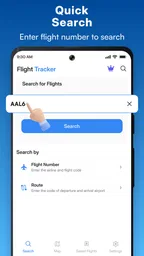
I often end up tracking a flight for someone else rather than planning my own trip: a relative is landing, a friend is connecting, or a pickup depends on whether a plane is actually close to the airport. Flight Tracker - Track Plane is aimed at that practical moment. It is a travel app from SaverHub Apps, built around seeing aircraft on a map and checking live flight information. I find that focused purpose appealing, especially for a household where one person is travelling and several others want to coordinate from their own phones.
Useful when several people are waiting on one flight
The clearest shared-use case is a family or housemate group trying to time a pickup. Instead of relying only on a traveller’s text message, one person can look up the flight and use its changing position and status as another point of reference. That can help when the traveller is busy, their phone is on airplane mode, or the group simply wants to know whether it is worth leaving home yet.
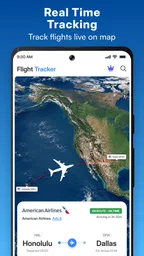
A realistic routine is to check the flight before setting out, then look again closer to arrival. The map gives a spatial view that a simple “on time” label cannot: it can make the journey feel easier to follow and help explain why an arrival estimate may shift. I would still treat the app as a coordination aid, not a promise that a car should be waiting at a particular minute. Airport arrivals, baggage collection, and the walk from the gate all take time that a plane tracker cannot settle.
That distinction matters when several people share responsibility. I would have one person use the tracker to follow the aircraft and keep the rest of the group updated, rather than asking everyone to refresh separate screens and debate small changes. It is a low-effort way to reduce “Where are you now?” messages, but it works best when someone still checks in with the traveller for details the flight itself cannot tell you.
A shared screen is not the same as a shared account
For a household, I would begin with a simple boundary: use the app to follow a flight that the traveller has chosen to share, rather than treating someone’s travel as something to monitor without their knowledge. That is especially important for teens and adults who value their privacy. A flight’s movement is useful for meeting someone, but it does not replace consent or direct communication.
I would also avoid assuming that different household members automatically get separate profiles, saved searches, or synchronized flight lists. The useful approach is to decide who is doing the tracking and share the relevant update in the family chat or by phone. If another person wants to follow along, they can check the same flight themselves, but I would not build a household routine around account-sharing unless the app’s own setup clearly supports it.
This boundary is practical as well as personal. A single person keeping an eye on the arrival can prevent conflicting interpretations of status changes, while the traveller remains the best source for gate changes, baggage delays, and pickup instructions. If the app does not show the detail your group needs, asking the traveller directly is better than guessing from the map.
Coordination is where the live map earns its place
Compared with a generic maps app, a flight tracker has a narrower job: it is about the aircraft and its trip, not the whole journey from home to the airport. Compared with an airline’s own app, a map-first tracker can be more convenient when you want a quick visual overview rather than navigating booking details. Those are different strengths, so I would not treat one as a complete replacement for the other.
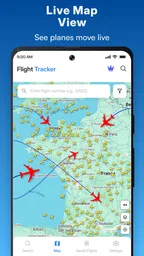
My practical tip is to use the map for orientation and the flight information for the decision. A plane appearing near a destination is not, by itself, a reliable cue to start driving; the status and the traveller’s own message matter too. Conversely, if your only question is whether a flight has changed, a status-focused airline app or airport information screen may be faster and easier to interpret. Flight Tracker makes more sense when seeing where the plane is adds value to the coordination.
For a pickup, I would check once before leaving and again when the arrival is closer, rather than watching the screen continuously. That keeps the app in its proper role: a quick reference that can reduce uncertainty, not a live conversation or a guarantee about ground arrangements. If the group needs to coordinate a meeting point, luggage, or a delayed passenger, a call or message remains the better tool.
There is also a useful trade-off in map-based tracking. A visual display can make progress intuitive, but it can encourage overconfidence: a marker moving toward an airport does not tell you how quickly people will get through the terminal. I would plan a flexible pickup window and use direct contact for the final handoff. That small habit makes the tracker more helpful and avoids turning a changing estimate into a family argument.
What to expect from a free app in everyday use
The app is free to install, with in-app purchases listed at $11.99 per item. Its current version is 1.0.30, and the stated minimum operating system is Android 7.0. I would try the free experience first and decide whether any paid option is relevant only after checking what it offers in the app. The presence of purchases is worth knowing about if a child uses a shared device, so I would keep purchase approval and store settings in the hands of the adult who manages that device.
Its audience is broad: the age rating is Everyone, which suits a straightforward travel utility used around the home. That rating is not a reason to hand over a phone without the usual household rules, though. Children can help follow a relative’s flight with an adult, but an adult should handle account choices, purchases, and any decisions about sharing travel details. I would treat the app as a public-facing travel tool, not as a family location service.
There is some public adoption, with over 100,000 installs, while its average rating is 3.6 from around 2,600 ratings. I read that as a reason to set sensible expectations rather than as a verdict on every household’s experience. The app may suit someone who wants a direct flight-viewing tool, but a lower average than the very strongest travel utilities suggests it is sensible to test the basic workflow before depending on it for a time-sensitive pickup.
Who will appreciate it—and who may prefer another option
I would recommend it to people who regularly meet travellers, follow a partner’s or relative’s arrival, or enjoy checking a plane’s progress on a map. It is especially handy when the person waiting wants context without repeatedly asking the passenger for updates. SaverHub Apps keeps the concept focused on flight tracking, which is a good fit for that one job.
I would skip it if what you really need is a complete trip manager with bookings, boarding passes, hotel plans, and shared itineraries. A flight tracker cannot stand in for those tools. I would also choose an airline’s own app when the most important details are tied to a particular booking, or an airport’s information service when I need terminal-specific arrival guidance. For a household coordinating a pickup, those options can complement this app rather than compete with it.
Another reason to choose an alternative is if your group expects automatic family sharing, shared alerts, or a single synchronized household view. I would not assume those conveniences are part of the experience just because the app can show flight information. If they are essential, check the app’s actual settings and compare them with a service designed around shared itineraries before making it the centre of your routine.
My household verdict
Flight Tracker - Track Plane is most convincing as a quick, shared point of reference when someone is travelling and another person is waiting. I like the idea of using its map to understand a flight’s progress, then switching to a direct message for the details that affect the pickup. That division of labour is more realistic than expecting a tracker to answer every travel question.
For a household, I would keep the setup simple: let one person follow the flight, share updates openly, and avoid treating the app as a way to monitor someone’s movements without agreement. The Everyone rating makes it approachable as a family utility, while the in-app purchase option is a reminder to keep spending decisions with the device owner. It is not a substitute for an airline app, airport guidance, or a conversation with the traveller, but it can make the waiting part of a trip easier to manage.
Overall, I would try it if a live map is the part of flight information you actually want. Its focused approach is useful for coordinating arrivals, and its limitations are manageable when you pair it with common sense and direct communication. For a household that wants a clearer picture of one incoming flight—not a full travel-planning system—it is a practical option worth testing.
What we like
- Live flight status helps users check delays and schedule changes.
- A map view makes it easier to follow a plane’s route.
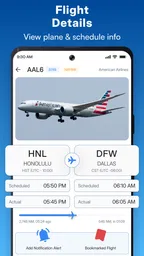
- Flight details can help travelers monitor arrivals and departures.
- Useful for tracking flights without relying on airport display boards.
- Can help friends and family estimate when to meet arriving passengers.
What could be better
- Accurate tracking depends on available data coverage.
- Some advanced features may require a paid subscription.
- Frequent updates can increase mobile data use.
- The interface may feel crowded with flight information.
- Tracking may be less useful for flights with limited public data.





