

earnify review
 Analysis by Appsdrops
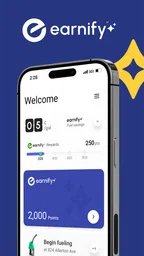
I judge a fuel-and-convenience app less by its promise of savings than by how clearly it helps me understand the choices involved. earnify is BP Products North America Inc’s free app in the travel and local category, aimed at people who want to connect their fuel stops and convenience-store visits with an earn-and-save program. Its average rating is 4.7 from around 56,000 ratings, and it has more than a million installs. That level of uptake makes it a familiar option for BP customers, though popularity alone does not tell me whether it fits every driver’s habits.
Trust starts with knowing what you are signing up for
The first practical question is whether earnify belongs in your routine at all. I see its strongest case when BP is already a regular stop: an app-based rewards relationship can be more convenient than keeping track of a separate card or trying to remember a promotion at the pump. If you usually choose whichever station is closest or cheapest, however, a BP-specific app may add little unless its offers and participating locations work with your routes.
The app is rated for Everyone, and its current version is 5.18.1. It was released on May 21, 2024, and requires Android 10 or later. Those details are useful when deciding whether an older phone can run it, but they are not a substitute for checking the app’s own screens and policies before creating an account. I would treat any rewards app as a service that connects a purchase routine with an account, not as a neutral price-comparison tool.
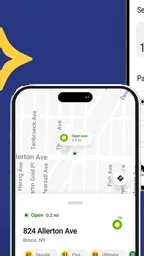
That distinction matters. A station-finder or map app helps answer where to go; earnify is more relevant when the destination is already a BP location and you want to manage the rewards side of that visit. For comparing fuel prices across brands, a dedicated comparison tool may be a better first stop. For tracking fuel economy or vehicle expenses, a mileage log is more directly suited to the job. I would not install earnify expecting it to replace either kind of tool.
Check the details before building a habit around rewards
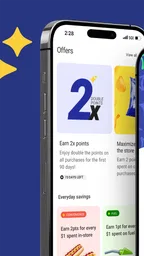
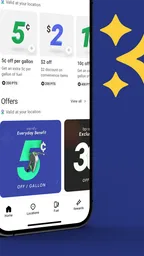
When I try a loyalty app, I look for the terms attached to the benefit before I change where I shop. The useful questions are straightforward: which purchases count, whether an offer needs to be activated, when a reward can be used, and whether there are restrictions that affect a normal visit. I recommend reading the current offer details inside earnify rather than assuming that every BP purchase earns the same way.
This is also where trust should be assessed carefully. An app’s purpose does not, by itself, establish what permissions it requests, what data it collects, how long it retains information, or what account controls are available. I would inspect the permission prompts on the phone and the privacy and account information shown in the app before sharing details or enabling optional access. If a prompt appears unrelated to something I am trying to do, I would pause and decide whether to deny it or continue without that access.
I also avoid treating a login as a small formality. Before registering, I check what information the sign-up flow asks me to provide and whether the app explains how that information supports the service. If I am only curious, I would first see what can be explored without completing every optional step. That simple approach keeps the decision in my hands: I can judge the value of the program before tying more of my personal routine to it.
At the pump, small workflow choices matter
A realistic use case is a weekday commute. I am already stopping at a BP station, and I want to know whether using the app changes the value of that visit. I would open it before pulling up to the pump, review any relevant offer or account instruction, and make sure I understand the steps before starting a transaction. Doing that in advance is less stressful than trying to read terms while cars are waiting behind me.
My less obvious tip is to separate “the station is convenient” from “the offer is worthwhile.” A reward can feel attractive while still requiring a detour, an extra purchase, or more attention than it is worth. I would compare the actual trip and purchase I planned with the offer’s conditions, rather than adding items just to make an app interaction seem productive. If the benefit only makes sense when I buy something I did not need, I would skip it.
Another useful habit is to check the app while planning a route, not only once I arrive. That gives me time to decide whether the BP stop fits the journey and to read the relevant terms without pressure. It also avoids a common loyalty-program trap: assuming a promotion applies because it appears in an app, then discovering at checkout that a condition was overlooked. I would keep the app’s role modest and let my normal route and fuel needs lead the decision.
What to examine around data and account control
Fuel stops can reveal patterns in a person’s daily movement, so I would be deliberate about any location-related prompt. If earnify asks for access, I would consider whether that access is necessary for the task I want to complete and whether the operating system offers a narrower choice. I would not grant broader access simply because a rewards app might be more convenient with it; convenience is a trade-off I should choose knowingly.
The same caution applies to notifications. They can be useful when I want reminders about offers or account activity, but repeated promotional messages can turn a small utility into background noise. I would review notification choices in the app and in my phone settings, keeping only the alerts that help me make a decision. If I find myself ignoring them, disabling them is more sensible than letting them interrupt every drive or errand.
Account controls deserve a look before they are needed. I would locate the profile and support areas early, then note how the app handles sign-out, password changes, and account-related requests where those options are presented. If I decide the program no longer suits me, I would use the controls or support route provided by the service instead of assuming that removing the app from my phone also closes the account. That is a general but important distinction with any account-based rewards service.
I would also avoid putting a phone interaction ahead of safe driving. If I need to review an offer or account screen, I do it while parked. The app’s usefulness is not worth trying to operate it in traffic, and planning the stop beforehand makes the whole process simpler.
Where earnify fits—and where another choice wins
Compared with a generic map, earnify is narrower: it is useful when I care about BP’s own rewards relationship, not when I need the broadest overview of nearby fuel options. Compared with a paper or plastic loyalty method, an app can keep the account experience on a phone, but it also means managing a login, software updates, and the device itself. That is a fair exchange for someone who already uses the brand; it may feel like unnecessary overhead for an occasional visitor.
I would recommend trying it if BP is part of your usual route and you are comfortable checking offers and account terms before a purchase. The app is free, which makes a cautious trial easier, but “free” does not mean there is no cost in attention or personal information. My approach would be to install it, inspect the sign-up and permission screens, and use it only if the value is clear without changing sensible buying habits.
On the other hand, I would skip it if you mainly need impartial fuel-price comparisons, avoid loyalty accounts, or do not want another app connected to routine purchases. I would also choose a simpler option if using the program requires more steps than the benefit is worth to me. In those cases, checking station prices through a general travel tool or paying without a loyalty account may be the cleaner choice.
A cautious recommendation for everyday drivers
Overall, I see earnify as a focused companion for people who already have a reason to stop at BP, rather than a must-have travel app for every driver. Its strong average rating and broad adoption suggest that many users find it worthwhile, but my recommendation still depends on the fit between the program and your habits. The practical value comes from checking the terms, planning before you reach the pump, and keeping permissions and notifications under your control.
My bottom line is to treat it as an optional account tool, not as proof that every advertised saving is automatically right for you. Read what each offer requires, decide what access you are comfortable granting, and review the account controls before relying on it. If the app makes an ordinary BP stop easier without steering you into purchases or detours you would not otherwise make, it has a sensible place on your phone. If not, a price-comparison app—or no rewards app at all—may serve you better.
What we like
- The app provides a clear overview of available earning opportunities.
- You can track your progress toward rewards in one place.
- Getting started is straightforward for new users.
- The interface makes key account details easy to find.
- It can offer a convenient way to explore extra income options.
What could be better
- Earnings may be small compared with the time required.
- Some offers may have strict eligibility requirements.
- Reward availability can vary by location.
- Payouts may take time to process.
- Users should review privacy terms before sharing personal data.





