


Disneyland® review
 Analysis by Appsdrops
I think of Disneyland® less as a general travel planner and more as a companion for the parts of a Disneyland visit that are easiest to mismanage: deciding what to do next, finding your way, and keeping tickets and practical details close at hand. It is a free travel app from Disney, and its usefulness is strongest when you are actually planning a visit or moving around the resort. If you want a broad guide to California or a tool for organizing every kind of trip, it is too specialized. For a park day, though, putting several relevant tasks in one place can make the phone feel like a useful part of the plan rather than another distraction.
What feels quick—and what still takes planning
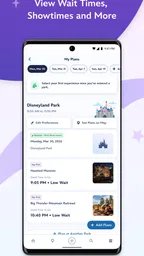
The first thing I value in a park app is not a flashy animation; it is whether I can get to a useful answer while standing in a crowd. Disneyland brings together tickets, hotel information, wait times, maps, mobile food ordering, and PhotoPass-related tools. That range makes it a practical reference point during the day, but it does not mean every decision becomes instant. The time saved depends on having the app ready and knowing where to look before the group is hungry or trying to cross the park.
My most useful preparation would happen before arriving: open the app, find the ticket area, orient yourself with the map, and become familiar with where wait-time information appears. That small bit of setup matters more than trying to learn the interface while everyone waits for an answer. If a screen takes longer than expected to load in a busy moment, knowing the route through the app helps avoid repeated tapping and needless backtracking.
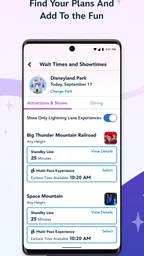
Wait times are valuable as a planning signal, not a promise that a particular attraction will take exactly that long. I would use them to compare options and decide whether to head across the park, pause for food, or choose something nearby. A posted estimate should not become the whole itinerary: conditions can change, and walking between areas also consumes time. The app is most helpful when it informs a flexible plan rather than replacing judgment.
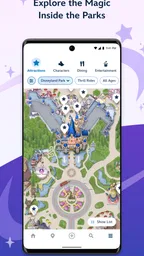
The map has a different kind of speed advantage. Rather than switching between a park app and a general mapping service, I can use a Disneyland-focused view to work out where to go within the destination. For a first visit, that can reduce the mental load of matching attraction names to locations. I would still check the map before setting off with a group, because an efficient route on a screen is not necessarily the route everyone wants to walk.
Useful when several park tasks collide
Heavy-use moments are where the app’s all-in-one approach makes the clearest case for itself. Imagine arriving with family, needing to check tickets, answer a question about the next attraction, and find lunch without splitting into separate searches. Keeping those park tasks together can make it easier to coordinate. It is especially helpful when one person is doing the navigation while another is deciding what the group wants to eat or ride.
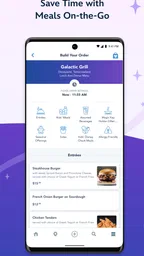
Mobile ordering is best treated as a way to organize a meal, not as a guarantee that food will be ready at the instant you want it. I would look at the ordering options before the group reaches the point of being very hungry, then agree on a place and a rough time together. That avoids the common trap of placing an order before everyone has decided what they want. It also keeps the phone from becoming a bottleneck when the group is already tired.
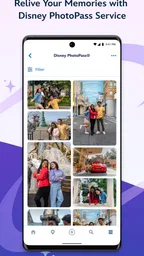
PhotoPass-related tools can be useful after a busy stretch, when you want to review or keep track of park photos rather than search through unrelated camera images. I see that as a supporting feature, not a reason on its own to install the app. Its value depends on whether those photos are part of your visit. For someone who does not care about this aspect, the tickets, map, and day-planning functions are likely to matter more.
One practical workflow is to check the map and wait information together before leaving your current area. First decide whether the next stop is worth the walk; then consider a nearby alternative if the estimate or group mood has shifted. This is more reliable than repeatedly checking a single attraction from across the park and committing to a long detour. The subtle advantage is not simply access to information, but being able to combine location and timing in one decision.
Reliability means having a fallback plan
For a full day out, I would not make the app the only place where essential details exist. Keep a sensible backup for anything you would be upset to lose access to, and make sure the phone has enough charge for navigation and repeated checks. This is ordinary preparation for relying on a phone in a crowded destination, not a claim that the app is unreliable. A single device can become a shared resource when several people depend on it, so agree who is handling it and avoid passing it around constantly.
When a page seems slow or information does not appear immediately, I would pause before tapping repeatedly. Reopening screens over and over can create confusion about what has loaded and what has not. A calmer approach is to return to the relevant section once, allow it a moment, and use the map or another available part of the app while deciding what to do. For a time-sensitive choice, having a nearby alternative in mind is more useful than treating one screen as the only path forward.
The same principle applies to changing plans. If an attraction no longer fits the group’s energy, use the app to orient yourself toward a closer option instead of trying to preserve an overpacked schedule. I find this particularly useful with children or anyone who needs breaks: the best itinerary is often the one that can bend without turning every adjustment into a debate. The app can support that flexibility, but it cannot decide what the group needs.
Device fit and the trade-offs of an all-in-one tool
Disneyland is listed for a minimum operating-system level of 10, so it is worth checking that an older device meets that requirement before building a visit around the app. It is available for Everyone, and the current version is 8.26.1. Those details help set expectations about compatibility and the version you are considering, but they do not tell me how a particular handset will perform under heavy use. An older or already-busy phone may feel less responsive than a newer one, especially when you are moving between information-heavy tasks.
I would also think about battery use as a day-planning issue. Maps, frequent screen checks, and keeping a phone available for tickets and ordering all compete with the other things you may want the device for. I cannot promise a particular battery impact, so my practical advice is simply to start the day charged and be deliberate about how often you refresh information. If your group has one phone doing all the work, that phone deserves more attention than a device used only occasionally.
Compared with a general travel app, this one is narrower but better matched to Disneyland-specific decisions. A broad map service may be preferable for driving to the resort or planning the rest of a Southern California trip. A notes app or shared message thread may be easier for keeping a custom schedule that includes non-park plans. But those alternatives do not replace a single destination-focused place for tickets, park mapping, wait information, food ordering, and PhotoPass-related tasks. I would use them alongside Disneyland only when the trip extends beyond the resort or the group wants a separate shared itinerary.
There is a genuine trade-off in putting so much of the day in one app: convenience can turn into dependence. If you only need a map once, installing a dedicated park app may feel like unnecessary overhead. If you are visiting for several days, coordinating a group, or expecting to use several of its functions, that consolidation becomes more persuasive. The app is not a substitute for checking details carefully or agreeing on a plan, but it can reduce the number of places you need to search.
Who will get the most from it
I would recommend it most to visitors who want to make decisions as they go: families balancing different interests, first-timers who need orientation, and returning guests who expect to use park services throughout the day. It is also a sensible choice if you want the practical pieces—tickets, maps, wait estimates, ordering, and photos—within one destination-specific app instead of hunting through unrelated tools.
I would be less enthusiastic about it for someone who is not visiting Disneyland, who prefers to keep phone use to a minimum, or who only wants general travel planning. In those situations, a regular map and a simple itinerary may be enough. Even at the park, a person who has already planned a quiet, fixed day may not need to consult every feature. The app is most valuable when plans are likely to change and quick orientation matters.
Disneyland has an average rating of 4.5 from around 92,000 ratings, with roughly 24,000 written reviews, and it has passed five million installs. I read that level of adoption as a sign that many visitors find a dedicated park tool worth keeping—not as proof that every screen will suit every device or travel style. The free price removes a purchase decision, while the real cost is the attention and battery you spend using it.
My performance verdict for a park day
My overall view is positive, with a clear condition: prepare before the busiest moments. The app’s strength is the way it brings Disneyland-specific tasks together, so it can help you move from checking a ticket to finding a route or considering a meal without changing tools. Its speed is most useful when you know what you need and keep your plans flexible. In a crowded moment, unfamiliar menus and repeated refreshing can make any app feel slower, so a little orientation beforehand pays off.
As a travel and local app developed by Disney, Disneyland® is focused on a particular destination rather than trying to be a universal companion. That focus is exactly why I would keep it on my phone for a visit, while still using a broader mapping or planning tool for travel outside the resort. Its age rating is Everyone, and its release date is August 4, 2015, with the app continuing in its current version. Those details sit behind a straightforward decision: if you expect to use park information and services during the day, it is a useful free companion; if you want only a general-purpose travel guide, choose a broader tool instead.
My best advice is to install it ahead of time, learn where the essentials are, and decide as a group how much you want to rely on one phone. Use wait estimates as guidance, check routes before walking, and think about food before hunger takes over. With those habits, the app can make a Disneyland visit easier to manage without pretending that an itinerary—or a screen—can remove every surprise.
What we like
- The app helps you find attractions with an interactive park map.
- You can check estimated wait times before choosing a ride.
- Mobile food ordering can save time at participating locations.
- It supports digital park tickets and MagicBand+ features.
- It offers park updates and details about entertainment schedules.
What could be better
- Some features require location access to work properly.
- Wait times can change before you reach an attraction.
- Mobile ordering is available only at selected dining spots.
- Using the app throughout the day can drain your battery.
- Some planning tools require a Disney account and sign-in.





