

Carnival HUB review
 Analysis by Appsdrops
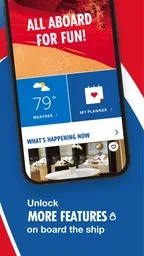
I think Carnival HUB is most useful when you treat it as a practical companion for a Carnival cruise, not as a general travel planner. Its purpose is narrow in a helpful way: keep shipboard planning close at hand while you’re on vacation. That focus can make it more convenient than juggling printed schedules, scattered notes, and whatever information you happen to remember—but it also means the app has limited appeal if you aren’t sailing with Carnival.
What the free app is worth before you sail
The app is free, so there’s no purchase decision to weigh before trying it. Carnival Corporation develops it, and its travel-and-local focus fits the job: helping passengers make sense of time spent aboard rather than replacing the tools you’d use to plan an entire trip. I’d think of the no-cost access as a low-risk way to prepare, while keeping expectations tied to the cruise itself.
Its scale suggests it has become a familiar option among Carnival guests: it has more than five million installs, an average rating of 4.6, and over 180,000 ratings. Those figures are useful context, not a promise that every passenger will find it indispensable. A person who likes organizing each day will have a different experience from someone who prefers to leave plans open.
The app is rated for Everyone, and the current version is 4.7.0. It first appeared on January 15, 2015, and its stated minimum operating-system requirement is version 12. If you’re deciding whether to install it before travel, checking that your phone meets that requirement is a simple step that can prevent a last-minute surprise.
A focused tool, rather than a complete travel organizer
Before a cruise, I’d still use the usual tools for the parts of a trip that happen away from the ship: arranging transport, keeping travel documents organized, and planning time in port. Carnival HUB is most compelling for the onboard portion. That distinction matters because a cruise app can be useful without being the only travel app you need.
I also wouldn’t judge its value solely by how often I open it at home. The point is to have a dedicated place to turn to during the sailing, when plans and questions are tied to the ship. Even a tool that sees light use before departure can earn its place if it makes onboard decisions easier to revisit.
Where it can make a cruise day easier
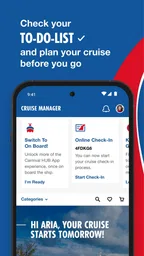
The strongest case for the app is reducing the small bits of friction that add up on vacation. Instead of relying on memory for what you meant to do later, you can use a single cruise-focused companion as part of your routine. That is especially helpful when a group is making plans on the fly: one person can check the app while everyone decides what to do next, rather than the conversation turning into a search through several unrelated sources.
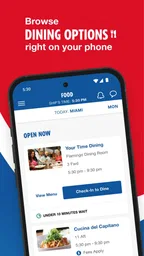
Imagine waking up with no firm plan for the day. You and a travel companion want to make a decision without turning breakfast into a long planning session. A dedicated onboard app gives you a natural first place to look for ship-related information and shape the next part of the day. The value isn’t that it chooses for you; it’s that it can make the choice feel less scattered.
There’s also a useful planning habit here: check the app at a few natural transition points instead of repeatedly reaching for your phone. I’d look while getting ready, then again when returning to the cabin or regrouping with my party. That keeps the app in a supporting role and leaves more of the vacation for the vacation itself.
For people who like spontaneous days, a central cruise companion can serve as a reference without forcing a rigid schedule. You can keep an idea in mind, check what makes sense next, and still change course. Conversely, a guest who likes a highly detailed itinerary may use it alongside a personal calendar or notes, rather than expecting one cruise app to manage every pre-trip and port-day detail.
Small workflow choices that improve its usefulness
First, install and open it before you’re in a hurry. That gives you time to confirm that it runs on your device and to become comfortable finding your way around. I wouldn’t wait until a group is already trying to make a quick decision to learn where the relevant information lives.
Second, make it part of a shared routine rather than assuming every person in your party will independently stay up to date. If you’re traveling with family or friends, agree on who will check the app when the group is deciding what comes next. This avoids a familiar cruise-day problem: everyone has a different impression of the plan, but nobody knows where that impression came from.
Third, keep a fallback for information you consider essential. A phone can run low on battery, a device can be left behind, or a traveler may simply prefer not to use an app at a particular moment. I’d save critical travel details in a separate place and use the Carnival tool as a convenient companion, not as the only way I can remember an important arrangement.
Finally, don’t confuse a shipboard companion with a general itinerary manager. I’d keep port plans, transport details, and personal reminders in whichever tools already work for me, then turn to Carnival HUB for the cruise-specific part of the experience. That division is easier to maintain than forcing every travel task into one app.
The tradeoffs I’d keep in mind
The biggest limitation is also the clearest boundary: this is built around Carnival cruising. If you’re comparing cruise options across different companies, planning an independent holiday, or looking for a broad destination guide, a general travel app will be more useful. There’s little reason to make this a regular tool outside the context it serves.
There’s a practical tradeoff in relying on any phone-based companion: it puts information within reach, but it also asks you to keep a charged, available device handy. I’d avoid letting the app become a reason to check my phone constantly. A deliberate glance when plans change is more pleasant than turning every quiet moment into another screen check.
Another consideration is personal preference. Some travelers enjoy having a digital point of reference; others are happier asking a companion, following their own notes, or taking the day as it comes. If you fall into the latter group, the app may be reassuring to have without becoming something you use often. Free access lowers the barrier to trying it, but it doesn’t make every digital habit worthwhile for every traveler.
It’s also not a substitute for judgment. A central source can help you orient yourself, but your group still needs to decide what suits its pace, interests, and energy. Families, couples, and solo travelers can approach a day differently, so I wouldn’t treat any app as a replacement for agreeing on a plan that works for everyone.
Who is most likely to get value from it?
I’d recommend it first to someone who is already booked on a Carnival cruise and wants a convenient onboard reference. It’s a particularly sensible fit for first-time cruisers, travelers who dislike keeping several scraps of information in their heads, and groups that need to coordinate without appointing one person as the permanent planner.
It can also suit experienced cruisers who already know how they like to spend a day but want a Carnival-specific tool close by. Familiarity with cruising doesn’t remove the value of having an organized place to check ship-related information. Still, people who prefer to plan everything independently may find their own notes and established travel apps are enough.
I’d skip it if you aren’t planning a Carnival sailing, or if you’re looking for an all-purpose app for flights, hotels, road trips, and destination research. A different travel tool is the better choice for those needs. Likewise, if you deliberately avoid using your phone on holiday and are comfortable with your own offline routines, there’s no need to change your style just because a cruise app is available.
How I’d fit it alongside other travel tools
Compared with the usual alternatives in travel, Carnival HUB has a narrower job than a map, booking service, or general itinerary organizer. That narrowness is an advantage when the question is specifically about the Carnival cruise experience, but a disadvantage when the question involves the full journey from home and back. I’d use a general travel tool for broad logistics and reserve this one for the onboard context.
Compared with paper notes, an app can be quicker to consult and easier to keep within reach. Paper, however, doesn’t depend on a phone being ready to use. I wouldn’t insist that one approach is universally better; a simple backup note for important plans can offer peace of mind while the app handles everyday reference.
That combination is especially useful for people traveling together. One person can use the app as a shared point of reference, while the group keeps a short, clear fallback plan for meeting up or changing direction. It’s a small adjustment, but it reduces the chance that a phone or a missed check becomes the center of the day.
My verdict for a Carnival sailing
For a passenger preparing for a Carnival cruise, I see Carnival HUB as an easy, free addition to the travel toolkit—not a must-have for every traveler and not a substitute for broader planning. Its value comes from having a cruise-focused companion ready when the group needs to orient itself, make a choice, or return to an onboard plan.
I’d install it before sailing, make sure the phone meets the minimum requirement, and spend a little time getting comfortable with it. Then I’d use it at sensible moments, keep other travel details in the tools that already work, and avoid depending on a single device for anything essential. That approach gets the convenience without asking the app to do more than its role.
My recommendation is straightforward: if you’re sailing with Carnival and like having information close at hand, it’s worth trying. If your trip doesn’t involve Carnival, or if you strongly prefer a phone-free, unstructured holiday, you can skip it without missing a general travel essential. For the right passenger, the free price and focused purpose make it a reasonable companion; the best reason to keep it is that it fits the way you want to spend your time aboard.
What we like
- Provides a central place to check carnival schedules and updates.
- Helps visitors find event information while on the go.
- Useful for planning a visit before arriving at the carnival.
- Can reduce the need to search across multiple information sources.
- Simple event-focused design keeps key details easy to locate.
What could be better
- Information may vary depending on the carnival using the app.
- Some features may be unavailable outside participating events.
- Event details can become outdated if organizers do not update them.
- A network connection may be needed to access current information.
- Its usefulness is limited when no local carnival is supported.





